> ## Documentation Index
> Fetch the complete documentation index at: https://docs-dev-docs-event-stream-action-templates.mintlify.site/llms.txt
> Use this file to discover all available pages before exploring further.
> Learn about Highly Regulated Identity, Auth0's Financial-Grade Identity solution.
# Highly Regulated Identity
To use Highly Regulated Identity features, you must have an Enterprise Plan with the Highly Regulated Identity add-on. Refer to [Auth0 Pricing](https://auth0.com/pricing/) for details.
Highly Regulated Identity (HRI) is Auth0’s Financial-Grade Identity™ solution to secure sensitive data operations and services important for your business. Initially targeting highly regulated industries like finance and healthcare, Highly Regulated Identity raises the security level to protect a wide range of customer use cases, including but not limited to money transfers, digital payments, and access to medical records. You can also use Highly Regulated Identity for other sensitive operations that require enhanced security, such as to approve changes in administrative credentials, secure privileged access to a web portal, and more.
To secure your sensitive business operations, Highly Regulated Identity provides:
* [Advanced security with OpenID Connect (FAPI)](#advanced-security-with-openid-connect-fapi-)
* [Strong Customer Authentication (SCA)](#strong-customer-authentication-sca-) and [Dynamic Linking](#dynamic-linking)
* [Confidentiality and integrity protection](#confidentiality-and-integrity-protection)
* [Strong application authentication](#stronger-application-authentication)
* [Protect access tokens with Token Binding](#protect-access-tokens-with-token-binding)
* [Customizable approval flows for better user experience](#customizable-approval-flows-for-better-user-experience)
## Advanced security with OpenID Connect (FAPI)
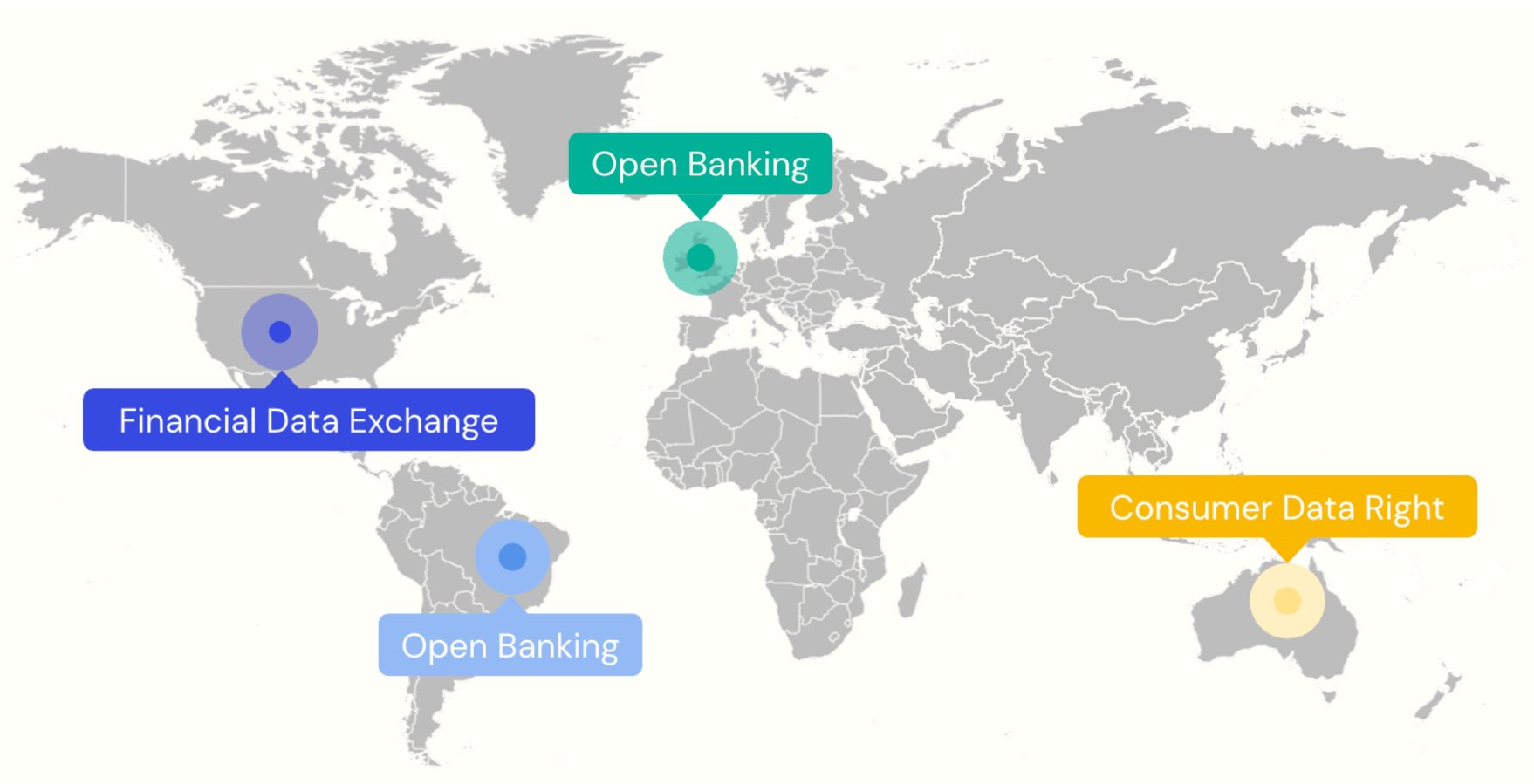
[OpenID FAPI](https://openid.net/wg/fapi/specifications/) is a suite of security and privacy specifications developed by the OpenID Foundation. APIs that meet the FAPI standards are classified as “financial-grade,” which means that they provide robust authentication and authorization mechanisms that help secure access to financial and other sensitive data and services.
Auth0 is a certified FAPI provider. To learn more about the security improvements we introduced to meet FAPI standards, see the following sections:
* [Confidentiality and integrity protection](#confidentiality-and-integrity-protection)
* [Strong application authentication](#stronger-application-authentication)
* [Protect access tokens with Token Binding](#protect-access-tokens-with-token-binding)
For more information on FAPI, see OpenID's [Open Banking, Open Data, and Financial-grade APIs](https://openid.net/wordpress-content/uploads/2022/03/OIDF-Whitepaper_Open-Banking-Open-Data-and-Financial-Grade-APIs_2022-03-16.pdf) whitepaper and the [FAPI Working Group specifications](https://openid.net/wg/fapi/specifications/).
 ## Strong Customer Authentication (SCA)
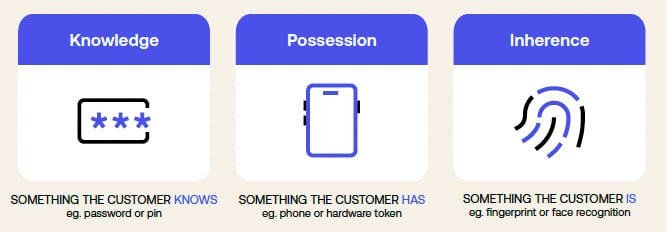 Introduced by Europe’s [Payment Services Directive (PSD2)](https://www.europeanpaymentscouncil.eu/sites/default/files/infographic/2018-04/EPC_Infographic_PSD2_April%202018.pdf), Strong Customer Authentication (SCA), mandates the use of at least two distinct authentication factors out of the following three:
* Something the user knows (e.g., a password)
* Something the user possesses (e.g., a device)
* Something intrinsic to the user (e.g., a fingerprint)
The authentication factors must be independent so that compromising one does not jeopardize the others. SCA is quickly becoming the worldwide standard for safeguarding sensitive data and services.
To help with SCA compliance, Auth0 offers various authentication factors that enroll and challenge users during a login transaction. Highly Regulated Identity leverages the following authentication factors to secure your transactions:
* Mobile push notifications
* SMS
* Email
* WebAuthn
Using [Actions](/docs/customize/actions), you can dynamically determine which authentication factors to use. This gives you the flexibility to customize your code logic. For example, you can add a second authentication factor for payments above 10 USD. To learn more, read [Apply dynamic policy](/docs/secure/highly-regulated-identity/transactional-authorization-with-authorization-code-flow#apply-dynamic-policy).
## Dynamic Linking
PSD2 requires that payment service providers implement Dynamic Linking along with Strong Customer Authentication. Dynamic Linking presents the user with transaction details for their explicit validation and approval and uniquely links the authorization and the transaction details. This ensures a good user experience and helps with regulatory compliance.
To enable Dynamic Linking, you can use Rich Authorization Requests (RAR) to pass fine-grained transaction authorization data to the OAuth authorization endpoint. The following code sample shows an `authorization_details` JSON object, which contains information like the payment type, amount, currency, and recipient:
```json lines theme={null}
"authorization_details": [
{
"type": "one_time_payment",
"amount": {
"amount": 2460.46,
"currency": "USD"
},
"sourceAccount": "xxxxxxxxxxx4567",
"recipient": "Acme Travel, Inc.",
"concept": "All Inclusive Resort Package for Two",
}
]
```
`authorization_details` is assigned a unique transaction reference, which Auth0 uses to prompt the user to perform step-up authentication:
* Use push notifications to show transaction details and get approval on a separate device such as a mobile phone application.
* Use SMS, email, or WebAuthn to confirm the details on the device that originated the transaction after the user completes the second authentication factor.
Do not pass fine-grained transaction authorization data or other sensitive or regulated data outside of `authorization_details`.
If the user confirms the details, the transaction progresses and Auth0 issues an access token associated with the now-approved authorization\_details. Developers can also add the unique transaction reference to the access token. As a result, your API servers can later validate the approved transaction details when receiving and servicing API requests.
To learn more about RAR, read [Authorization Code Flow with Rich Authorization Requests](/docs/get-started/authentication-and-authorization-flow/authorization-code-flow/authorization-code-flow-with-rar).
## Confidentiality and integrity protection
Authorization details may include account numbers, monetary amounts, merchant names, and other highly sensitive information that are passed in URLs or access tokens that are not secure. To protect sensitive data from unauthorized access and tampering, Highly Regulated Identity offers comprehensive confidentiality and integrity protection.
### Protect sensitive data in the front channel
To protect sensitive data in the front channel, such as a web browser, Highly Regulated Identity offers the following solutions as part of the FAPI 1 Advanced Security profile.
#### Pushed Authorization Requests (PAR)
[PAR](https://datatracker.ietf.org/doc/rfc9126/) introduces a new endpoint, which allows clients to directly push the payload of an OAuth 2.0 authorization request to the authorization server (i.e. Auth0 in this case). This avoids passing the authorization parameters via the insecure front channel (i.e., the browser), thus reducing the risk of unauthorized access to authorization parameters by an intermediary.
To learn more about PAR, read [Authorization Code Flow with Pushed Authorization Requests (PAR)](/docs/get-started/authentication-and-authorization-flow/authorization-code-flow/authorization-code-flow-with-par) and [Configure Pushed Authorization Requests (PAR)](/docs/get-started/applications/configure-par).
#### JWT-Secured Authorization Request (JAR)
[JAR](https://datatracker.ietf.org/doc/rfc9101/) is an OAuth2 protocol extension that enhances the security of authorization requests. It does so by using a JSON Web Token (JWT) request parameter to protect the integrity and, optionally, the confidentiality of the authorization request parameters.
To learn more about JAR, read [Authorization Code Flow with JWT-Secured Authorization Requests (JAR)](/docs/get-started/authentication-and-authorization-flow/authorization-code-flow/authorization-code-flow-with-jar) and [Configure JWT-Secured Authorization Requests (JAR)](/docs/get-started/applications/configure-jar).
#### Protect sensitive data in access tokens
To protect the authorization details included in access tokens, Highly Regulated Identity provides support for using [JSON Web Encryption (JWE)](https://datatracker.ietf.org/doc/html/rfc7516) to encrypt the payload of access tokens. This protects access tokens from application-side data breaches and unauthorized inspection into API calls by intermediaries.
To learn more about JWE, read [JSON Web Encryption](/docs/secure/tokens/access-tokens/json-web-encryption) and [Configure JSON Web Encryption](/docs/get-started/apis/configure-json-web-encryption).
## Stronger application authentication
To improve your application authentication security, Highly Regulated Identity offers two different alternatives as part of the FAPI 1 Advanced Security profile:
* [Private Key JWT](http://tools.ietf.org/html/draft-ietf-oauth-jwt-bearer): involves generating a public-private key pair to use as credentials to authenticate an application. It is already available for customers on the Enterprise plan. To learn more, read [Private Key JWT Authentication](/docs/secure/application-credentials#private-key-jwt-authentication).
* [mTLS for OAuth](https://datatracker.ietf.org/doc/html/rfc8705): involves registering a standard X.509 certificate linked to an application on your tenant. The certificate can either be CA-issued or self-signed. Following standard mTLS procedures, the private key corresponding to the certificate is used on the client side to establish the mTLS tunnel when sending requests to your Auth0 tenant endpoints. As a result, Auth0 can authenticate the application without transmitting secrets over the network. To learn more, read [mTLS for OAuth](/docs/get-started/authentication-and-authorization-flow/authenticate-with-mtls).
With both Private Key JWT and OAuth 2.0 mTLS, you can rotate credentials with zero downtime by temporarily keeping two active keys and/or certificates at the same time for a given application.
## Protect access tokens with Token Binding
Supporting mTLS also adds the ability to use Token Binding or Sender Constraining. Token Binding associates the thumbprint of the client certificate used for establishing the mTLS tunnel to an access token. When the client consumes an API using the certificate-bound access token, the API server is then able to verify whether the client is also using the associated client certificate. As a result, even if the access token is compromised, malicious actors who don’t know the client certificate still cannot access protected resources.
**Note:** Token Binding operates independently of the application's authentication method and does not require the pre-registration of the client certificate. To learn more, read [Configure Sender Constraining](/docs/secure/sender-constraining/configure-sender-constraining).
## Customizable approval flows for better user experience
When designing real-world solutions for financial-grade security, it’s important to consider user experience. Applying one-size-fits-all authentication flows for all transactions is not as effective as dynamically adjusting based on transaction details and use cases.
You can customize your authentication flow using [Actions](/docs/customize/actions). For example, after the user logs in, you can inspect transaction details received via RAR, list the user’s enrolled and already validated authentication factors, and use external services, such as risk evaluation engines, to determine the next authentication factor to use. To learn more, read [Apply dynamic policy](/docs/secure/highly-regulated-identity/transactional-authorization-with-authorization-code-flow#apply-dynamic-policy).
The New Universal Login templates also enable you to customize the attributes displayed on the transaction approval screen depending on the type of transaction and other authorization details. To learn more, read [Configure Rich Authorization Requests (RAR)](/docs/get-started/apis/configure-rich-authorization-requests).
## Learn more
To learn how Highly Regulated Identity works from end-to-end to authorize a one-time transaction, read [Transactional Authorization with Authorization Code Flow](/docs/secure/highly-regulated-identity/transactional-authorization-with-authorization-code-flow).
Introduced by Europe’s [Payment Services Directive (PSD2)](https://www.europeanpaymentscouncil.eu/sites/default/files/infographic/2018-04/EPC_Infographic_PSD2_April%202018.pdf), Strong Customer Authentication (SCA), mandates the use of at least two distinct authentication factors out of the following three:
* Something the user knows (e.g., a password)
* Something the user possesses (e.g., a device)
* Something intrinsic to the user (e.g., a fingerprint)
The authentication factors must be independent so that compromising one does not jeopardize the others. SCA is quickly becoming the worldwide standard for safeguarding sensitive data and services.
To help with SCA compliance, Auth0 offers various authentication factors that enroll and challenge users during a login transaction. Highly Regulated Identity leverages the following authentication factors to secure your transactions:
* Mobile push notifications
* SMS
* Email
* WebAuthn
Using [Actions](/docs/customize/actions), you can dynamically determine which authentication factors to use. This gives you the flexibility to customize your code logic. For example, you can add a second authentication factor for payments above 10 USD. To learn more, read [Apply dynamic policy](/docs/secure/highly-regulated-identity/transactional-authorization-with-authorization-code-flow#apply-dynamic-policy).
## Dynamic Linking
PSD2 requires that payment service providers implement Dynamic Linking along with Strong Customer Authentication. Dynamic Linking presents the user with transaction details for their explicit validation and approval and uniquely links the authorization and the transaction details. This ensures a good user experience and helps with regulatory compliance.
To enable Dynamic Linking, you can use Rich Authorization Requests (RAR) to pass fine-grained transaction authorization data to the OAuth authorization endpoint. The following code sample shows an `authorization_details` JSON object, which contains information like the payment type, amount, currency, and recipient:
```json lines theme={null}
"authorization_details": [
{
"type": "one_time_payment",
"amount": {
"amount": 2460.46,
"currency": "USD"
},
"sourceAccount": "xxxxxxxxxxx4567",
"recipient": "Acme Travel, Inc.",
"concept": "All Inclusive Resort Package for Two",
}
]
```
`authorization_details` is assigned a unique transaction reference, which Auth0 uses to prompt the user to perform step-up authentication:
* Use push notifications to show transaction details and get approval on a separate device such as a mobile phone application.
* Use SMS, email, or WebAuthn to confirm the details on the device that originated the transaction after the user completes the second authentication factor.
Do not pass fine-grained transaction authorization data or other sensitive or regulated data outside of `authorization_details`.
If the user confirms the details, the transaction progresses and Auth0 issues an access token associated with the now-approved authorization\_details. Developers can also add the unique transaction reference to the access token. As a result, your API servers can later validate the approved transaction details when receiving and servicing API requests.
To learn more about RAR, read [Authorization Code Flow with Rich Authorization Requests](/docs/get-started/authentication-and-authorization-flow/authorization-code-flow/authorization-code-flow-with-rar).
## Confidentiality and integrity protection
Authorization details may include account numbers, monetary amounts, merchant names, and other highly sensitive information that are passed in URLs or access tokens that are not secure. To protect sensitive data from unauthorized access and tampering, Highly Regulated Identity offers comprehensive confidentiality and integrity protection.
### Protect sensitive data in the front channel
To protect sensitive data in the front channel, such as a web browser, Highly Regulated Identity offers the following solutions as part of the FAPI 1 Advanced Security profile.
#### Pushed Authorization Requests (PAR)
[PAR](https://datatracker.ietf.org/doc/rfc9126/) introduces a new endpoint, which allows clients to directly push the payload of an OAuth 2.0 authorization request to the authorization server (i.e. Auth0 in this case). This avoids passing the authorization parameters via the insecure front channel (i.e., the browser), thus reducing the risk of unauthorized access to authorization parameters by an intermediary.
To learn more about PAR, read [Authorization Code Flow with Pushed Authorization Requests (PAR)](/docs/get-started/authentication-and-authorization-flow/authorization-code-flow/authorization-code-flow-with-par) and [Configure Pushed Authorization Requests (PAR)](/docs/get-started/applications/configure-par).
#### JWT-Secured Authorization Request (JAR)
[JAR](https://datatracker.ietf.org/doc/rfc9101/) is an OAuth2 protocol extension that enhances the security of authorization requests. It does so by using a JSON Web Token (JWT) request parameter to protect the integrity and, optionally, the confidentiality of the authorization request parameters.
To learn more about JAR, read [Authorization Code Flow with JWT-Secured Authorization Requests (JAR)](/docs/get-started/authentication-and-authorization-flow/authorization-code-flow/authorization-code-flow-with-jar) and [Configure JWT-Secured Authorization Requests (JAR)](/docs/get-started/applications/configure-jar).
#### Protect sensitive data in access tokens
To protect the authorization details included in access tokens, Highly Regulated Identity provides support for using [JSON Web Encryption (JWE)](https://datatracker.ietf.org/doc/html/rfc7516) to encrypt the payload of access tokens. This protects access tokens from application-side data breaches and unauthorized inspection into API calls by intermediaries.
To learn more about JWE, read [JSON Web Encryption](/docs/secure/tokens/access-tokens/json-web-encryption) and [Configure JSON Web Encryption](/docs/get-started/apis/configure-json-web-encryption).
## Stronger application authentication
To improve your application authentication security, Highly Regulated Identity offers two different alternatives as part of the FAPI 1 Advanced Security profile:
* [Private Key JWT](http://tools.ietf.org/html/draft-ietf-oauth-jwt-bearer): involves generating a public-private key pair to use as credentials to authenticate an application. It is already available for customers on the Enterprise plan. To learn more, read [Private Key JWT Authentication](/docs/secure/application-credentials#private-key-jwt-authentication).
* [mTLS for OAuth](https://datatracker.ietf.org/doc/html/rfc8705): involves registering a standard X.509 certificate linked to an application on your tenant. The certificate can either be CA-issued or self-signed. Following standard mTLS procedures, the private key corresponding to the certificate is used on the client side to establish the mTLS tunnel when sending requests to your Auth0 tenant endpoints. As a result, Auth0 can authenticate the application without transmitting secrets over the network. To learn more, read [mTLS for OAuth](/docs/get-started/authentication-and-authorization-flow/authenticate-with-mtls).
With both Private Key JWT and OAuth 2.0 mTLS, you can rotate credentials with zero downtime by temporarily keeping two active keys and/or certificates at the same time for a given application.
## Protect access tokens with Token Binding
Supporting mTLS also adds the ability to use Token Binding or Sender Constraining. Token Binding associates the thumbprint of the client certificate used for establishing the mTLS tunnel to an access token. When the client consumes an API using the certificate-bound access token, the API server is then able to verify whether the client is also using the associated client certificate. As a result, even if the access token is compromised, malicious actors who don’t know the client certificate still cannot access protected resources.
**Note:** Token Binding operates independently of the application's authentication method and does not require the pre-registration of the client certificate. To learn more, read [Configure Sender Constraining](/docs/secure/sender-constraining/configure-sender-constraining).
## Customizable approval flows for better user experience
When designing real-world solutions for financial-grade security, it’s important to consider user experience. Applying one-size-fits-all authentication flows for all transactions is not as effective as dynamically adjusting based on transaction details and use cases.
You can customize your authentication flow using [Actions](/docs/customize/actions). For example, after the user logs in, you can inspect transaction details received via RAR, list the user’s enrolled and already validated authentication factors, and use external services, such as risk evaluation engines, to determine the next authentication factor to use. To learn more, read [Apply dynamic policy](/docs/secure/highly-regulated-identity/transactional-authorization-with-authorization-code-flow#apply-dynamic-policy).
The New Universal Login templates also enable you to customize the attributes displayed on the transaction approval screen depending on the type of transaction and other authorization details. To learn more, read [Configure Rich Authorization Requests (RAR)](/docs/get-started/apis/configure-rich-authorization-requests).
## Learn more
To learn how Highly Regulated Identity works from end-to-end to authorize a one-time transaction, read [Transactional Authorization with Authorization Code Flow](/docs/secure/highly-regulated-identity/transactional-authorization-with-authorization-code-flow).