> ## Documentation Index
> Fetch the complete documentation index at: https://docs-dev-docs-event-stream-action-templates.mintlify.site/llms.txt
> Use this file to discover all available pages before exploring further.
> Describes how Auth0 detects attacks to protect against malicious attempts to access your application, alert you and your users of suspicious activity, and block further login attempts.
# Bot Detection
To use one of the supported third-party CAPTCHA provider integrations, you need the provider’s configuration details. To learn more, read [Configure third-party CAPTCHA provider integrations](/docs/secure/attack-protection/bot-detection/configure-captcha).
Bot Detection mitigates scripted attacks by detecting when a request is likely coming from a bot. These types of attacks are sometimes called credential stuffing attacks or list validation attacks. Bot Detection provides support against certain attacks and adds very little friction to legitimate users. Auth Challenge is our default bot detection response, which provides a CAPTCHA-free user verification.
To learn more, read [Credential Stuffing Attacks: What Are They and How to Combat Them](https://auth0.com/resources/whitepapers/credential-stuffing-attacks).
Auth0 uses a large amount of data and statistical models to identify patterns that signal when bursts of login, signup, or password reset traffic are likely from a bot or script. Users who attempt to log in, create accounts, or reset passwords from IP addresses that have a high likelihood of being part of a credential stuffing attack are required to complete an additional verification step. The triggers detect traffic relating to these attacks without adding unnecessary friction to legitimate users.
## Configure Bot Detection
When enabled, you can customize Bot Detection preferences, such as the detection model, and response actions, which applies to all connections in your tenant.
If you do not configure **Response** actions with Bot Detection enabled, Bot Detection operates in [Monitoring](/docs/secure/attack-protection#monitoring) mode. Monitoring mode records related events, including risk assessment details, in your tenant logs for review. To learn more, read [View Attack Protection Log Events](/docs/secure/attack-protection/view-attack-protection-events).
You can enable tenant logs for Risk Assessment in the [Auth0 Dashboard](https://manage.auth0.com/#).
1. Go to [Dashboard > Security > Attack Protection](https://manage.auth0.com/#/security/attack-protection) and select **Bot Detection**.
2. In the **Detection** section, enable the toggle.
 If you cannot see the toggle to enable tenant logs for Risk Assessment, you may need to [upgrade your plan](https://manage.auth0.com/#/tenant/billing/subscription).
3. In the **Response** section, choose a bot detection response.
If you cannot see the toggle to enable tenant logs for Risk Assessment, you may need to [upgrade your plan](https://manage.auth0.com/#/tenant/billing/subscription).
3. In the **Response** section, choose a bot detection response.
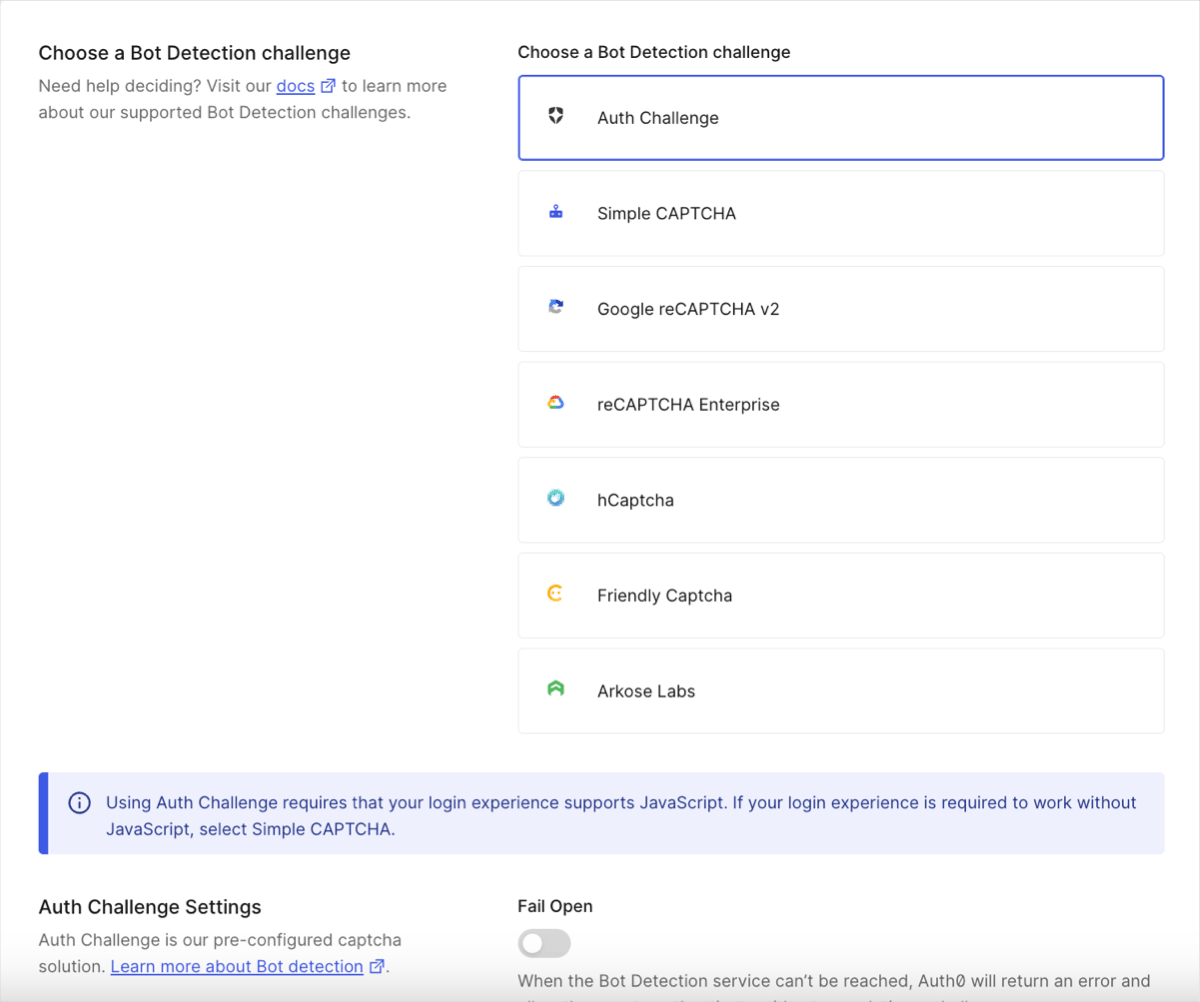 When using Auth Challenge, the **Fail open** toggle is disabled by default.
If you enable the **Fail Open** toggle:
* When the Bot Detection service is unreacheable, Auth0 prioritizes the authentication process and proceeds without a CAPTCHA challenge. End users do not see an error message and can still log in or register.
* When the Bot Detection service is reachable, the authentication process proceeds with a CAPTCHA challenge.
Auth Challenge is the default bot detection response, offering a CAPTCHA-free web experience with stronger privacy and a better user experience.
As noted on the dashboard, this login experience requires Javascript; if your login experience is required to work without Javascript, select Simple CAPTCHA.
4. Select when you want to require CAPTCHA for password flows, passwordless flows, and password reset flows.
* **Never**: Never require your users to complete a CAPTCHA to log in.
* **When Risky**: Only require your users to complete a CAPTCHA if the login matches your **Bot Detection Level** setting.
* **Always**: Always require your users to complete a CAPTCHA to log in.
5. If you choose **When Risky** or **Always**, the **CAPTCHA Providers** field will appear in the **Response** section. Select **Auth Challenge** (provided by Auth0), **Simple CAPTCHA** (provided by Auth0), or one of the supported third-party provider integrations (requires external setup and registration).
* If you choose **Auth Challenge** or **Simple CAPTCHA**, you are done. If your login experience does not support JavaScript, you must select **Simple CAPTCHA**.
* If you choose one of our third-party provider integrations, enter the provider’s configuration details. To learn more, read [Configure third-party CAPTCHA provider integrations](/docs/secure/attack-protection/bot-detection/configure-captcha).
* If you choose **Simple CAPTCHA,** the CAPTCHA image is not legible to screen readers.
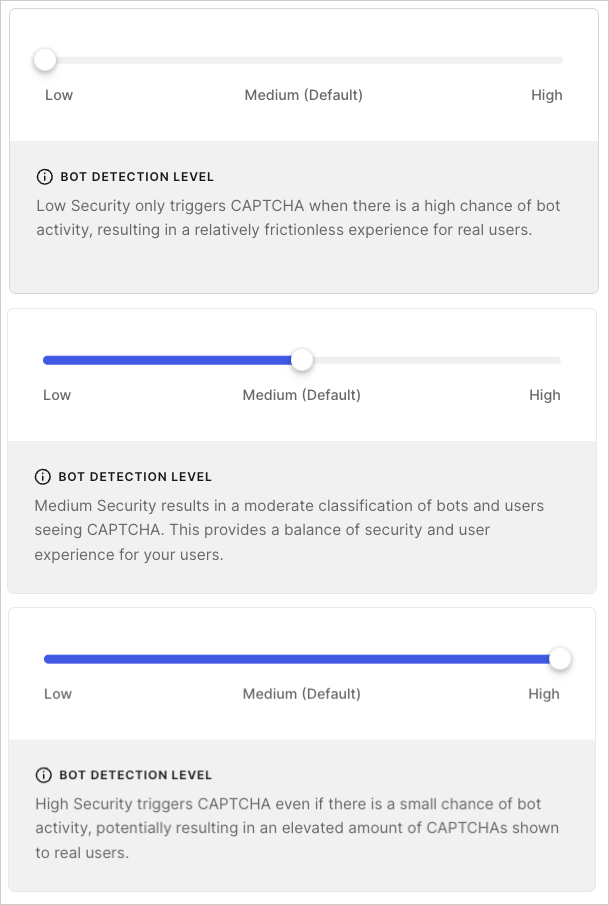
6. If you choose **When Risky**, the **Bot Detection Level** field will appear in the **Response** section. Select the security level that best fits your use case. For more information, read [Configure Bot Detection Level](/docs/secure/attack-protection/bot-detection#configure-bot-detection-level).
7. Select **Save**.
## Configure Bot Detection Level
Configure the **Bot Detection Level** setting to match your risk tolerance and business needs.
There are three settings to choose from:
1. **Low**: Triggers CAPTCHA when there is a high chance of bot activity, providing a relatively frictionless experience for real users.
2. **Medium**: Default. Triggers CAPTCHA when there is a moderate chance of bot activity, providing a balance of security and experience for real users.
3. **High**: Triggers CAPTCHA when there is a small chance of bot activity, providing more security but potentially more friction for real users.
When using Auth Challenge, the **Fail open** toggle is disabled by default.
If you enable the **Fail Open** toggle:
* When the Bot Detection service is unreacheable, Auth0 prioritizes the authentication process and proceeds without a CAPTCHA challenge. End users do not see an error message and can still log in or register.
* When the Bot Detection service is reachable, the authentication process proceeds with a CAPTCHA challenge.
Auth Challenge is the default bot detection response, offering a CAPTCHA-free web experience with stronger privacy and a better user experience.
As noted on the dashboard, this login experience requires Javascript; if your login experience is required to work without Javascript, select Simple CAPTCHA.
4. Select when you want to require CAPTCHA for password flows, passwordless flows, and password reset flows.
* **Never**: Never require your users to complete a CAPTCHA to log in.
* **When Risky**: Only require your users to complete a CAPTCHA if the login matches your **Bot Detection Level** setting.
* **Always**: Always require your users to complete a CAPTCHA to log in.
5. If you choose **When Risky** or **Always**, the **CAPTCHA Providers** field will appear in the **Response** section. Select **Auth Challenge** (provided by Auth0), **Simple CAPTCHA** (provided by Auth0), or one of the supported third-party provider integrations (requires external setup and registration).
* If you choose **Auth Challenge** or **Simple CAPTCHA**, you are done. If your login experience does not support JavaScript, you must select **Simple CAPTCHA**.
* If you choose one of our third-party provider integrations, enter the provider’s configuration details. To learn more, read [Configure third-party CAPTCHA provider integrations](/docs/secure/attack-protection/bot-detection/configure-captcha).
* If you choose **Simple CAPTCHA,** the CAPTCHA image is not legible to screen readers.
6. If you choose **When Risky**, the **Bot Detection Level** field will appear in the **Response** section. Select the security level that best fits your use case. For more information, read [Configure Bot Detection Level](/docs/secure/attack-protection/bot-detection#configure-bot-detection-level).
7. Select **Save**.
## Configure Bot Detection Level
Configure the **Bot Detection Level** setting to match your risk tolerance and business needs.
There are three settings to choose from:
1. **Low**: Triggers CAPTCHA when there is a high chance of bot activity, providing a relatively frictionless experience for real users.
2. **Medium**: Default. Triggers CAPTCHA when there is a moderate chance of bot activity, providing a balance of security and experience for real users.
3. **High**: Triggers CAPTCHA when there is a small chance of bot activity, providing more security but potentially more friction for real users.
 ## Allow trusted IP addresses to bypass Bot Detection
You can allow up to 100 discrete IP addresses and/or CIDR ranges (IPv4 or IPv6) to bypass Bot Detection by adding them to the **IP AllowList** field. Auth0 does not enforce blocking and does not send alerts for IP addresses or CIDR ranges on this list.
1. Go to [Dashboard > Security > Attack Protection](https://manage.auth0.com/#/security/attack-protection), and select **Bot Detection**.
2. In the **IP AllowList** field, enter the IP addresses and/or CIDR ranges you want to bypass Bot Detection. Separate multiple addresses or ranges with commas.
## Configure signup detection model for Custom Login Page and Classic Login Experience
Auth0 provides a signup detection machine-learning model, distinct from the login model, that addresses different attack types by analyzing unique signals.
This model allows CAPTCHA to behave differently between signup and login flows to provide stronger protection against signup attacks and align with the latest security advancements.
Ensure all applications using [Auth0.js](https://github.com/auth0/auth0.js/) and/or [Lock](https://github.com/auth0/lock) are using the most recent library version(s) before you enable this model:
* **Auth0.js**: 9.28.0+
* **Lock**: 13.0+
If you enable this model while using an outdated library, your application may encounter errors.
You can configure the detection model that Bot Detection uses for signup flows when using a [Custom Login Page](/docs/customize/login-pages) or the [Classic Login Experience](/docs/authenticate/login/auth0-universal-login/universal-login-vs-classic-login/classic-experience) in the Auth0 Dashboard.
1. Go to [Dashboard > Security > Attack Protection](https://manage.auth0.com/#/security/attack-protection), and select **Bot Detection**.
2. Locate the **Detection Models** section.
3. Enable the toggle for **Signup detection models for custom and classic login pages**.
## Restrictions and limitations
### Flow limitations
Bot Detection works for web and mobile applications that use [Auth0 Universal Login](/docs/authenticate/login/auth0-universal-login). For applications that do not use Universal Login, levels of support are limited, in particular for flows that cannot support a CAPTCHA or reCAPTCHA challenge.
Ensure all of your login experiences are supported before you enable Bot Detection, or you may introduce errors into your application.
| Flow | Limitation |
| ---------------------------------------------------------------------------------------------------------------------------------- | ---------------------------------------------------------------------------------------------------------------------------------------------------------------------------------------------------------------------------------------------------------------------------------- |
| Universal Login | Supported by default. |
| Classic Login (no customizations) | Supported by default. |
| Classic Login (Custom Login Page using **Lock** template) | Supported if using `lock.js` SDK version 12.4.0 or higher. |
| Classic Login (Custom Login Page using **Custom Login Form** template) | Supported if using `auth0.js` SDK version 9.24 or higher, and you enhance your code to handle a CAPTCHA or reCAPTCHA challenge. |
| Native applications | Supported if using one of the following SDKs:
## Allow trusted IP addresses to bypass Bot Detection
You can allow up to 100 discrete IP addresses and/or CIDR ranges (IPv4 or IPv6) to bypass Bot Detection by adding them to the **IP AllowList** field. Auth0 does not enforce blocking and does not send alerts for IP addresses or CIDR ranges on this list.
1. Go to [Dashboard > Security > Attack Protection](https://manage.auth0.com/#/security/attack-protection), and select **Bot Detection**.
2. In the **IP AllowList** field, enter the IP addresses and/or CIDR ranges you want to bypass Bot Detection. Separate multiple addresses or ranges with commas.
## Configure signup detection model for Custom Login Page and Classic Login Experience
Auth0 provides a signup detection machine-learning model, distinct from the login model, that addresses different attack types by analyzing unique signals.
This model allows CAPTCHA to behave differently between signup and login flows to provide stronger protection against signup attacks and align with the latest security advancements.
Ensure all applications using [Auth0.js](https://github.com/auth0/auth0.js/) and/or [Lock](https://github.com/auth0/lock) are using the most recent library version(s) before you enable this model:
* **Auth0.js**: 9.28.0+
* **Lock**: 13.0+
If you enable this model while using an outdated library, your application may encounter errors.
You can configure the detection model that Bot Detection uses for signup flows when using a [Custom Login Page](/docs/customize/login-pages) or the [Classic Login Experience](/docs/authenticate/login/auth0-universal-login/universal-login-vs-classic-login/classic-experience) in the Auth0 Dashboard.
1. Go to [Dashboard > Security > Attack Protection](https://manage.auth0.com/#/security/attack-protection), and select **Bot Detection**.
2. Locate the **Detection Models** section.
3. Enable the toggle for **Signup detection models for custom and classic login pages**.
## Restrictions and limitations
### Flow limitations
Bot Detection works for web and mobile applications that use [Auth0 Universal Login](/docs/authenticate/login/auth0-universal-login). For applications that do not use Universal Login, levels of support are limited, in particular for flows that cannot support a CAPTCHA or reCAPTCHA challenge.
Ensure all of your login experiences are supported before you enable Bot Detection, or you may introduce errors into your application.
| Flow | Limitation |
| ---------------------------------------------------------------------------------------------------------------------------------- | ---------------------------------------------------------------------------------------------------------------------------------------------------------------------------------------------------------------------------------------------------------------------------------- |
| Universal Login | Supported by default. |
| Classic Login (no customizations) | Supported by default. |
| Classic Login (Custom Login Page using **Lock** template) | Supported if using `lock.js` SDK version 12.4.0 or higher. |
| Classic Login (Custom Login Page using **Custom Login Form** template) | Supported if using `auth0.js` SDK version 9.24 or higher, and you enhance your code to handle a CAPTCHA or reCAPTCHA challenge. |
| Native applications | Supported if using one of the following SDKs:- `Auth0.swift` version 1.28.0+
- `Auth0.Android` version 1.25.0+
- `Lock.Swift` version 2.19.0+
- `Lock.Android` version 2.22.0+
|
| Regular Web or Native applications using Resource Owner Password Flow | Supported in a limited capacity. Bot Detection Response such as CAPTCHA requires an interactive flow and therefore is not supported. If the `requires_verification` error is returned by the SDK, you must trigger a web-based login flow for the user to complete authentication. |
| Flows not hosted by Auth0 using `lock.js` or `auth0.js` SDK which perform cross-origin authentication (`co/authenticate` endpoint) | Not supported. |
### Connection type limitations
Depending on the types of connections you use, Bot Detection has the following limitations.
| Connection Type | Limitation |
| --------------------- | ----------------------------------------------------------------------------------------------- |
| Database | Supported if the login uses a compatible login flow as described in the Flow limitations table. |
| Custom database | Supported if the login uses a compatible login flow as described in the Flow limitations table. |
| Active Directory/LDAP | Supported if the login uses a compatible login flow as described in the Flow limitations table. |
| Enterprise | Not supported. |
| Social Login | Not supported. |
| Passwordless | Supported if the login uses a compatible login flow as described in the Flow limitations table. |
### Custom login page support
If you build a custom login page using Auth0.js, you can enable Bot Detection to render a CAPTCHA step in scenarios when a login request is determined by Auth0 to be high-risk.
Your custom login form code must handle scenarios where the user is asked to pass a CAPTCHA step. To learn more, read [Add Bot Detection to Custom Login Pages](/docs/secure/attack-protection/bot-detection/bot-detection-custom-login-pages).
### Native application support
If you build native applications using an Auth0 SDK for the login flow, you can enable Bot Detection to render a CAPTCHA step in scenarios when a login request is determined by Auth0 to be high-risk.
Your custom login form code must handle scenarios where the user is asked to pass a CAPTCHA step. To learn more, read [Add Bot Detection to Native Applications](/docs/secure/attack-protection/bot-detection/bot-detection-native-apps).
## Learn more
* [Configure Third-Party CAPTCHA Provider Integrations](/docs/secure/attack-protection/bot-detection/configure-captcha)
* [Add Bot Detection to Custom Login Pages](/docs/secure/attack-protection/bot-detection/bot-detection-custom-login-pages)
* [Add Bot Detection to Native Applications](/docs/secure/attack-protection/bot-detection/bot-detection-native-apps)
* [Breached Password Detection](/docs/secure/attack-protection/breached-password-detection)
* [Brute-Force Protection](/docs/secure/attack-protection/brute-force-protection)
* [Suspicious IP Throttling](/docs/secure/attack-protection/suspicious-ip-throttling)