> ## Documentation Index
> Fetch the complete documentation index at: https://docs-dev-docs-event-stream-action-templates.mintlify.site/llms.txt
> Use this file to discover all available pages before exploring further.
# ResetPasswordMfaPushChallengePush
> Describes all the hooks and methods available to customize the Universal Login `reset-password-mfa-push-challenge-push` screen.
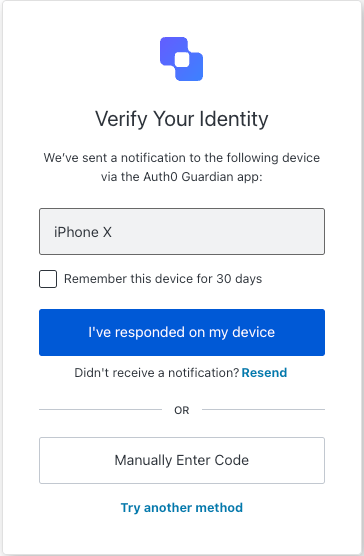
The `reset-password-mfa-push-challenge-push` screen is displayed during the password reset flow when multi-factor authentication is required via a push notification. It prompts the user to approve the request on their enrolled mobile device to continue the reset process.
## Import
Each screen has its own set of hooks and methods. The SDK supports **partial import** and **root import** for each screen.
* Using partial import allows you to include only the code you need for your specific use case.
* Using root import allows you to load all screens from a single bundle, which is useful when you want a unified build to handle all possible screens.
```jsx Import Example theme={null}
// root import
import { useResetPasswordMfaPushChallengePush } from '@auth0/auth0-acul-react';
// partial import
import {
useResetPasswordMfaPushChallengePush,
// Context hooks
useUser,
useTenant,
useBranding,
useClient,
useOrganization,
usePrompt,
useScreen,
useTransaction,
useUntrustedData,
// Common hooks
useCurrentScreen,
useAuth0Themes,
useErrors,
useMfaPolling,
// Utility hooks
useChangeLanguage,
// Methods
continueMethod,
enterCodeManually,
resendPushNotification,
tryAnotherMethod,
} from '@auth0/auth0-acul-react/reset-password-mfa-push-challenge-push';
function ResetPasswordMfaPushChallengePushScreen() {
const { resendPushNotification } = useResetPasswordMfaPushChallengePush();
return (
);
}
```
## Context Hooks
Screen-scoped hooks that provide read-only access to Auth0 context data on the `reset-password-mfa-push-challenge-push` screen. Import them from `@auth0/auth0-acul-react/reset-password-mfa-push-challenge-push`.
() => BrandingMembers}>
This hook provides branding configurations, such as logo, colors, and theme settings displayed on the `reset-password-mfa-push-challenge-push` screen.
```jsx Example theme={null}
import { useBranding } from '@auth0/auth0-acul-react/reset-password-mfa-push-challenge-push';
function CustomTheme() {
const branding = useBranding();
}
```
() => ClientMembers}>
This hook provides client-related configurations, such as `id`, `name`, and `logoUrl`, for the `reset-password-mfa-push-challenge-push` screen.
```jsx Example theme={null}
import { useClient } from '@auth0/auth0-acul-react/reset-password-mfa-push-challenge-push';
function AppInfo() {
const client = useClient();
}
```
() => OrganizationMembers}>
This hook provides information about the user's Organization if the password reset is Organization-scoped. Returns `null` when no Organization context is present.
```jsx Example theme={null}
import { useOrganization } from '@auth0/auth0-acul-react/reset-password-mfa-push-challenge-push';
function OrgSelector() {
const organization = useOrganization();
if (!organization) {
return
No Organization context
;
}
}
```
() => PromptMembers}>
This hook contains data about the current prompt in the authentication flow.
```jsx Example theme={null}
import { usePrompt } from '@auth0/auth0-acul-react/reset-password-mfa-push-challenge-push';
function FlowInfo() {
const prompt = usePrompt();
}
```
() => ScreenMembersOnResetPasswordMfaPushChallengePush}>
This hook contains details specific to the `reset-password-mfa-push-challenge-push` screen, including its configuration and context.
```jsx Example theme={null}
import { useScreen } from '@auth0/auth0-acul-react/reset-password-mfa-push-challenge-push';
function ScreenDebug() {
const screen = useScreen();
}
```
() => TenantMembers}>
This hook contains data related to the tenant, such as `id` and associated metadata.
```jsx Example theme={null}
import { useTenant } from '@auth0/auth0-acul-react/reset-password-mfa-push-challenge-push';
function TenantInfo() {
const tenant = useTenant();
}
```
() => TransactionMembers}>
This hook provides transaction-specific data for the `reset-password-mfa-push-challenge-push` screen, such as active connections and current flow state.
```jsx Example theme={null}
import { useTransaction } from '@auth0/auth0-acul-react/reset-password-mfa-push-challenge-push';
function TransactionInfo() {
const transaction = useTransaction();
}
```
() => UntrustedDataMembers}>
This hook handles untrusted data passed to the screen, such as a prefilled email or username from URL parameters.
```jsx Example theme={null}
import { useUntrustedData } from '@auth0/auth0-acul-react/reset-password-mfa-push-challenge-push';
function PrefilledForm() {
const untrustedData = useUntrustedData();
}
```
() => UserMembers}>
This hook provides details of the active user, including `username`, `email`, and available authentication methods.
```jsx Example theme={null}
import { useUser } from '@auth0/auth0-acul-react/reset-password-mfa-push-challenge-push';
function UserProfile() {
const user = useUser();
}
```
ResetPasswordMfaPushChallengePushMembers}>
This hook returns all methods and context available on the `reset-password-mfa-push-challenge-push` screen.
## Methods
This method continues the password reset flow after the user has approved the push notification on their mobile device.
```jsx Example theme={null}
import { useResetPasswordMfaPushChallengePush } from '@auth0/auth0-acul-react/reset-password-mfa-push-challenge-push';
function ContinueButton() {
const { continueMethod } = useResetPasswordMfaPushChallengePush();
return (
);
}
```
This method navigates the user to enter the OTP code manually instead of waiting for push notification approval.
```jsx Example theme={null}
import { useResetPasswordMfaPushChallengePush } from '@auth0/auth0-acul-react/reset-password-mfa-push-challenge-push';
function EnterCodeButton() {
const { enterCodeManually } = useResetPasswordMfaPushChallengePush();
return (
);
}
```
This method resends the push notification to the user's enrolled mobile device.
```jsx Example theme={null}
import { useResetPasswordMfaPushChallengePush } from '@auth0/auth0-acul-react/reset-password-mfa-push-challenge-push';
function ResendButton() {
const { resendPushNotification } = useResetPasswordMfaPushChallengePush();
return (
);
}
```
This method navigates the user to select a different MFA method.
```jsx Example theme={null}
import { useResetPasswordMfaPushChallengePush } from '@auth0/auth0-acul-react/reset-password-mfa-push-challenge-push';
function TryAnotherMethodButton() {
const { tryAnotherMethod } = useResetPasswordMfaPushChallengePush();
return (
);
}
```
## Common/Utility Hooks
useMfaPolling} type="Hooks">
This hook manages MFA push notification polling, repeatedly checking the push challenge endpoint until the user approves or denies the request.
useAuth0Themes} type="Hooks">
This hook gets the current theme options with flattened configuration from branding context.
useChangeLanguage} type="Hooks">
This hook returns a function for changing the display language on the current ACUL screen.
useCurrentScreen} type="Hooks">
This hook gets the current screen context and state.
useErrors} type="Hooks">
This hook reads and manages server, client, and developer errors on the screen.
 ## Import
Each screen has its own set of hooks and methods. The SDK supports **partial import** and **root import** for each screen.
* Using partial import allows you to include only the code you need for your specific use case.
* Using root import allows you to load all screens from a single bundle, which is useful when you want a unified build to handle all possible screens.
```jsx Import Example theme={null}
// root import
import { useResetPasswordMfaPushChallengePush } from '@auth0/auth0-acul-react';
// partial import
import {
useResetPasswordMfaPushChallengePush,
// Context hooks
useUser,
useTenant,
useBranding,
useClient,
useOrganization,
usePrompt,
useScreen,
useTransaction,
useUntrustedData,
// Common hooks
useCurrentScreen,
useAuth0Themes,
useErrors,
useMfaPolling,
// Utility hooks
useChangeLanguage,
// Methods
continueMethod,
enterCodeManually,
resendPushNotification,
tryAnotherMethod,
} from '@auth0/auth0-acul-react/reset-password-mfa-push-challenge-push';
function ResetPasswordMfaPushChallengePushScreen() {
const { resendPushNotification } = useResetPasswordMfaPushChallengePush();
return (
);
}
```
## Context Hooks
Screen-scoped hooks that provide read-only access to Auth0 context data on the `reset-password-mfa-push-challenge-push` screen. Import them from `@auth0/auth0-acul-react/reset-password-mfa-push-challenge-push`.
## Import
Each screen has its own set of hooks and methods. The SDK supports **partial import** and **root import** for each screen.
* Using partial import allows you to include only the code you need for your specific use case.
* Using root import allows you to load all screens from a single bundle, which is useful when you want a unified build to handle all possible screens.
```jsx Import Example theme={null}
// root import
import { useResetPasswordMfaPushChallengePush } from '@auth0/auth0-acul-react';
// partial import
import {
useResetPasswordMfaPushChallengePush,
// Context hooks
useUser,
useTenant,
useBranding,
useClient,
useOrganization,
usePrompt,
useScreen,
useTransaction,
useUntrustedData,
// Common hooks
useCurrentScreen,
useAuth0Themes,
useErrors,
useMfaPolling,
// Utility hooks
useChangeLanguage,
// Methods
continueMethod,
enterCodeManually,
resendPushNotification,
tryAnotherMethod,
} from '@auth0/auth0-acul-react/reset-password-mfa-push-challenge-push';
function ResetPasswordMfaPushChallengePushScreen() {
const { resendPushNotification } = useResetPasswordMfaPushChallengePush();
return (
);
}
```
## Context Hooks
Screen-scoped hooks that provide read-only access to Auth0 context data on the `reset-password-mfa-push-challenge-push` screen. Import them from `@auth0/auth0-acul-react/reset-password-mfa-push-challenge-push`.