> ## Documentation Index
> Fetch the complete documentation index at: https://docs-dev-docs-event-stream-action-templates.mintlify.site/llms.txt
> Use this file to discover all available pages before exploring further.
# My Account API
> My Account APIを使用して、ユーザーが自分のアカウント情報を管理できるようにする方法について説明します。
export const AuthCodeGroup = ({children, dropdown}) => {
const [processedChildren, setProcessedChildren] = useState(children);
useEffect(() => {
let unsubscribe = null;
function init() {
unsubscribe = window.autorun(() => {
const processChildren = node => {
if (typeof node === "string") {
let processedNode = node;
for (const [key, value] of window.rootStore.variableStore.values.entries()) {
const escapedKey = key.replaceAll(/[.*+?^${}()|[\]\\]/g, (String.raw)`\$&`);
processedNode = processedNode.replaceAll(new RegExp(escapedKey, "g"), value);
}
return processedNode;
} else if (Array.isArray(node)) {
return node.map(processChildren);
} else if (node && node.props && node.props.children) {
return {
...node,
props: {
...node.props,
children: processChildren(node.props.children)
}
};
}
return node;
};
setProcessedChildren(processChildren(children));
});
}
if (window.rootStore) {
init();
} else {
window.addEventListener("adu:storeReady", init);
}
return () => {
window.removeEventListener("adu:storeReady", init);
unsubscribe?.();
};
}, [children]);
return {processedChildren};
};
export const AuthCodeBlock = ({filename, icon, language, highlight, children}) => {
const [displayText, setDisplayText] = useState(children);
const [copyText, setCopyText] = useState(children);
const wrapperRef = React.useRef(null);
useEffect(() => {
let unsubscribe = null;
function init() {
if (!window.autorun || !window.rootStore) {
return;
}
unsubscribe = window.autorun(() => {
let processedChildrenForDisplay = children;
let processedChildrenForCopy = children;
for (const [key, value] of window.rootStore.variableStore.values.entries()) {
const escapedKey = key.replaceAll(/[.*+?^${}()|[\]\\]/g, (String.raw)`\$&`);
let displayValue = value;
if (key === "{yourClientSecret}" && value !== "{yourClientSecret}") {
displayValue = value.substring(0, 3) + "*****MASKED*****";
}
processedChildrenForDisplay = processedChildrenForDisplay.replaceAll(new RegExp(escapedKey, "g"), displayValue);
processedChildrenForCopy = processedChildrenForCopy.replaceAll(new RegExp(escapedKey, "g"), value);
}
setDisplayText(processedChildrenForDisplay);
setCopyText(processedChildrenForCopy);
});
}
if (window.rootStore) {
init();
} else {
window.addEventListener("adu:storeReady", init);
}
return () => {
window.removeEventListener("adu:storeReady", init);
unsubscribe?.();
};
}, [children]);
useEffect(() => {
if (!wrapperRef.current) return;
const originalWriteText = navigator.clipboard.writeText.bind(navigator.clipboard);
let isOverriding = false;
const handleClick = e => {
const button = e.target.closest('[data-testid="copy-code-button"]');
if (!button || !wrapperRef.current.contains(button)) return;
isOverriding = true;
navigator.clipboard.writeText = text => {
if (isOverriding) {
isOverriding = false;
navigator.clipboard.writeText = originalWriteText;
return originalWriteText(copyText);
}
return originalWriteText(text);
};
setTimeout(() => {
if (isOverriding) {
isOverriding = false;
navigator.clipboard.writeText = originalWriteText;
}
}, 100);
};
const wrapper = wrapperRef.current;
wrapper.addEventListener('click', handleClick, true);
return () => {
wrapper.removeEventListener('click', handleClick, true);
if (navigator.clipboard.writeText !== originalWriteText) {
navigator.clipboard.writeText = originalWriteText;
}
};
}, [copyText]);
return
{displayText}
;
};
My Account APIは限定早期アクセスでご利用いただけます。アクセスのリクエストは、Auth0アカウントマネージャーにお問い合わせください。Auth0の製品リリースサイクルについて詳しくは、[製品リリースステージ](/docs/ja-jp/troubleshoot/product-lifecycle/product-release-stages)をご覧ください。
Auth0 My Account APIは、ユーザーが自分のアカウント情報を管理するための専用エンドポイントを提供します。お客様はこれらのAPIを使用して、アプリケーション内でセルフサービスエクスペリエンスを構築したり、ユーザーアカウントに詳細情報を段階的に追加したりすることができます。
My Account APIは、現在ログインしているユーザーのコンテキスト内で動作し、ユーザー向けアプリケーション内で直接使用できます。
**Auth0ドメインの使用とカスタムドメインの使用**
My Account APIは、正規のAuth0ドメインまたはカスタムドメインの使用をサポートしていますが、以下のプロセス全体で同じドメインを使用する必要があります。
* アクセストークンの取得
* `audience` 値の設定
* My Account APIエンドポイントの呼び出し
詳細については、[カスタムドメイン](/docs/ja-jp/customize/custom-domains)をご覧ください。
## My Account APIを有効にする
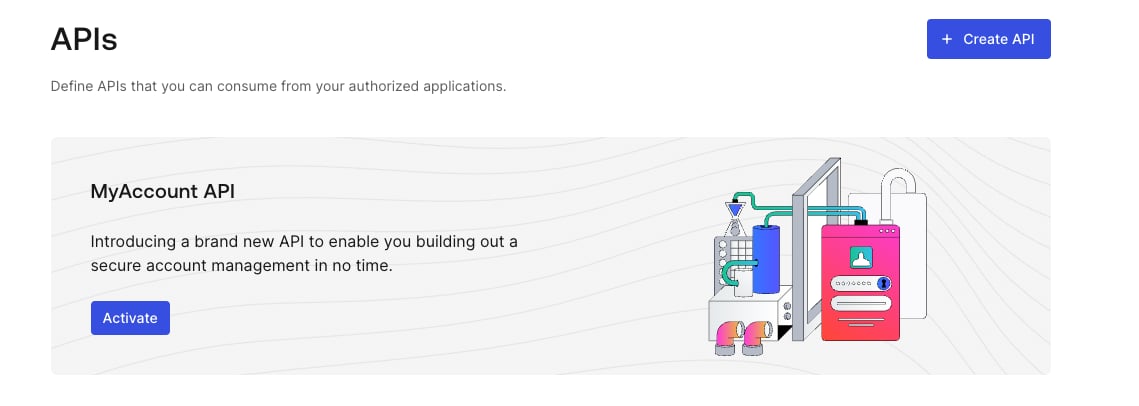
以下のように、Auth0 DashboardでテナントのMy Account APIを有効にできます。
1. \*\*[認証]>[API]\*\*に移動します。
2. **MyAccount API**のバナーを見つけます。
3. \*\*[アクティブ化]\*\*を選択します。
 デフォルトでは、My Account APIは次のアプリケーションAPIアクセスポリシーを使用して作成されます。
* ユーザーフローの場合は`require_client_grant`
* クライアント(マシンツーマシン)フローの場合は`deny_all`
ユーザーに代わってMy Account APIにアクセスするアプリケーションに対しては、明示的にクライアント付与を作成して、アプリケーションがリクエストできるスコープの最大数を定義できるようにする必要があります。あるいは、ユーザーアクセスフローのポリシーを`allow_all`に変更すると、テナント内のすべてのアプリケーションがMy Account APIから任意のスコープをリクエストできるようになります。
My Account APIが機密情報や操作を公開するようになるため、Auth0ではユーザーアクセスフローに`allow_all`を使用することを推奨していません。My Account APIでは最小特権の原則に従い、アプリケーションが本当に必要なものだけにアクセスできるようにして、潜在的なセキュリティリスクを最小限に抑える必要があります。
アプリケーションに付与される最終的な権限は、アプリケーションAPIアクセスポリシーによって許可されるスコープや、エンドユーザーに割り当てられたRole-based Access Control(RBAC)の権限、ユーザーの同意(該当する場合)の共通部分によって決まります。
My Account APIへクライアントがアクセスする際のアプリケーションAPIポリシーは更新できません。つまり、クライアントの資格情報フローを使用してMy Account APIにアクセスすることはできません。
アプリケーションAPIアクセスポリシーとそれに関連するクライアント付与を管理する方法について詳しくは、[APIへのアプリケーションアクセス:クライアント付与](/docs/ja-jp/get-started/applications/application-access-to-apis-client-grants)をご覧ください。
## アクセストークンを取得する
独自APIのアクセストークンを取得するのと同じ方法で、My Account APIのアクセストークンを取得できます。
My Account APIに機密性の高い操作(認証方法の登録など)の実行を許可する場合は、[ステップアップ認証](/docs/ja-jp/secure/multi-factor-authentication/step-up-authentication)を使用して、[多要素認証(MFA)](/docs/ja-jp/secure/multi-factor-authentication)によって追加のセキュリティポリシーを適用することを強くお勧めします。
ユニバーサルログインを使用する場合には、次の記事を参照してください。
* [認可コードフローを使用してAPIを呼び出す](/docs/ja-jp/get-started/authentication-and-authorization-flow/authorization-code-flow/call-your-api-using-the-authorization-code-flow)
* [PKCE対応の認可コードフローを使用してAPIを呼び出す](/docs/ja-jp/get-started/authentication-and-authorization-flow/authorization-code-flow-with-pkce/call-your-api-using-the-authorization-code-flow-with-pkce)
埋め込みログインを使用する場合には、次の記事を参照してください。
* [リソースオーナーパスワードフローを使用してAPIを呼び出す](/docs/ja-jp/get-started/authentication-and-authorization-flow/resource-owner-password-flow/call-your-api-using-resource-owner-password-flow)
* [ネイティブパスキーAPIを使用したログインフロー](/docs/ja-jp/native-passkeys-api#login-flow)
### オーディエンス
My Account APIのオーディエンスは`https://{yourDomain}/me/`です。
### スコープ
My Account APIは次のスコープをサポートしています。
| スコープ | 説明 |
| ---------------------------------- | ------------------------- |
| `create:me:authentication-methods` | ユーザーが新しい認証方法を登録できるようにします。 |
| `read:me:authentication-methods` | ユーザーが既存の認証方法を参照できるようにします。 |
| `update:me:authentication-methods` | ユーザーが既存の認証方法を変更できるようにします。 |
| `delete:me:authentication-methods` | ユーザーが既存の認証方法を変更できるようにします。 |
| `read:me:factors` | ユーザーが登録できる要素を参照できるようにします。 |
[トークンVaultのある接続アカウント](/docs/secure/tokens/connected-accounts-for-token-vault)の場合、My Account APIは次のスコープをサポートします。
| スコープ | 説明 |
| ------------------------------ | -------------------------------------------------- |
| `create:me:connected_accounts` | ユーザーが新しいアカウントをユーザープロファイルに接続できるようにします。 |
| `read:me:connected_accounts` | ユーザーが自分のユーザープロファイルにリンクされている既存の接続アカウントを参照できるようにします。 |
| `delete:me:connected_accounts` | ユーザーが自分のユーザープロファイルから接続アカウントを削除できるようにします。 |
### 例
#### 認可コードフローを使用したユニバーサルログイン
##### 手順1:認可コードのリクエスト
```bash cURL theme={null}
curl --request GET \
--url 'https://{yourDomain}/authorize?response_type=code&client_id={yourClientId}&redirect_uri=%7ByourRedirectUri%7D&scope=create%3Ame%3Aauthentication_methods&offline_access=&audience=https%3A%2F%2F{yourDomain}%2Fme%2F'
```
```csharp C# theme={null}
var client = new RestClient("https://{yourDomain}/authorize?response_type=code&client_id={yourClientId}&redirect_uri=%7ByourRedirectUri%7D&scope=create%3Ame%3Aauthentication_methods&offline_access=&audience=https%3A%2F%2F{yourDomain}%2Fme%2F");
var request = new RestRequest(Method.GET);
IRestResponse response = client.Execute(request);
```
```go Go theme={null}
package main
import (
"fmt"
"net/http"
"io/ioutil"
)
func main() {
url := "https://{yourDomain}/authorize?response_type=code&client_id={yourClientId}&redirect_uri=%7ByourRedirectUri%7D&scope=create%3Ame%3Aauthentication_methods&offline_access=&audience=https%3A%2F%2F{yourDomain}%2Fme%2F"
req, _ := http.NewRequest("GET", url, nil)
res, _ := http.DefaultClient.Do(req)
defer res.Body.Close()
body, _ := ioutil.ReadAll(res.Body)
fmt.Println(res)
fmt.Println(string(body))
}
```
```java Java theme={null}
HttpResponse response = Unirest.get("https://{yourDomain}/authorize?response_type=code&client_id={yourClientId}&redirect_uri=%7ByourRedirectUri%7D&scope=create%3Ame%3Aauthentication_methods&offline_access=&audience=https%3A%2F%2F{yourDomain}%2Fme%2F")
.asString();
```
```javascript Node.JS theme={null}
var axios = require("axios").default;
var options = {
method: 'GET',
url: 'https://{yourDomain}/authorize',
params: {
response_type: 'code',
client_id: '{yourClientId}',
redirect_uri: '{yourRedirectUri}',
scope: 'create:me:authentication_methods',
offline_access: '',
audience: 'https://{yourDomain}/me/'
}
};
axios.request(options).then(function (response) {
console.log(response.data);
}).catch(function (error) {
console.error(error);
});
```
```objc Obj-C theme={null}
#import
NSMutableURLRequest *request = [NSMutableURLRequest requestWithURL:[NSURL URLWithString:@"https://{yourDomain}/authorize?response_type=code&client_id={yourClientId}&redirect_uri=%7ByourRedirectUri%7D&scope=create%3Ame%3Aauthentication_methods&offline_access=&audience=https%3A%2F%2F{yourDomain}%2Fme%2F"]
cachePolicy:NSURLRequestUseProtocolCachePolicy
timeoutInterval:10.0];
[request setHTTPMethod:@"GET"];
NSURLSession *session = [NSURLSession sharedSession];
NSURLSessionDataTask *dataTask = [session dataTaskWithRequest:request
completionHandler:^(NSData *data, NSURLResponse *response, NSError *error) {
if (error) {
NSLog(@"%@", error);
} else {
NSHTTPURLResponse *httpResponse = (NSHTTPURLResponse *) response;
NSLog(@"%@", httpResponse);
}
}];
[dataTask resume];
```
```php PHP theme={null}
$curl = curl_init();
curl_setopt_array($curl, [
CURLOPT_URL => "https://{yourDomain}/authorize?response_type=code&client_id={yourClientId}&redirect_uri=%7ByourRedirectUri%7D&scope=create%3Ame%3Aauthentication_methods&offline_access=&audience=https%3A%2F%2F{yourDomain}%2Fme%2F",
CURLOPT_RETURNTRANSFER => true,
CURLOPT_ENCODING => "",
CURLOPT_MAXREDIRS => 10,
CURLOPT_TIMEOUT => 30,
CURLOPT_HTTP_VERSION => CURL_HTTP_VERSION_1_1,
CURLOPT_CUSTOMREQUEST => "GET",
]);
$response = curl_exec($curl);
$err = curl_error($curl);
curl_close($curl);
if ($err) {
echo "cURL Error #:" . $err;
} else {
echo $response;
}
```
```python Python theme={null}
import http.client
conn = http.client.HTTPSConnection("")
conn.request("GET", "/{yourDomain}/authorize?response_type=code&client_id={yourClientId}&redirect_uri=%7ByourRedirectUri%7D&scope=create%3Ame%3Aauthentication_methods&offline_access=&audience=https%3A%2F%2F{yourDomain}%2Fme%2F")
res = conn.getresponse()
data = res.read()
print(data.decode("utf-8"))
```
```ruby Ruby theme={null}
require 'uri'
require 'net/http'
require 'openssl'
url = URI("https://{yourDomain}/authorize?response_type=code&client_id={yourClientId}&redirect_uri=%7ByourRedirectUri%7D&scope=create%3Ame%3Aauthentication_methods&offline_access=&audience=https%3A%2F%2F{yourDomain}%2Fme%2F")
http = Net::HTTP.new(url.host, url.port)
http.use_ssl = true
http.verify_mode = OpenSSL::SSL::VERIFY_NONE
request = Net::HTTP::Get.new(url)
response = http.request(request)
puts response.read_body
```
```swift Swift theme={null}
import Foundation
let request = NSMutableURLRequest(url: NSURL(string: "https://{yourDomain}/authorize?response_type=code&client_id={yourClientId}&redirect_uri=%7ByourRedirectUri%7D&scope=create%3Ame%3Aauthentication_methods&offline_access=&audience=https%3A%2F%2F{yourDomain}%2Fme%2F")! as URL,
cachePolicy: .useProtocolCachePolicy,
timeoutInterval: 10.0)
request.httpMethod = "GET"
let session = URLSession.shared
let dataTask = session.dataTask(with: request as URLRequest, completionHandler: { (data, response, error) -> Void in
if (error != nil) {
print(error)
} else {
let httpResponse = response as? HTTPURLResponse
print(httpResponse)
}
})
dataTask.resume()
```
##### 手順2:アクセストークン用コードの交換
```bash cURL theme={null}
curl --request POST \
--url 'https://{yourDomain}/oauth/token' \
--header 'content-type: application/json' \
--data '{"grant_type": "authorization_code","client_id": "{yourClientId}","client_secret": "{yourClientId}","code": "{yourAuthorizationCode}","redirect_uri": "{yourRedirectUri}","audience": "{yourAudience}","scope": "create:me:authentication_methods","offline_access": ""}'
```
```csharp C# theme={null}
var client = new RestClient("https://{yourDomain}/oauth/token");
var request = new RestRequest(Method.POST);
request.AddHeader("content-type", "application/json");
request.AddParameter("application/json", "{"grant_type": "authorization_code","client_id": "{yourClientId}","client_secret": "{yourClientId}","code": "{yourAuthorizationCode}","redirect_uri": "{yourRedirectUri}","audience": "{yourAudience}","scope": "create:me:authentication_methods","offline_access": ""}", ParameterType.RequestBody);
IRestResponse response = client.Execute(request);
```
```go Go theme={null}
package main
import (
"fmt"
"strings"
"net/http"
"io/ioutil"
)
func main() {
url := "https://{yourDomain}/oauth/token"
payload := strings.NewReader("{"grant_type": "authorization_code","client_id": "{yourClientId}","client_secret": "{yourClientId}","code": "{yourAuthorizationCode}","redirect_uri": "{yourRedirectUri}","audience": "{yourAudience}","scope": "create:me:authentication_methods","offline_access": ""}")
req, _ := http.NewRequest("POST", url, payload)
req.Header.Add("content-type", "application/json")
res, _ := http.DefaultClient.Do(req)
defer res.Body.Close()
body, _ := ioutil.ReadAll(res.Body)
fmt.Println(res)
fmt.Println(string(body))
}
```
```java Java theme={null}
HttpResponse response = Unirest.post("https://{yourDomain}/oauth/token")
.header("content-type", "application/json")
.body("{"grant_type": "authorization_code","client_id": "{yourClientId}","client_secret": "{yourClientId}","code": "{yourAuthorizationCode}","redirect_uri": "{yourRedirectUri}","audience": "{yourAudience}","scope": "create:me:authentication_methods","offline_access": ""}")
.asString();
```
```javascript Node.JS theme={null}
var axios = require("axios").default;
var options = {
method: 'POST',
url: 'https://{yourDomain}/oauth/token',
headers: {'content-type': 'application/json'},
data: {
grant_type: 'authorization_code',
client_id: '{yourClientId}',
client_secret: '{yourClientId}',
code: '{yourAuthorizationCode}',
redirect_uri: '{yourRedirectUri}',
audience: '{yourAudience}',
scope: 'create:me:authentication_methods',
offline_access: ''
}
};
axios.request(options).then(function (response) {
console.log(response.data);
}).catch(function (error) {
console.error(error);
});
```
```objc Obj-C theme={null}
#import
NSDictionary *headers = @{ @"content-type": @"application/json" };
NSDictionary *parameters = @{ @"grant_type": @"authorization_code",
@"client_id": @"{yourClientId}",
@"client_secret": @"{yourClientId}",
@"code": @"{yourAuthorizationCode}",
@"redirect_uri": @"{yourRedirectUri}",
@"audience": @"{yourAudience}",
@"scope": @"create:me:authentication_methods",
@"offline_access": @"" };
NSData *postData = [NSJSONSerialization dataWithJSONObject:parameters options:0 error:nil];
NSMutableURLRequest *request = [NSMutableURLRequest requestWithURL:[NSURL URLWithString:@"https://{yourDomain}/oauth/token"]
cachePolicy:NSURLRequestUseProtocolCachePolicy
timeoutInterval:10.0];
[request setHTTPMethod:@"POST"];
[request setAllHTTPHeaderFields:headers];
[request setHTTPBody:postData];
NSURLSession *session = [NSURLSession sharedSession];
NSURLSessionDataTask *dataTask = [session dataTaskWithRequest:request
completionHandler:^(NSData *data, NSURLResponse *response, NSError *error) {
if (error) {
NSLog(@"%@", error);
} else {
NSHTTPURLResponse *httpResponse = (NSHTTPURLResponse *) response;
NSLog(@"%@", httpResponse);
}
}];
[dataTask resume];
```
```php PHP theme={null}
$curl = curl_init();
curl_setopt_array($curl, [
CURLOPT_URL => "https://{yourDomain}/oauth/token",
CURLOPT_RETURNTRANSFER => true,
CURLOPT_ENCODING => "",
CURLOPT_MAXREDIRS => 10,
CURLOPT_TIMEOUT => 30,
CURLOPT_HTTP_VERSION => CURL_HTTP_VERSION_1_1,
CURLOPT_CUSTOMREQUEST => "POST",
CURLOPT_POSTFIELDS => "{"grant_type": "authorization_code","client_id": "{yourClientId}","client_secret": "{yourClientId}","code": "{yourAuthorizationCode}","redirect_uri": "{yourRedirectUri}","audience": "{yourAudience}","scope": "create:me:authentication_methods","offline_access": ""}",
CURLOPT_HTTPHEADER => [
"content-type: application/json"
],
]);
$response = curl_exec($curl);
$err = curl_error($curl);
curl_close($curl);
if ($err) {
echo "cURL Error #:" . $err;
} else {
echo $response;
}
```
```python Python theme={null}
import http.client
conn = http.client.HTTPSConnection("")
payload = "{"grant_type": "authorization_code","client_id": "{yourClientId}","client_secret": "{yourClientId}","code": "{yourAuthorizationCode}","redirect_uri": "{yourRedirectUri}","audience": "{yourAudience}","scope": "create:me:authentication_methods","offline_access": ""}"
headers = { 'content-type': "application/json" }
conn.request("POST", "/{yourDomain}/oauth/token", payload, headers)
res = conn.getresponse()
data = res.read()
print(data.decode("utf-8"))
```
```ruby Ruby theme={null}
require 'uri'
require 'net/http'
require 'openssl'
url = URI("https://{yourDomain}/oauth/token")
http = Net::HTTP.new(url.host, url.port)
http.use_ssl = true
http.verify_mode = OpenSSL::SSL::VERIFY_NONE
request = Net::HTTP::Post.new(url)
request["content-type"] = 'application/json'
request.body = "{"grant_type": "authorization_code","client_id": "{yourClientId}","client_secret": "{yourClientId}","code": "{yourAuthorizationCode}","redirect_uri": "{yourRedirectUri}","audience": "{yourAudience}","scope": "create:me:authentication_methods","offline_access": ""}"
response = http.request(request)
puts response.read_body
```
```swift Swift theme={null}
import Foundation
let headers = ["content-type": "application/json"]
let parameters = [
"grant_type": "authorization_code",
"client_id": "{yourClientId}",
"client_secret": "{yourClientId}",
"code": "{yourAuthorizationCode}",
"redirect_uri": "{yourRedirectUri}",
"audience": "{yourAudience}",
"scope": "create:me:authentication_methods",
"offline_access": ""
] as [String : Any]
let postData = JSONSerialization.data(withJSONObject: parameters, options: [])
let request = NSMutableURLRequest(url: NSURL(string: "https://{yourDomain}/oauth/token")! as URL,
cachePolicy: .useProtocolCachePolicy,
timeoutInterval: 10.0)
request.httpMethod = "POST"
request.allHTTPHeaderFields = headers
request.httpBody = postData as Data
let session = URLSession.shared
let dataTask = session.dataTask(with: request as URLRequest, completionHandler: { (data, response, error) -> Void in
if (error != nil) {
print(error)
} else {
let httpResponse = response as? HTTPURLResponse
print(httpResponse)
}
})
dataTask.resume()
```
#### ネイティブパスキーを使用した埋め込みログイン
##### 手順1:ログインチャレンジのリクエスト
```bash cURL theme={null}
curl --request POST \
--url 'https://{yourDomain}/passkey/challenge' \
--header 'content-type: application/json' \
--data '{"client_id": "{yourDomain}"}'
```
```csharp C# theme={null}
var client = new RestClient("https://{yourDomain}/passkey/challenge");
var request = new RestRequest(Method.POST);
request.AddHeader("content-type", "application/json");
request.AddParameter("application/json", "{"client_id": "{yourDomain}"}", ParameterType.RequestBody);
IRestResponse response = client.Execute(request);
```
```go Go theme={null}
package main
import (
"fmt"
"strings"
"net/http"
"io/ioutil"
)
func main() {
url := "https://{yourDomain}/passkey/challenge"
payload := strings.NewReader("{"client_id": "{yourDomain}"}")
req, _ := http.NewRequest("POST", url, payload)
req.Header.Add("content-type", "application/json")
res, _ := http.DefaultClient.Do(req)
defer res.Body.Close()
body, _ := ioutil.ReadAll(res.Body)
fmt.Println(res)
fmt.Println(string(body))
}
```
```java Java theme={null}
HttpResponse response = Unirest.post("https://{yourDomain}/passkey/challenge")
.header("content-type", "application/json")
.body("{"client_id": "{yourDomain}"}")
.asString();
```
```javascript Node.JS theme={null}
var axios = require("axios").default;
var options = {
method: 'POST',
url: 'https://{yourDomain}/passkey/challenge',
headers: {'content-type': 'application/json'},
data: {client_id: '{yourDomain}'}
};
axios.request(options).then(function (response) {
console.log(response.data);
}).catch(function (error) {
console.error(error);
});
```
```objc Obj-C theme={null}
#import
NSDictionary *headers = @{ @"content-type": @"application/json" };
NSDictionary *parameters = @{ @"client_id": @"{yourDomain}" };
NSData *postData = [NSJSONSerialization dataWithJSONObject:parameters options:0 error:nil];
NSMutableURLRequest *request = [NSMutableURLRequest requestWithURL:[NSURL URLWithString:@"https://{yourDomain}/passkey/challenge"]
cachePolicy:NSURLRequestUseProtocolCachePolicy
timeoutInterval:10.0];
[request setHTTPMethod:@"POST"];
[request setAllHTTPHeaderFields:headers];
[request setHTTPBody:postData];
NSURLSession *session = [NSURLSession sharedSession];
NSURLSessionDataTask *dataTask = [session dataTaskWithRequest:request
completionHandler:^(NSData *data, NSURLResponse *response, NSError *error) {
if (error) {
NSLog(@"%@", error);
} else {
NSHTTPURLResponse *httpResponse = (NSHTTPURLResponse *) response;
NSLog(@"%@", httpResponse);
}
}];
[dataTask resume];
```
```php PHP theme={null}
$curl = curl_init();
curl_setopt_array($curl, [
CURLOPT_URL => "https://{yourDomain}/passkey/challenge",
CURLOPT_RETURNTRANSFER => true,
CURLOPT_ENCODING => "",
CURLOPT_MAXREDIRS => 10,
CURLOPT_TIMEOUT => 30,
CURLOPT_HTTP_VERSION => CURL_HTTP_VERSION_1_1,
CURLOPT_CUSTOMREQUEST => "POST",
CURLOPT_POSTFIELDS => "{"client_id": "{yourDomain}"}",
CURLOPT_HTTPHEADER => [
"content-type: application/json"
],
]);
$response = curl_exec($curl);
$err = curl_error($curl);
curl_close($curl);
if ($err) {
echo "cURL Error #:" . $err;
} else {
echo $response;
}
```
```python Python theme={null}
import http.client
conn = http.client.HTTPSConnection("")
payload = "{"client_id": "{yourDomain}"}"
headers = { 'content-type': "application/json" }
conn.request("POST", "/{yourDomain}/passkey/challenge", payload, headers)
res = conn.getresponse()
data = res.read()
print(data.decode("utf-8"))
```
```ruby Ruby theme={null}
require 'uri'
require 'net/http'
require 'openssl'
url = URI("https://{yourDomain}/passkey/challenge")
http = Net::HTTP.new(url.host, url.port)
http.use_ssl = true
http.verify_mode = OpenSSL::SSL::VERIFY_NONE
request = Net::HTTP::Post.new(url)
request["content-type"] = 'application/json'
request.body = "{"client_id": "{yourDomain}"}"
response = http.request(request)
puts response.read_body
```
```swift Swift theme={null}
import Foundation
let headers = ["content-type": "application/json"]
let parameters = ["client_id": "{yourDomain}"] as [String : Any]
let postData = JSONSerialization.data(withJSONObject: parameters, options: [])
let request = NSMutableURLRequest(url: NSURL(string: "https://{yourDomain}/passkey/challenge")! as URL,
cachePolicy: .useProtocolCachePolicy,
timeoutInterval: 10.0)
request.httpMethod = "POST"
request.allHTTPHeaderFields = headers
request.httpBody = postData as Data
let session = URLSession.shared
let dataTask = session.dataTask(with: request as URLRequest, completionHandler: { (data, response, error) -> Void in
if (error != nil) {
print(error)
} else {
let httpResponse = response as? HTTPURLResponse
print(httpResponse)
}
})
dataTask.resume()
```
##### 手順2:既存ユーザーの認証
```bash cURL theme={null}
curl --request POST \
--url 'https://{yourDomain}/oauth/token' \
--header 'content-type: application/json' \
--data '{ "grant_type": "urn:okta:params:oauth:grant-type:webauthn", "client_id": "{yourClientId}", "scope": "create:me:authentication_methods offline_access", "audience": "https://{yourDomain}/me/" "auth_session": "{sessionIdFromTheFirstRequest}", "authn_response": "{authenticatorResponse}"}'
```
```csharp C# theme={null}
var client = new RestClient("https://{yourDomain}/oauth/token");
var request = new RestRequest(Method.POST);
request.AddHeader("content-type", "application/json");
request.AddParameter("application/json", "{ "grant_type": "urn:okta:params:oauth:grant-type:webauthn", "client_id": "{yourClientId}", "scope": "create:me:authentication_methods offline_access", "audience": "https://{yourDomain}/me/" "auth_session": "{sessionIdFromTheFirstRequest}", "authn_response": "{authenticatorResponse}"}", ParameterType.RequestBody);
IRestResponse response = client.Execute(request);
```
```go Go theme={null}
package main
import (
"fmt"
"strings"
"net/http"
"io/ioutil"
)
func main() {
url := "https://{yourDomain}/oauth/token"
payload := strings.NewReader("{ "grant_type": "urn:okta:params:oauth:grant-type:webauthn", "client_id": "{yourClientId}", "scope": "create:me:authentication_methods offline_access", "audience": "https://{yourDomain}/me/" "auth_session": "{sessionIdFromTheFirstRequest}", "authn_response": "{authenticatorResponse}"}")
req, _ := http.NewRequest("POST", url, payload)
req.Header.Add("content-type", "application/json")
res, _ := http.DefaultClient.Do(req)
defer res.Body.Close()
body, _ := ioutil.ReadAll(res.Body)
fmt.Println(res)
fmt.Println(string(body))
}
```
```java Java theme={null}
HttpResponse response = Unirest.post("https://{yourDomain}/oauth/token")
.header("content-type", "application/json")
.body("{ "grant_type": "urn:okta:params:oauth:grant-type:webauthn", "client_id": "{yourClientId}", "scope": "create:me:authentication_methods offline_access", "audience": "https://{yourDomain}/me/" "auth_session": "{sessionIdFromTheFirstRequest}", "authn_response": "{authenticatorResponse}"}")
.asString();
```
```javascript Node.JS theme={null}
var axios = require("axios").default;
var options = {
method: 'POST',
url: 'https://{yourDomain}/oauth/token',
headers: {'content-type': 'application/json'},
data: '{ "grant_type": "urn:okta:params:oauth:grant-type:webauthn", "client_id": "{yourClientId}", "scope": "create:me:authentication_methods offline_access", "audience": "https://{yourDomain}/me/" "auth_session": "{sessionIdFromTheFirstRequest}", "authn_response": "{authenticatorResponse}"}'
};
axios.request(options).then(function (response) {
console.log(response.data);
}).catch(function (error) {
console.error(error);
});
```
```objc Obj-C theme={null}
#import
NSDictionary *headers = @{ @"content-type": @"application/json" };
NSData *postData = [[NSData alloc] initWithData:[@"{ "grant_type": "urn:okta:params:oauth:grant-type:webauthn", "client_id": "{yourClientId}", "scope": "create:me:authentication_methods offline_access", "audience": "https://{yourDomain}/me/" "auth_session": "{sessionIdFromTheFirstRequest}", "authn_response": "{authenticatorResponse}"}" dataUsingEncoding:NSUTF8StringEncoding]];
NSMutableURLRequest *request = [NSMutableURLRequest requestWithURL:[NSURL URLWithString:@"https://{yourDomain}/oauth/token"]
cachePolicy:NSURLRequestUseProtocolCachePolicy
timeoutInterval:10.0];
[request setHTTPMethod:@"POST"];
[request setAllHTTPHeaderFields:headers];
[request setHTTPBody:postData];
NSURLSession *session = [NSURLSession sharedSession];
NSURLSessionDataTask *dataTask = [session dataTaskWithRequest:request
completionHandler:^(NSData *data, NSURLResponse *response, NSError *error) {
if (error) {
NSLog(@"%@", error);
} else {
NSHTTPURLResponse *httpResponse = (NSHTTPURLResponse *) response;
NSLog(@"%@", httpResponse);
}
}];
[dataTask resume];
```
```php PHP theme={null}
$curl = curl_init();
curl_setopt_array($curl, [
CURLOPT_URL => "https://{yourDomain}/oauth/token",
CURLOPT_RETURNTRANSFER => true,
CURLOPT_ENCODING => "",
CURLOPT_MAXREDIRS => 10,
CURLOPT_TIMEOUT => 30,
CURLOPT_HTTP_VERSION => CURL_HTTP_VERSION_1_1,
CURLOPT_CUSTOMREQUEST => "POST",
CURLOPT_POSTFIELDS => "{ "grant_type": "urn:okta:params:oauth:grant-type:webauthn", "client_id": "{yourClientId}", "scope": "create:me:authentication_methods offline_access", "audience": "https://{yourDomain}/me/" "auth_session": "{sessionIdFromTheFirstRequest}", "authn_response": "{authenticatorResponse}"}",
CURLOPT_HTTPHEADER => [
"content-type: application/json"
],
]);
$response = curl_exec($curl);
$err = curl_error($curl);
curl_close($curl);
if ($err) {
echo "cURL Error #:" . $err;
} else {
echo $response;
}
```
```python Python theme={null}
import http.client
conn = http.client.HTTPSConnection("")
payload = "{ "grant_type": "urn:okta:params:oauth:grant-type:webauthn", "client_id": "{yourClientId}", "scope": "create:me:authentication_methods offline_access", "audience": "https://{yourDomain}/me/" "auth_session": "{sessionIdFromTheFirstRequest}", "authn_response": "{authenticatorResponse}"}"
headers = { 'content-type': "application/json" }
conn.request("POST", "/{yourDomain}/oauth/token", payload, headers)
res = conn.getresponse()
data = res.read()
print(data.decode("utf-8"))
```
```ruby Ruby theme={null}
rrequire 'uri'
require 'net/http'
require 'openssl'
url = URI("https://{yourDomain}/oauth/token")
http = Net::HTTP.new(url.host, url.port)
http.use_ssl = true
http.verify_mode = OpenSSL::SSL::VERIFY_NONE
request = Net::HTTP::Post.new(url)
request["content-type"] = 'application/json'
request.body = "{ "grant_type": "urn:okta:params:oauth:grant-type:webauthn", "client_id": "{yourClientId}", "scope": "create:me:authentication_methods offline_access", "audience": "https://{yourDomain}/me/" "auth_session": "{sessionIdFromTheFirstRequest}", "authn_response": "{authenticatorResponse}"}"
response = http.request(request)
puts response.read_body
```
```swift Swift theme={null}
import Foundation
let headers = ["content-type": "application/json"]
let postData = NSData(data: "{ "grant_type": "urn:okta:params:oauth:grant-type:webauthn", "client_id": "{yourClientId}", "scope": "create:me:authentication_methods offline_access", "audience": "https://{yourDomain}/me/" "auth_session": "{sessionIdFromTheFirstRequest}", "authn_response": "{authenticatorResponse}"}".data(using: String.Encoding.utf8)!)
let request = NSMutableURLRequest(url: NSURL(string: "https://{yourDomain}/oauth/token")! as URL,
cachePolicy: .useProtocolCachePolicy,
timeoutInterval: 10.0)
request.httpMethod = "POST"
request.allHTTPHeaderFields = headers
request.httpBody = postData as Data
let session = URLSession.shared
let dataTask = session.dataTask(with: request as URLRequest, completionHandler: { (data, response, error) -> Void in
if (error != nil) {
print(error)
} else {
let httpResponse = response as? HTTPURLResponse
print(httpResponse)
}
})
dataTask.resume()
```
## エンドポイント
My Account APIの機能は現在、[ネイティブパスキー登録](/docs/ja-jp/native-passkeys-api)に限られています。Auth0では今後、さらに多くのセルフサービス機能のサポートを追加していく予定です。
#### 認証方法
##### 認証方法を登録する
ユーザーが新しい認証方法(パスキーなど)を登録できるようにします。
**エンドポイント**
`POST https://{yourDomain}/me/authentication-methods`
**スコープ**
`create:me:authentication-methods`
**本文パラメーター**
| パラメーター | データ型 | 必須/任意 | 説明 |
| ------------------ | ---- | ----- | --------------------------------------- |
| `type` | 文字列 | 必須 | 認証方法の種類。使用可能な値:`passkey`。 |
| `connection` | 文字列 | 任意 | 新しい認証方法を作成する接続の名前。 |
| `identity_user_id` | 文字列 | 任意 | 現在のユーザーアイデンティティの識別子。リンクされたアカウントで使用されます。 |
## レート制限
早期アクセスの期間中、My Account APIはテナントレベルで1秒あたり25リクエストに制限されます。
## Cross-Originリクエスト
Auth0テナントとは異なるドメインで実行されているブラウザベースのアプリケーション(シングルページアプリケーションなど)からMy Account APIを直接呼び出す場合、Cross-Origin Resource Sharing(CORS)と呼ばれるブラウザのセキュリティポリシーが適用されます。デフォルトでは、ブラウザはこれらのCross-Originリクエストをブロックします。
アプリケーションがAPIに正常にリクエストできるようにするには、次の手順で、アプリケーションのドメイン(その「オリジン」)をクライアントの構成に追加する必要があります。
1. [[Dashboard] > [アプリケーション]](https://manage.auth0.com/#/applications)に移動して、表示するアプリケーションを選択します。
2. [Cross-Origin認証]で、[Cross-Origin認証を許可する]をオンにします。
3. \*\*[許可されたオリジン(CORS)]\*\*を見つけて、アプリケーションのオリジンURLを入力します。
4. \*\*[保存] \*\*を選択します。
詳細については、[Cross-Originリソース共有を構成する](/docs/ja-jp/get-started/applications/set-up-cors)をご覧ください。
アプリケーションでCORSを使用する必要がない場合は、[Cross-Origin認証を許可する]をオフにしてください。アプリケーションのURLをこのリストに追加すると、Auth0はそのオリジンからのリクエストを信頼し、クライアント側アプリケーションがAPIにアクセスできるようになります。
デフォルトでは、My Account APIは次のアプリケーションAPIアクセスポリシーを使用して作成されます。
* ユーザーフローの場合は`require_client_grant`
* クライアント(マシンツーマシン)フローの場合は`deny_all`
ユーザーに代わってMy Account APIにアクセスするアプリケーションに対しては、明示的にクライアント付与を作成して、アプリケーションがリクエストできるスコープの最大数を定義できるようにする必要があります。あるいは、ユーザーアクセスフローのポリシーを`allow_all`に変更すると、テナント内のすべてのアプリケーションがMy Account APIから任意のスコープをリクエストできるようになります。
My Account APIが機密情報や操作を公開するようになるため、Auth0ではユーザーアクセスフローに`allow_all`を使用することを推奨していません。My Account APIでは最小特権の原則に従い、アプリケーションが本当に必要なものだけにアクセスできるようにして、潜在的なセキュリティリスクを最小限に抑える必要があります。
アプリケーションに付与される最終的な権限は、アプリケーションAPIアクセスポリシーによって許可されるスコープや、エンドユーザーに割り当てられたRole-based Access Control(RBAC)の権限、ユーザーの同意(該当する場合)の共通部分によって決まります。
My Account APIへクライアントがアクセスする際のアプリケーションAPIポリシーは更新できません。つまり、クライアントの資格情報フローを使用してMy Account APIにアクセスすることはできません。
アプリケーションAPIアクセスポリシーとそれに関連するクライアント付与を管理する方法について詳しくは、[APIへのアプリケーションアクセス:クライアント付与](/docs/ja-jp/get-started/applications/application-access-to-apis-client-grants)をご覧ください。
## アクセストークンを取得する
独自APIのアクセストークンを取得するのと同じ方法で、My Account APIのアクセストークンを取得できます。
My Account APIに機密性の高い操作(認証方法の登録など)の実行を許可する場合は、[ステップアップ認証](/docs/ja-jp/secure/multi-factor-authentication/step-up-authentication)を使用して、[多要素認証(MFA)](/docs/ja-jp/secure/multi-factor-authentication)によって追加のセキュリティポリシーを適用することを強くお勧めします。
ユニバーサルログインを使用する場合には、次の記事を参照してください。
* [認可コードフローを使用してAPIを呼び出す](/docs/ja-jp/get-started/authentication-and-authorization-flow/authorization-code-flow/call-your-api-using-the-authorization-code-flow)
* [PKCE対応の認可コードフローを使用してAPIを呼び出す](/docs/ja-jp/get-started/authentication-and-authorization-flow/authorization-code-flow-with-pkce/call-your-api-using-the-authorization-code-flow-with-pkce)
埋め込みログインを使用する場合には、次の記事を参照してください。
* [リソースオーナーパスワードフローを使用してAPIを呼び出す](/docs/ja-jp/get-started/authentication-and-authorization-flow/resource-owner-password-flow/call-your-api-using-resource-owner-password-flow)
* [ネイティブパスキーAPIを使用したログインフロー](/docs/ja-jp/native-passkeys-api#login-flow)
### オーディエンス
My Account APIのオーディエンスは`https://{yourDomain}/me/`です。
### スコープ
My Account APIは次のスコープをサポートしています。
| スコープ | 説明 |
| ---------------------------------- | ------------------------- |
| `create:me:authentication-methods` | ユーザーが新しい認証方法を登録できるようにします。 |
| `read:me:authentication-methods` | ユーザーが既存の認証方法を参照できるようにします。 |
| `update:me:authentication-methods` | ユーザーが既存の認証方法を変更できるようにします。 |
| `delete:me:authentication-methods` | ユーザーが既存の認証方法を変更できるようにします。 |
| `read:me:factors` | ユーザーが登録できる要素を参照できるようにします。 |
[トークンVaultのある接続アカウント](/docs/secure/tokens/connected-accounts-for-token-vault)の場合、My Account APIは次のスコープをサポートします。
| スコープ | 説明 |
| ------------------------------ | -------------------------------------------------- |
| `create:me:connected_accounts` | ユーザーが新しいアカウントをユーザープロファイルに接続できるようにします。 |
| `read:me:connected_accounts` | ユーザーが自分のユーザープロファイルにリンクされている既存の接続アカウントを参照できるようにします。 |
| `delete:me:connected_accounts` | ユーザーが自分のユーザープロファイルから接続アカウントを削除できるようにします。 |
### 例
#### 認可コードフローを使用したユニバーサルログイン
##### 手順1:認可コードのリクエスト
```bash cURL theme={null}
curl --request GET \
--url 'https://{yourDomain}/authorize?response_type=code&client_id={yourClientId}&redirect_uri=%7ByourRedirectUri%7D&scope=create%3Ame%3Aauthentication_methods&offline_access=&audience=https%3A%2F%2F{yourDomain}%2Fme%2F'
```
```csharp C# theme={null}
var client = new RestClient("https://{yourDomain}/authorize?response_type=code&client_id={yourClientId}&redirect_uri=%7ByourRedirectUri%7D&scope=create%3Ame%3Aauthentication_methods&offline_access=&audience=https%3A%2F%2F{yourDomain}%2Fme%2F");
var request = new RestRequest(Method.GET);
IRestResponse response = client.Execute(request);
```
```go Go theme={null}
package main
import (
"fmt"
"net/http"
"io/ioutil"
)
func main() {
url := "https://{yourDomain}/authorize?response_type=code&client_id={yourClientId}&redirect_uri=%7ByourRedirectUri%7D&scope=create%3Ame%3Aauthentication_methods&offline_access=&audience=https%3A%2F%2F{yourDomain}%2Fme%2F"
req, _ := http.NewRequest("GET", url, nil)
res, _ := http.DefaultClient.Do(req)
defer res.Body.Close()
body, _ := ioutil.ReadAll(res.Body)
fmt.Println(res)
fmt.Println(string(body))
}
```
```java Java theme={null}
HttpResponse response = Unirest.get("https://{yourDomain}/authorize?response_type=code&client_id={yourClientId}&redirect_uri=%7ByourRedirectUri%7D&scope=create%3Ame%3Aauthentication_methods&offline_access=&audience=https%3A%2F%2F{yourDomain}%2Fme%2F")
.asString();
```
```javascript Node.JS theme={null}
var axios = require("axios").default;
var options = {
method: 'GET',
url: 'https://{yourDomain}/authorize',
params: {
response_type: 'code',
client_id: '{yourClientId}',
redirect_uri: '{yourRedirectUri}',
scope: 'create:me:authentication_methods',
offline_access: '',
audience: 'https://{yourDomain}/me/'
}
};
axios.request(options).then(function (response) {
console.log(response.data);
}).catch(function (error) {
console.error(error);
});
```
```objc Obj-C theme={null}
#import
NSMutableURLRequest *request = [NSMutableURLRequest requestWithURL:[NSURL URLWithString:@"https://{yourDomain}/authorize?response_type=code&client_id={yourClientId}&redirect_uri=%7ByourRedirectUri%7D&scope=create%3Ame%3Aauthentication_methods&offline_access=&audience=https%3A%2F%2F{yourDomain}%2Fme%2F"]
cachePolicy:NSURLRequestUseProtocolCachePolicy
timeoutInterval:10.0];
[request setHTTPMethod:@"GET"];
NSURLSession *session = [NSURLSession sharedSession];
NSURLSessionDataTask *dataTask = [session dataTaskWithRequest:request
completionHandler:^(NSData *data, NSURLResponse *response, NSError *error) {
if (error) {
NSLog(@"%@", error);
} else {
NSHTTPURLResponse *httpResponse = (NSHTTPURLResponse *) response;
NSLog(@"%@", httpResponse);
}
}];
[dataTask resume];
```
```php PHP theme={null}
$curl = curl_init();
curl_setopt_array($curl, [
CURLOPT_URL => "https://{yourDomain}/authorize?response_type=code&client_id={yourClientId}&redirect_uri=%7ByourRedirectUri%7D&scope=create%3Ame%3Aauthentication_methods&offline_access=&audience=https%3A%2F%2F{yourDomain}%2Fme%2F",
CURLOPT_RETURNTRANSFER => true,
CURLOPT_ENCODING => "",
CURLOPT_MAXREDIRS => 10,
CURLOPT_TIMEOUT => 30,
CURLOPT_HTTP_VERSION => CURL_HTTP_VERSION_1_1,
CURLOPT_CUSTOMREQUEST => "GET",
]);
$response = curl_exec($curl);
$err = curl_error($curl);
curl_close($curl);
if ($err) {
echo "cURL Error #:" . $err;
} else {
echo $response;
}
```
```python Python theme={null}
import http.client
conn = http.client.HTTPSConnection("")
conn.request("GET", "/{yourDomain}/authorize?response_type=code&client_id={yourClientId}&redirect_uri=%7ByourRedirectUri%7D&scope=create%3Ame%3Aauthentication_methods&offline_access=&audience=https%3A%2F%2F{yourDomain}%2Fme%2F")
res = conn.getresponse()
data = res.read()
print(data.decode("utf-8"))
```
```ruby Ruby theme={null}
require 'uri'
require 'net/http'
require 'openssl'
url = URI("https://{yourDomain}/authorize?response_type=code&client_id={yourClientId}&redirect_uri=%7ByourRedirectUri%7D&scope=create%3Ame%3Aauthentication_methods&offline_access=&audience=https%3A%2F%2F{yourDomain}%2Fme%2F")
http = Net::HTTP.new(url.host, url.port)
http.use_ssl = true
http.verify_mode = OpenSSL::SSL::VERIFY_NONE
request = Net::HTTP::Get.new(url)
response = http.request(request)
puts response.read_body
```
```swift Swift theme={null}
import Foundation
let request = NSMutableURLRequest(url: NSURL(string: "https://{yourDomain}/authorize?response_type=code&client_id={yourClientId}&redirect_uri=%7ByourRedirectUri%7D&scope=create%3Ame%3Aauthentication_methods&offline_access=&audience=https%3A%2F%2F{yourDomain}%2Fme%2F")! as URL,
cachePolicy: .useProtocolCachePolicy,
timeoutInterval: 10.0)
request.httpMethod = "GET"
let session = URLSession.shared
let dataTask = session.dataTask(with: request as URLRequest, completionHandler: { (data, response, error) -> Void in
if (error != nil) {
print(error)
} else {
let httpResponse = response as? HTTPURLResponse
print(httpResponse)
}
})
dataTask.resume()
```
##### 手順2:アクセストークン用コードの交換
```bash cURL theme={null}
curl --request POST \
--url 'https://{yourDomain}/oauth/token' \
--header 'content-type: application/json' \
--data '{"grant_type": "authorization_code","client_id": "{yourClientId}","client_secret": "{yourClientId}","code": "{yourAuthorizationCode}","redirect_uri": "{yourRedirectUri}","audience": "{yourAudience}","scope": "create:me:authentication_methods","offline_access": ""}'
```
```csharp C# theme={null}
var client = new RestClient("https://{yourDomain}/oauth/token");
var request = new RestRequest(Method.POST);
request.AddHeader("content-type", "application/json");
request.AddParameter("application/json", "{"grant_type": "authorization_code","client_id": "{yourClientId}","client_secret": "{yourClientId}","code": "{yourAuthorizationCode}","redirect_uri": "{yourRedirectUri}","audience": "{yourAudience}","scope": "create:me:authentication_methods","offline_access": ""}", ParameterType.RequestBody);
IRestResponse response = client.Execute(request);
```
```go Go theme={null}
package main
import (
"fmt"
"strings"
"net/http"
"io/ioutil"
)
func main() {
url := "https://{yourDomain}/oauth/token"
payload := strings.NewReader("{"grant_type": "authorization_code","client_id": "{yourClientId}","client_secret": "{yourClientId}","code": "{yourAuthorizationCode}","redirect_uri": "{yourRedirectUri}","audience": "{yourAudience}","scope": "create:me:authentication_methods","offline_access": ""}")
req, _ := http.NewRequest("POST", url, payload)
req.Header.Add("content-type", "application/json")
res, _ := http.DefaultClient.Do(req)
defer res.Body.Close()
body, _ := ioutil.ReadAll(res.Body)
fmt.Println(res)
fmt.Println(string(body))
}
```
```java Java theme={null}
HttpResponse response = Unirest.post("https://{yourDomain}/oauth/token")
.header("content-type", "application/json")
.body("{"grant_type": "authorization_code","client_id": "{yourClientId}","client_secret": "{yourClientId}","code": "{yourAuthorizationCode}","redirect_uri": "{yourRedirectUri}","audience": "{yourAudience}","scope": "create:me:authentication_methods","offline_access": ""}")
.asString();
```
```javascript Node.JS theme={null}
var axios = require("axios").default;
var options = {
method: 'POST',
url: 'https://{yourDomain}/oauth/token',
headers: {'content-type': 'application/json'},
data: {
grant_type: 'authorization_code',
client_id: '{yourClientId}',
client_secret: '{yourClientId}',
code: '{yourAuthorizationCode}',
redirect_uri: '{yourRedirectUri}',
audience: '{yourAudience}',
scope: 'create:me:authentication_methods',
offline_access: ''
}
};
axios.request(options).then(function (response) {
console.log(response.data);
}).catch(function (error) {
console.error(error);
});
```
```objc Obj-C theme={null}
#import
NSDictionary *headers = @{ @"content-type": @"application/json" };
NSDictionary *parameters = @{ @"grant_type": @"authorization_code",
@"client_id": @"{yourClientId}",
@"client_secret": @"{yourClientId}",
@"code": @"{yourAuthorizationCode}",
@"redirect_uri": @"{yourRedirectUri}",
@"audience": @"{yourAudience}",
@"scope": @"create:me:authentication_methods",
@"offline_access": @"" };
NSData *postData = [NSJSONSerialization dataWithJSONObject:parameters options:0 error:nil];
NSMutableURLRequest *request = [NSMutableURLRequest requestWithURL:[NSURL URLWithString:@"https://{yourDomain}/oauth/token"]
cachePolicy:NSURLRequestUseProtocolCachePolicy
timeoutInterval:10.0];
[request setHTTPMethod:@"POST"];
[request setAllHTTPHeaderFields:headers];
[request setHTTPBody:postData];
NSURLSession *session = [NSURLSession sharedSession];
NSURLSessionDataTask *dataTask = [session dataTaskWithRequest:request
completionHandler:^(NSData *data, NSURLResponse *response, NSError *error) {
if (error) {
NSLog(@"%@", error);
} else {
NSHTTPURLResponse *httpResponse = (NSHTTPURLResponse *) response;
NSLog(@"%@", httpResponse);
}
}];
[dataTask resume];
```
```php PHP theme={null}
$curl = curl_init();
curl_setopt_array($curl, [
CURLOPT_URL => "https://{yourDomain}/oauth/token",
CURLOPT_RETURNTRANSFER => true,
CURLOPT_ENCODING => "",
CURLOPT_MAXREDIRS => 10,
CURLOPT_TIMEOUT => 30,
CURLOPT_HTTP_VERSION => CURL_HTTP_VERSION_1_1,
CURLOPT_CUSTOMREQUEST => "POST",
CURLOPT_POSTFIELDS => "{"grant_type": "authorization_code","client_id": "{yourClientId}","client_secret": "{yourClientId}","code": "{yourAuthorizationCode}","redirect_uri": "{yourRedirectUri}","audience": "{yourAudience}","scope": "create:me:authentication_methods","offline_access": ""}",
CURLOPT_HTTPHEADER => [
"content-type: application/json"
],
]);
$response = curl_exec($curl);
$err = curl_error($curl);
curl_close($curl);
if ($err) {
echo "cURL Error #:" . $err;
} else {
echo $response;
}
```
```python Python theme={null}
import http.client
conn = http.client.HTTPSConnection("")
payload = "{"grant_type": "authorization_code","client_id": "{yourClientId}","client_secret": "{yourClientId}","code": "{yourAuthorizationCode}","redirect_uri": "{yourRedirectUri}","audience": "{yourAudience}","scope": "create:me:authentication_methods","offline_access": ""}"
headers = { 'content-type': "application/json" }
conn.request("POST", "/{yourDomain}/oauth/token", payload, headers)
res = conn.getresponse()
data = res.read()
print(data.decode("utf-8"))
```
```ruby Ruby theme={null}
require 'uri'
require 'net/http'
require 'openssl'
url = URI("https://{yourDomain}/oauth/token")
http = Net::HTTP.new(url.host, url.port)
http.use_ssl = true
http.verify_mode = OpenSSL::SSL::VERIFY_NONE
request = Net::HTTP::Post.new(url)
request["content-type"] = 'application/json'
request.body = "{"grant_type": "authorization_code","client_id": "{yourClientId}","client_secret": "{yourClientId}","code": "{yourAuthorizationCode}","redirect_uri": "{yourRedirectUri}","audience": "{yourAudience}","scope": "create:me:authentication_methods","offline_access": ""}"
response = http.request(request)
puts response.read_body
```
```swift Swift theme={null}
import Foundation
let headers = ["content-type": "application/json"]
let parameters = [
"grant_type": "authorization_code",
"client_id": "{yourClientId}",
"client_secret": "{yourClientId}",
"code": "{yourAuthorizationCode}",
"redirect_uri": "{yourRedirectUri}",
"audience": "{yourAudience}",
"scope": "create:me:authentication_methods",
"offline_access": ""
] as [String : Any]
let postData = JSONSerialization.data(withJSONObject: parameters, options: [])
let request = NSMutableURLRequest(url: NSURL(string: "https://{yourDomain}/oauth/token")! as URL,
cachePolicy: .useProtocolCachePolicy,
timeoutInterval: 10.0)
request.httpMethod = "POST"
request.allHTTPHeaderFields = headers
request.httpBody = postData as Data
let session = URLSession.shared
let dataTask = session.dataTask(with: request as URLRequest, completionHandler: { (data, response, error) -> Void in
if (error != nil) {
print(error)
} else {
let httpResponse = response as? HTTPURLResponse
print(httpResponse)
}
})
dataTask.resume()
```
#### ネイティブパスキーを使用した埋め込みログイン
##### 手順1:ログインチャレンジのリクエスト
```bash cURL theme={null}
curl --request POST \
--url 'https://{yourDomain}/passkey/challenge' \
--header 'content-type: application/json' \
--data '{"client_id": "{yourDomain}"}'
```
```csharp C# theme={null}
var client = new RestClient("https://{yourDomain}/passkey/challenge");
var request = new RestRequest(Method.POST);
request.AddHeader("content-type", "application/json");
request.AddParameter("application/json", "{"client_id": "{yourDomain}"}", ParameterType.RequestBody);
IRestResponse response = client.Execute(request);
```
```go Go theme={null}
package main
import (
"fmt"
"strings"
"net/http"
"io/ioutil"
)
func main() {
url := "https://{yourDomain}/passkey/challenge"
payload := strings.NewReader("{"client_id": "{yourDomain}"}")
req, _ := http.NewRequest("POST", url, payload)
req.Header.Add("content-type", "application/json")
res, _ := http.DefaultClient.Do(req)
defer res.Body.Close()
body, _ := ioutil.ReadAll(res.Body)
fmt.Println(res)
fmt.Println(string(body))
}
```
```java Java theme={null}
HttpResponse response = Unirest.post("https://{yourDomain}/passkey/challenge")
.header("content-type", "application/json")
.body("{"client_id": "{yourDomain}"}")
.asString();
```
```javascript Node.JS theme={null}
var axios = require("axios").default;
var options = {
method: 'POST',
url: 'https://{yourDomain}/passkey/challenge',
headers: {'content-type': 'application/json'},
data: {client_id: '{yourDomain}'}
};
axios.request(options).then(function (response) {
console.log(response.data);
}).catch(function (error) {
console.error(error);
});
```
```objc Obj-C theme={null}
#import
NSDictionary *headers = @{ @"content-type": @"application/json" };
NSDictionary *parameters = @{ @"client_id": @"{yourDomain}" };
NSData *postData = [NSJSONSerialization dataWithJSONObject:parameters options:0 error:nil];
NSMutableURLRequest *request = [NSMutableURLRequest requestWithURL:[NSURL URLWithString:@"https://{yourDomain}/passkey/challenge"]
cachePolicy:NSURLRequestUseProtocolCachePolicy
timeoutInterval:10.0];
[request setHTTPMethod:@"POST"];
[request setAllHTTPHeaderFields:headers];
[request setHTTPBody:postData];
NSURLSession *session = [NSURLSession sharedSession];
NSURLSessionDataTask *dataTask = [session dataTaskWithRequest:request
completionHandler:^(NSData *data, NSURLResponse *response, NSError *error) {
if (error) {
NSLog(@"%@", error);
} else {
NSHTTPURLResponse *httpResponse = (NSHTTPURLResponse *) response;
NSLog(@"%@", httpResponse);
}
}];
[dataTask resume];
```
```php PHP theme={null}
$curl = curl_init();
curl_setopt_array($curl, [
CURLOPT_URL => "https://{yourDomain}/passkey/challenge",
CURLOPT_RETURNTRANSFER => true,
CURLOPT_ENCODING => "",
CURLOPT_MAXREDIRS => 10,
CURLOPT_TIMEOUT => 30,
CURLOPT_HTTP_VERSION => CURL_HTTP_VERSION_1_1,
CURLOPT_CUSTOMREQUEST => "POST",
CURLOPT_POSTFIELDS => "{"client_id": "{yourDomain}"}",
CURLOPT_HTTPHEADER => [
"content-type: application/json"
],
]);
$response = curl_exec($curl);
$err = curl_error($curl);
curl_close($curl);
if ($err) {
echo "cURL Error #:" . $err;
} else {
echo $response;
}
```
```python Python theme={null}
import http.client
conn = http.client.HTTPSConnection("")
payload = "{"client_id": "{yourDomain}"}"
headers = { 'content-type': "application/json" }
conn.request("POST", "/{yourDomain}/passkey/challenge", payload, headers)
res = conn.getresponse()
data = res.read()
print(data.decode("utf-8"))
```
```ruby Ruby theme={null}
require 'uri'
require 'net/http'
require 'openssl'
url = URI("https://{yourDomain}/passkey/challenge")
http = Net::HTTP.new(url.host, url.port)
http.use_ssl = true
http.verify_mode = OpenSSL::SSL::VERIFY_NONE
request = Net::HTTP::Post.new(url)
request["content-type"] = 'application/json'
request.body = "{"client_id": "{yourDomain}"}"
response = http.request(request)
puts response.read_body
```
```swift Swift theme={null}
import Foundation
let headers = ["content-type": "application/json"]
let parameters = ["client_id": "{yourDomain}"] as [String : Any]
let postData = JSONSerialization.data(withJSONObject: parameters, options: [])
let request = NSMutableURLRequest(url: NSURL(string: "https://{yourDomain}/passkey/challenge")! as URL,
cachePolicy: .useProtocolCachePolicy,
timeoutInterval: 10.0)
request.httpMethod = "POST"
request.allHTTPHeaderFields = headers
request.httpBody = postData as Data
let session = URLSession.shared
let dataTask = session.dataTask(with: request as URLRequest, completionHandler: { (data, response, error) -> Void in
if (error != nil) {
print(error)
} else {
let httpResponse = response as? HTTPURLResponse
print(httpResponse)
}
})
dataTask.resume()
```
##### 手順2:既存ユーザーの認証
```bash cURL theme={null}
curl --request POST \
--url 'https://{yourDomain}/oauth/token' \
--header 'content-type: application/json' \
--data '{ "grant_type": "urn:okta:params:oauth:grant-type:webauthn", "client_id": "{yourClientId}", "scope": "create:me:authentication_methods offline_access", "audience": "https://{yourDomain}/me/" "auth_session": "{sessionIdFromTheFirstRequest}", "authn_response": "{authenticatorResponse}"}'
```
```csharp C# theme={null}
var client = new RestClient("https://{yourDomain}/oauth/token");
var request = new RestRequest(Method.POST);
request.AddHeader("content-type", "application/json");
request.AddParameter("application/json", "{ "grant_type": "urn:okta:params:oauth:grant-type:webauthn", "client_id": "{yourClientId}", "scope": "create:me:authentication_methods offline_access", "audience": "https://{yourDomain}/me/" "auth_session": "{sessionIdFromTheFirstRequest}", "authn_response": "{authenticatorResponse}"}", ParameterType.RequestBody);
IRestResponse response = client.Execute(request);
```
```go Go theme={null}
package main
import (
"fmt"
"strings"
"net/http"
"io/ioutil"
)
func main() {
url := "https://{yourDomain}/oauth/token"
payload := strings.NewReader("{ "grant_type": "urn:okta:params:oauth:grant-type:webauthn", "client_id": "{yourClientId}", "scope": "create:me:authentication_methods offline_access", "audience": "https://{yourDomain}/me/" "auth_session": "{sessionIdFromTheFirstRequest}", "authn_response": "{authenticatorResponse}"}")
req, _ := http.NewRequest("POST", url, payload)
req.Header.Add("content-type", "application/json")
res, _ := http.DefaultClient.Do(req)
defer res.Body.Close()
body, _ := ioutil.ReadAll(res.Body)
fmt.Println(res)
fmt.Println(string(body))
}
```
```java Java theme={null}
HttpResponse response = Unirest.post("https://{yourDomain}/oauth/token")
.header("content-type", "application/json")
.body("{ "grant_type": "urn:okta:params:oauth:grant-type:webauthn", "client_id": "{yourClientId}", "scope": "create:me:authentication_methods offline_access", "audience": "https://{yourDomain}/me/" "auth_session": "{sessionIdFromTheFirstRequest}", "authn_response": "{authenticatorResponse}"}")
.asString();
```
```javascript Node.JS theme={null}
var axios = require("axios").default;
var options = {
method: 'POST',
url: 'https://{yourDomain}/oauth/token',
headers: {'content-type': 'application/json'},
data: '{ "grant_type": "urn:okta:params:oauth:grant-type:webauthn", "client_id": "{yourClientId}", "scope": "create:me:authentication_methods offline_access", "audience": "https://{yourDomain}/me/" "auth_session": "{sessionIdFromTheFirstRequest}", "authn_response": "{authenticatorResponse}"}'
};
axios.request(options).then(function (response) {
console.log(response.data);
}).catch(function (error) {
console.error(error);
});
```
```objc Obj-C theme={null}
#import
NSDictionary *headers = @{ @"content-type": @"application/json" };
NSData *postData = [[NSData alloc] initWithData:[@"{ "grant_type": "urn:okta:params:oauth:grant-type:webauthn", "client_id": "{yourClientId}", "scope": "create:me:authentication_methods offline_access", "audience": "https://{yourDomain}/me/" "auth_session": "{sessionIdFromTheFirstRequest}", "authn_response": "{authenticatorResponse}"}" dataUsingEncoding:NSUTF8StringEncoding]];
NSMutableURLRequest *request = [NSMutableURLRequest requestWithURL:[NSURL URLWithString:@"https://{yourDomain}/oauth/token"]
cachePolicy:NSURLRequestUseProtocolCachePolicy
timeoutInterval:10.0];
[request setHTTPMethod:@"POST"];
[request setAllHTTPHeaderFields:headers];
[request setHTTPBody:postData];
NSURLSession *session = [NSURLSession sharedSession];
NSURLSessionDataTask *dataTask = [session dataTaskWithRequest:request
completionHandler:^(NSData *data, NSURLResponse *response, NSError *error) {
if (error) {
NSLog(@"%@", error);
} else {
NSHTTPURLResponse *httpResponse = (NSHTTPURLResponse *) response;
NSLog(@"%@", httpResponse);
}
}];
[dataTask resume];
```
```php PHP theme={null}
$curl = curl_init();
curl_setopt_array($curl, [
CURLOPT_URL => "https://{yourDomain}/oauth/token",
CURLOPT_RETURNTRANSFER => true,
CURLOPT_ENCODING => "",
CURLOPT_MAXREDIRS => 10,
CURLOPT_TIMEOUT => 30,
CURLOPT_HTTP_VERSION => CURL_HTTP_VERSION_1_1,
CURLOPT_CUSTOMREQUEST => "POST",
CURLOPT_POSTFIELDS => "{ "grant_type": "urn:okta:params:oauth:grant-type:webauthn", "client_id": "{yourClientId}", "scope": "create:me:authentication_methods offline_access", "audience": "https://{yourDomain}/me/" "auth_session": "{sessionIdFromTheFirstRequest}", "authn_response": "{authenticatorResponse}"}",
CURLOPT_HTTPHEADER => [
"content-type: application/json"
],
]);
$response = curl_exec($curl);
$err = curl_error($curl);
curl_close($curl);
if ($err) {
echo "cURL Error #:" . $err;
} else {
echo $response;
}
```
```python Python theme={null}
import http.client
conn = http.client.HTTPSConnection("")
payload = "{ "grant_type": "urn:okta:params:oauth:grant-type:webauthn", "client_id": "{yourClientId}", "scope": "create:me:authentication_methods offline_access", "audience": "https://{yourDomain}/me/" "auth_session": "{sessionIdFromTheFirstRequest}", "authn_response": "{authenticatorResponse}"}"
headers = { 'content-type': "application/json" }
conn.request("POST", "/{yourDomain}/oauth/token", payload, headers)
res = conn.getresponse()
data = res.read()
print(data.decode("utf-8"))
```
```ruby Ruby theme={null}
rrequire 'uri'
require 'net/http'
require 'openssl'
url = URI("https://{yourDomain}/oauth/token")
http = Net::HTTP.new(url.host, url.port)
http.use_ssl = true
http.verify_mode = OpenSSL::SSL::VERIFY_NONE
request = Net::HTTP::Post.new(url)
request["content-type"] = 'application/json'
request.body = "{ "grant_type": "urn:okta:params:oauth:grant-type:webauthn", "client_id": "{yourClientId}", "scope": "create:me:authentication_methods offline_access", "audience": "https://{yourDomain}/me/" "auth_session": "{sessionIdFromTheFirstRequest}", "authn_response": "{authenticatorResponse}"}"
response = http.request(request)
puts response.read_body
```
```swift Swift theme={null}
import Foundation
let headers = ["content-type": "application/json"]
let postData = NSData(data: "{ "grant_type": "urn:okta:params:oauth:grant-type:webauthn", "client_id": "{yourClientId}", "scope": "create:me:authentication_methods offline_access", "audience": "https://{yourDomain}/me/" "auth_session": "{sessionIdFromTheFirstRequest}", "authn_response": "{authenticatorResponse}"}".data(using: String.Encoding.utf8)!)
let request = NSMutableURLRequest(url: NSURL(string: "https://{yourDomain}/oauth/token")! as URL,
cachePolicy: .useProtocolCachePolicy,
timeoutInterval: 10.0)
request.httpMethod = "POST"
request.allHTTPHeaderFields = headers
request.httpBody = postData as Data
let session = URLSession.shared
let dataTask = session.dataTask(with: request as URLRequest, completionHandler: { (data, response, error) -> Void in
if (error != nil) {
print(error)
} else {
let httpResponse = response as? HTTPURLResponse
print(httpResponse)
}
})
dataTask.resume()
```
## エンドポイント
My Account APIの機能は現在、[ネイティブパスキー登録](/docs/ja-jp/native-passkeys-api)に限られています。Auth0では今後、さらに多くのセルフサービス機能のサポートを追加していく予定です。
#### 認証方法
##### 認証方法を登録する
ユーザーが新しい認証方法(パスキーなど)を登録できるようにします。
**エンドポイント**
`POST https://{yourDomain}/me/authentication-methods`
**スコープ**
`create:me:authentication-methods`
**本文パラメーター**
| パラメーター | データ型 | 必須/任意 | 説明 |
| ------------------ | ---- | ----- | --------------------------------------- |
| `type` | 文字列 | 必須 | 認証方法の種類。使用可能な値:`passkey`。 |
| `connection` | 文字列 | 任意 | 新しい認証方法を作成する接続の名前。 |
| `identity_user_id` | 文字列 | 任意 | 現在のユーザーアイデンティティの識別子。リンクされたアカウントで使用されます。 |
## レート制限
早期アクセスの期間中、My Account APIはテナントレベルで1秒あたり25リクエストに制限されます。
## Cross-Originリクエスト
Auth0テナントとは異なるドメインで実行されているブラウザベースのアプリケーション(シングルページアプリケーションなど)からMy Account APIを直接呼び出す場合、Cross-Origin Resource Sharing(CORS)と呼ばれるブラウザのセキュリティポリシーが適用されます。デフォルトでは、ブラウザはこれらのCross-Originリクエストをブロックします。
アプリケーションがAPIに正常にリクエストできるようにするには、次の手順で、アプリケーションのドメイン(その「オリジン」)をクライアントの構成に追加する必要があります。
1. [[Dashboard] > [アプリケーション]](https://manage.auth0.com/#/applications)に移動して、表示するアプリケーションを選択します。
2. [Cross-Origin認証]で、[Cross-Origin認証を許可する]をオンにします。
3. \*\*[許可されたオリジン(CORS)]\*\*を見つけて、アプリケーションのオリジンURLを入力します。
4. \*\*[保存] \*\*を選択します。
詳細については、[Cross-Originリソース共有を構成する](/docs/ja-jp/get-started/applications/set-up-cors)をご覧ください。
アプリケーションでCORSを使用する必要がない場合は、[Cross-Origin認証を許可する]をオフにしてください。アプリケーションのURLをこのリストに追加すると、Auth0はそのオリジンからのリクエストを信頼し、クライアント側アプリケーションがAPIにアクセスできるようになります。