> ## Documentation Index
> Fetch the complete documentation index at: https://docs-dev-docs-event-stream-action-templates.mintlify.site/llms.txt
> Use this file to discover all available pages before exploring further.
# ルールのグローバル変数を構成する
> ルールのグローバル変数をAuth0 Dashboardを使って構成する方法を説明します。
RulesとHooksのサポート終了(EOL)日は**2026年11月18日** であり、**2023年10月16** 日の時点で作成された新しいテナントは使用できなくなります。Hooksが有効な既存のテナントは、サポート終了までHooksを利用できます。
今後はActionsに移行して、Auth0の機能を拡張することを強くお勧めします。Actionsを使用すると、豊富な情報やインラインドキュメント、パブリック`npm`パッケージにアクセスして、外部統合を使って全体的な拡張エクスペリエンスを強化することができます。Actionsの詳細については、「[Auth0 Actionsの仕組みを理解する](/docs/ja-jp/customize/actions/actions-overview)」をお読みください。
当社では、移行の参考資料として、[RulesからActionsへの移行](/docs/ja-jp/customize/actions/migrate/migrate-from-rules-to-actions)と[HooksからActionsへの移行](/docs/ja-jp/customize/actions/migrate/migrate-from-hooks-to-actions)に関するガイドを提供しています。また、専用の「[Actionsへの移行](https://auth0.com/extensibility/movetoactions)」ページでは、機能の比較や[Actionsのデモ](https://www.youtube.com/watch?v=UesFSY1klrI)、その他のリソースを掲載して、円滑な移行をサポートしています。
RulesとHooksの廃止の詳細については、当社のブログ記事「[RulesとHooksの提供終了について](https://auth0.com/blog/preparing-for-rules-and-hooks-end-of-life/)」をお読みください。
ルールのグローバル変数はAuth0 Dashboardを用いて構成できます。詳細については、「[Auth0ルール](/docs/ja-jp/customize/rules)」をご覧ください。
1. [[Auth0 Dashboard]>[Auth Pipeline(Authパイプライン)]>[Rules(ルール)]](https://manage.auth0.com/#/rules)に移動して、**[Settings(設定)]** セクションを見つけます。
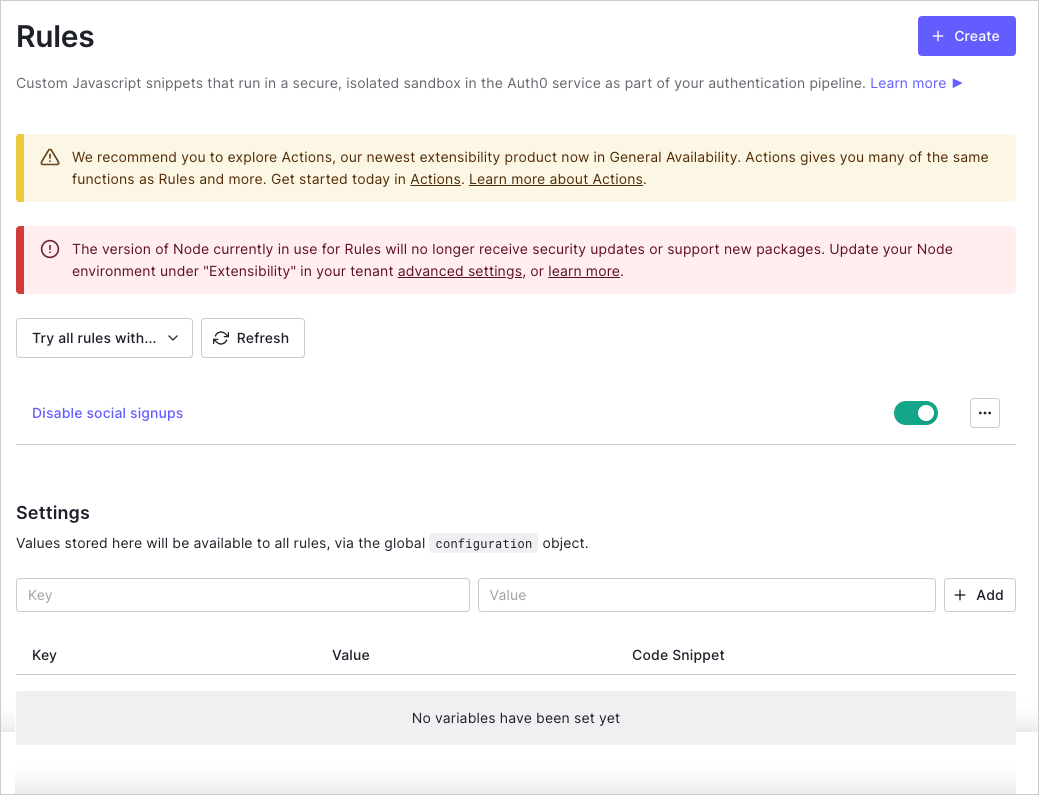 2. 変数キー/値ペアを入力し、**[+Add(追加)]** を選択します。
これで、入力した値がグローバル`configuration`オブジェクト経由ですべてのルールで利用できるようになり、**[Code Snippet(コードスニペット)]** 列の値を使用して参照できるようになりました。
## もっと詳しく
* [ルールを作成する](/docs/ja-jp/customize/rules/create-rules)
2. 変数キー/値ペアを入力し、**[+Add(追加)]** を選択します。
これで、入力した値がグローバル`configuration`オブジェクト経由ですべてのルールで利用できるようになり、**[Code Snippet(コードスニペット)]** 列の値を使用して参照できるようになりました。
## もっと詳しく
* [ルールを作成する](/docs/ja-jp/customize/rules/create-rules)