> ## Documentation Index
> Fetch the complete documentation index at: https://docs-dev-docs-event-stream-action-templates.mintlify.site/llms.txt
> Use this file to discover all available pages before exploring further.
# 保管ルールを設定する
> ルールでよく使用される値を保管するための、グローバルなconfigurationオブジェクトについて説明します。
RulesとHooksのサポート終了(EOL)日は**2026年11月18日** であり、**2023年10月16** 日の時点で作成された新しいテナントは使用できなくなります。Hooksが有効な既存のテナントは、サポート終了までHooksを利用できます。
今後はActionsに移行して、Auth0の機能を拡張することを強くお勧めします。Actionsを使用すると、豊富な情報やインラインドキュメント、パブリック`npm`パッケージにアクセスして、外部統合を使って全体的な拡張エクスペリエンスを強化することができます。Actionsの詳細については、「[Auth0 Actionsの仕組みを理解する](/docs/ja-jp/customize/actions/actions-overview)」をお読みください。
当社では、移行の参考資料として、[RulesからActionsへの移行](/docs/ja-jp/customize/actions/migrate/migrate-from-rules-to-actions)と[HooksからActionsへの移行](/docs/ja-jp/customize/actions/migrate/migrate-from-hooks-to-actions)に関するガイドを提供しています。また、専用の「[Actionsへの移行](https://auth0.com/extensibility/movetoactions)」ページでは、機能の比較や[Actionsのデモ](https://www.youtube.com/watch?v=UesFSY1klrI)、その他のリソースを掲載して、円滑な移行をサポートしています。
RulesとHooksの廃止の詳細については、当社のブログ記事「[RulesとHooksの提供終了について](https://auth0.com/blog/preparing-for-rules-and-hooks-end-of-life/)」をお読みください。
グローバル`configuration`オブジェクトは、URLなどの一般的に使用される値を保存するためにRule内で利用可能です。資格情報やAPIキーなどの機密情報は、`configuration`オブジェクトを通じて保存し、Ruleのコードには含めないようにするべきです。
## 構成値
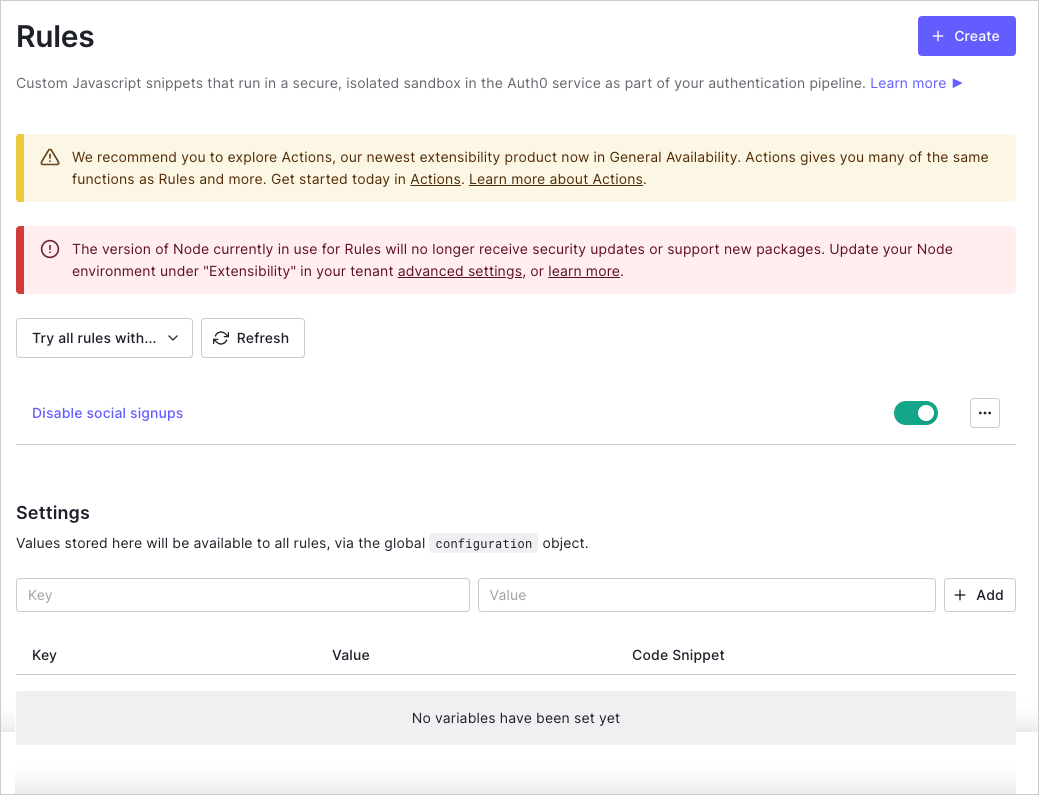
ダッシュボードの[[Rules Settings(Rule設定)]](https://manage.auth0.com/#/rules/)で、設定値を設定できます。
構成キーの値を編集・変更するには、既存の構成設定を削除し、新しい値に置き換えます。構成領域を表示するには、少なくとも1つのRuleが作成されている必要があります。作成されていない場合は、Rulesのデモが表示されます。
 ## configurationオブジェクトを使用する
設定した任意の設定値は、Rulesのコード内でキーを使って`configuration`オブジェクトを通じてアクセスできます。
```javascript lines theme={null}
var MY_API_KEY = configuration.MY_API_KEY;
```
次の例は、新しいユーザーがサインアップした際にSlackメッセージを送信するRuleです。[Slack Webhook](https://api.slack.com/incoming-webhooks)は`SLACK_HOOK_URL`キーで設定された`設定`値です。
```javascript lines theme={null}
function (user, context, callback) {
// short-circuit if the user signed up already or is using a Refresh Token
if (context.stats.loginsCount > 1 || context.protocol === 'oauth2-refresh-token') {
return callback(null, user, context);
}
// get your slack's hook url from: https://slack.com/services/10525858050
const SLACK_HOOK = configuration.SLACK_HOOK_URL;
const slack = require('slack-notify')(SLACK_HOOK);
const message = 'New User: ' + (user.name || user.email) + ' (' + user.email + ')';
const channel = '#some_channel';
slack.success({
text: message,
channel: channel
});
// don’t wait for the Slack API call to finish, return right away (the request will continue on the sandbox)`
callback(null, user, context);
}
```
## configurationオブジェクトを使用する
設定した任意の設定値は、Rulesのコード内でキーを使って`configuration`オブジェクトを通じてアクセスできます。
```javascript lines theme={null}
var MY_API_KEY = configuration.MY_API_KEY;
```
次の例は、新しいユーザーがサインアップした際にSlackメッセージを送信するRuleです。[Slack Webhook](https://api.slack.com/incoming-webhooks)は`SLACK_HOOK_URL`キーで設定された`設定`値です。
```javascript lines theme={null}
function (user, context, callback) {
// short-circuit if the user signed up already or is using a Refresh Token
if (context.stats.loginsCount > 1 || context.protocol === 'oauth2-refresh-token') {
return callback(null, user, context);
}
// get your slack's hook url from: https://slack.com/services/10525858050
const SLACK_HOOK = configuration.SLACK_HOOK_URL;
const slack = require('slack-notify')(SLACK_HOOK);
const message = 'New User: ' + (user.name || user.email) + ' (' + user.email + ')';
const channel = '#some_channel';
slack.success({
text: message,
channel: channel
});
// don’t wait for the Slack API call to finish, return right away (the request will continue on the sandbox)`
callback(null, user, context);
}
```