> ## Documentation Index
> Fetch the complete documentation index at: https://docs-dev-docs-event-stream-action-templates.mintlify.site/llms.txt
> Use this file to discover all available pages before exploring further.
# ログストリーミング
> ログストリーミングを使って、ログイベントをほぼリアルタイムでエクスポートする方法について説明します。
Auth0のログストリーミングサービスは、テナントログイベントをログイベントの分析サービスURLにエクスポートできるようにします。コンテンツ型とフォームを選んで、Auth0 Dashboardを使ってペイロードをプレビューすることができます。ログストリーミングを使用すると、パスワードの変更や新規登録などのイベントに対して、独自の業務ロジックで対処することができます。Auth0 Dashboardを使ってストリームを一時停止したり、設定を表示や更新したり、ストリームの正常性を確認したりすることができます。
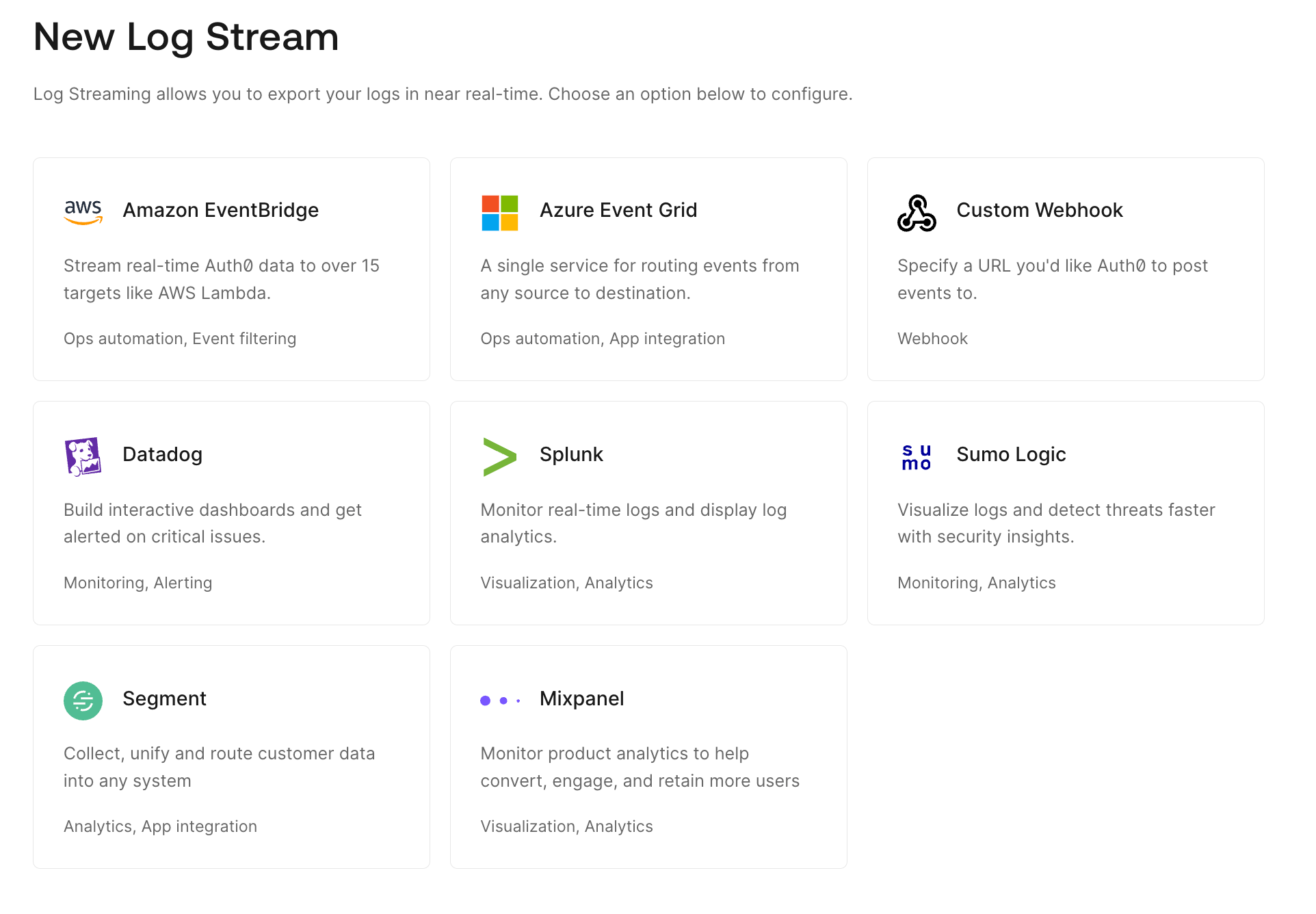
対応するサービスの1つを使って、Auth0 Dashboardで新しいログストリームを作成することができます。また、カスタムWebhookを使って、すでに使用しているサービスへのストリームを構成することもできます。
 ## 対応しているログストリーミングサービス
Auth0は以下を含む多種多様な[ログストリーミングサービス](https://marketplace.auth0.com/features/log-streaming)を[Auth0 Marketplace](https://marketplace.auth0.com)を介してサポートしています。
* [Amazon EventBridge](https://marketplace.auth0.com/integrations/amazon-log-streaming)
* [Azure Event Grid](https://marketplace.auth0.com/integrations/azure-log-streaming)
* [Elastic](https://marketplace.auth0.com/integrations/elastic-security)
* [Logz.io](https://marketplace.auth0.com/integrations/logz-io)
* [MDR ONE](https://marketplace.auth0.com/integrations/mdr-one)
* [Mixpanel](https://marketplace.auth0.com/integrations/mixpanel-log-streaming)
* [Oort](https://marketplace.auth0.com/integrations/oort)
* [Pangea](https://marketplace.auth0.com/integrations/pangea-log-streaming)
* [Panther](https://marketplace.auth0.com/integrations/panther-log-stream)
* [Perch Security](https://marketplace.auth0.com/integrations/perch-security-log-streaming)
* [Segment](https://marketplace.auth0.com/integrations/segment-log-streaming)
* [Slack](https://marketplace.auth0.com/integrations/slack-log-streaming)
* [Verosint](https://marketplace.auth0.com/integrations/verosint-log-stream)
* [Datadog](https://marketplace.auth0.com/integrations/datadog-log-streaming)(Auth0ではDatadogダッシュボードテンプレートも用意しています。詳細は、「[DatadogにAuth0 Dashboardテンプレートを使用する](/docs/ja-jp/customize/log-streams/datadog-dashboard-templates)」を参照してください。
* [Splunk](https://marketplace.auth0.com/integrations/splunk-log-streaming)(Auth0には、Auth0テナントからのデータを可視化するダッシュボードもあります。アプリではAuth0からの推奨集計を使用するか、それらを活用して独自の可視化を行うことができます。詳細は、「[Auth0 App for Splunkを使用する](/docs/ja-jp/customize/log-streams/splunk-dashboard)」を参照してください。)
* [Sumo Logic](https://marketplace.auth0.com/integrations/sumo-logic-log-streaming)(Auth0 App for Sumo Logicを使用すると、Auth0テナントからのデータを可視化するダッシュボードを作成することができます。ダッシュボートでは、テナントのログイントラフィックの正常性を監視することができます。アプリではAuth0からの推奨集計を使用するか、それらを活用して独自の可視化を行うことができます。詳細は、「[Auth0 App for Sumo Logicを使用する](/docs/ja-jp/customize/log-streams/sumo-logic-dashboard)」を参照してください。)
## 配信の試行
Auth0はストリーミングメカニズムを使って、イベントがシステムで発生するとサーバーに配信します。イベントは確実に、少なくとも一度は配信されます。
イベントが発生した際には以下を行います。
1. イベントを3回までサーバーへ配信しようとします。
2. サーバーへ3回とも配信できなかった場合には、ログストリームの **[Health(正常性)]** ビューにエラーが記録されます。
3. エラーが発生したイベントについて、問題が解決するまでこのプロセスを繰り返します。
サーバーへ連続で7日間配信できなかった場合には、自動的にストリームを一時停止します。サーバー側でこの問題を解決して、手動でストリームを再開させる必要があります。
## ログの保持
Auth0はイベントを30日間保持します。
Auth0が送信したログイベントをサーバーが受信しないという問題がある場合には、まずストリームを削除して、もう一度作成し、 **[Starting Cursor(開始位置)]** フィールドを30日の保持期間内で特定の日時に設定します。
## もっと詳しく
* [Webhookを使用してカスタムログストリームを作成する](/docs/ja-jp/customize/log-streams/custom-log-streams)
* [ログストリームの正常性を確認する](/docs/ja-jp/customize/log-streams/check-log-stream-health)
* [ログストリームフィルター](/docs/ja-jp/customize/log-streams/event-filters)
## 対応しているログストリーミングサービス
Auth0は以下を含む多種多様な[ログストリーミングサービス](https://marketplace.auth0.com/features/log-streaming)を[Auth0 Marketplace](https://marketplace.auth0.com)を介してサポートしています。
* [Amazon EventBridge](https://marketplace.auth0.com/integrations/amazon-log-streaming)
* [Azure Event Grid](https://marketplace.auth0.com/integrations/azure-log-streaming)
* [Elastic](https://marketplace.auth0.com/integrations/elastic-security)
* [Logz.io](https://marketplace.auth0.com/integrations/logz-io)
* [MDR ONE](https://marketplace.auth0.com/integrations/mdr-one)
* [Mixpanel](https://marketplace.auth0.com/integrations/mixpanel-log-streaming)
* [Oort](https://marketplace.auth0.com/integrations/oort)
* [Pangea](https://marketplace.auth0.com/integrations/pangea-log-streaming)
* [Panther](https://marketplace.auth0.com/integrations/panther-log-stream)
* [Perch Security](https://marketplace.auth0.com/integrations/perch-security-log-streaming)
* [Segment](https://marketplace.auth0.com/integrations/segment-log-streaming)
* [Slack](https://marketplace.auth0.com/integrations/slack-log-streaming)
* [Verosint](https://marketplace.auth0.com/integrations/verosint-log-stream)
* [Datadog](https://marketplace.auth0.com/integrations/datadog-log-streaming)(Auth0ではDatadogダッシュボードテンプレートも用意しています。詳細は、「[DatadogにAuth0 Dashboardテンプレートを使用する](/docs/ja-jp/customize/log-streams/datadog-dashboard-templates)」を参照してください。
* [Splunk](https://marketplace.auth0.com/integrations/splunk-log-streaming)(Auth0には、Auth0テナントからのデータを可視化するダッシュボードもあります。アプリではAuth0からの推奨集計を使用するか、それらを活用して独自の可視化を行うことができます。詳細は、「[Auth0 App for Splunkを使用する](/docs/ja-jp/customize/log-streams/splunk-dashboard)」を参照してください。)
* [Sumo Logic](https://marketplace.auth0.com/integrations/sumo-logic-log-streaming)(Auth0 App for Sumo Logicを使用すると、Auth0テナントからのデータを可視化するダッシュボードを作成することができます。ダッシュボートでは、テナントのログイントラフィックの正常性を監視することができます。アプリではAuth0からの推奨集計を使用するか、それらを活用して独自の可視化を行うことができます。詳細は、「[Auth0 App for Sumo Logicを使用する](/docs/ja-jp/customize/log-streams/sumo-logic-dashboard)」を参照してください。)
## 配信の試行
Auth0はストリーミングメカニズムを使って、イベントがシステムで発生するとサーバーに配信します。イベントは確実に、少なくとも一度は配信されます。
イベントが発生した際には以下を行います。
1. イベントを3回までサーバーへ配信しようとします。
2. サーバーへ3回とも配信できなかった場合には、ログストリームの **[Health(正常性)]** ビューにエラーが記録されます。
3. エラーが発生したイベントについて、問題が解決するまでこのプロセスを繰り返します。
サーバーへ連続で7日間配信できなかった場合には、自動的にストリームを一時停止します。サーバー側でこの問題を解決して、手動でストリームを再開させる必要があります。
## ログの保持
Auth0はイベントを30日間保持します。
Auth0が送信したログイベントをサーバーが受信しないという問題がある場合には、まずストリームを削除して、もう一度作成し、 **[Starting Cursor(開始位置)]** フィールドを30日の保持期間内で特定の日時に設定します。
## もっと詳しく
* [Webhookを使用してカスタムログストリームを作成する](/docs/ja-jp/customize/log-streams/custom-log-streams)
* [ログストリームの正常性を確認する](/docs/ja-jp/customize/log-streams/check-log-stream-health)
* [ログストリームフィルター](/docs/ja-jp/customize/log-streams/event-filters)