> ## Documentation Index
> Fetch the complete documentation index at: https://docs-dev-docs-event-stream-action-templates.mintlify.site/llms.txt
> Use this file to discover all available pages before exploring further.
# Auth0でGoogle Cloud Endpointsをセキュリティ保護する
> Google Cloud Endpoints APIをAuth0でセキュリティ保護する方法
export const AuthCodeGroup = ({children, dropdown}) => {
const [processedChildren, setProcessedChildren] = useState(children);
useEffect(() => {
let unsubscribe = null;
function init() {
unsubscribe = window.autorun(() => {
const processChildren = node => {
if (typeof node === "string") {
let processedNode = node;
for (const [key, value] of window.rootStore.variableStore.values.entries()) {
const escapedKey = key.replaceAll(/[.*+?^${}()|[\]\\]/g, (String.raw)`\$&`);
processedNode = processedNode.replaceAll(new RegExp(escapedKey, "g"), value);
}
return processedNode;
} else if (Array.isArray(node)) {
return node.map(processChildren);
} else if (node && node.props && node.props.children) {
return {
...node,
props: {
...node.props,
children: processChildren(node.props.children)
}
};
}
return node;
};
setProcessedChildren(processChildren(children));
});
}
if (window.rootStore) {
init();
} else {
window.addEventListener("adu:storeReady", init);
}
return () => {
window.removeEventListener("adu:storeReady", init);
unsubscribe?.();
};
}, [children]);
return {processedChildren};
};
export const AuthCodeBlock = ({filename, icon, language, highlight, children}) => {
const [displayText, setDisplayText] = useState(children);
const [copyText, setCopyText] = useState(children);
const wrapperRef = React.useRef(null);
useEffect(() => {
let unsubscribe = null;
function init() {
if (!window.autorun || !window.rootStore) {
return;
}
unsubscribe = window.autorun(() => {
let processedChildrenForDisplay = children;
let processedChildrenForCopy = children;
for (const [key, value] of window.rootStore.variableStore.values.entries()) {
const escapedKey = key.replaceAll(/[.*+?^${}()|[\]\\]/g, (String.raw)`\$&`);
let displayValue = value;
if (key === "{yourClientSecret}" && value !== "{yourClientSecret}") {
displayValue = value.substring(0, 3) + "*****MASKED*****";
}
processedChildrenForDisplay = processedChildrenForDisplay.replaceAll(new RegExp(escapedKey, "g"), displayValue);
processedChildrenForCopy = processedChildrenForCopy.replaceAll(new RegExp(escapedKey, "g"), value);
}
setDisplayText(processedChildrenForDisplay);
setCopyText(processedChildrenForCopy);
});
}
if (window.rootStore) {
init();
} else {
window.addEventListener("adu:storeReady", init);
}
return () => {
window.removeEventListener("adu:storeReady", init);
unsubscribe?.();
};
}, [children]);
useEffect(() => {
if (!wrapperRef.current) return;
const originalWriteText = navigator.clipboard.writeText.bind(navigator.clipboard);
let isOverriding = false;
const handleClick = e => {
const button = e.target.closest('[data-testid="copy-code-button"]');
if (!button || !wrapperRef.current.contains(button)) return;
isOverriding = true;
navigator.clipboard.writeText = text => {
if (isOverriding) {
isOverriding = false;
navigator.clipboard.writeText = originalWriteText;
return originalWriteText(copyText);
}
return originalWriteText(text);
};
setTimeout(() => {
if (isOverriding) {
isOverriding = false;
navigator.clipboard.writeText = originalWriteText;
}
}, 100);
};
const wrapper = wrapperRef.current;
wrapper.addEventListener('click', handleClick, true);
return () => {
wrapper.removeEventListener('click', handleClick, true);
if (navigator.clipboard.writeText !== originalWriteText) {
navigator.clipboard.writeText = originalWriteText;
}
};
}, [copyText]);
return
{displayText}
;
};
[Google Cloud Endpoints(GCE)](https://cloud.google.com/endpoints/)は、APIの作成、維持、およびセキュリティ保護などの機能を提供するAPI管理システムです。GCEは[OpenAPI](https://www.openapis.org/)を使用して、APIのエンドポイント、入出力、エラー、およびセキュリティ記述を定義します。
OpenAPI仕様の詳細については、GitHubの[OpenAPI Specification(OpenAPIの仕様)](https://github.com/OAI/OpenAPI-Specification)リポジトリを参照してください。
このチュートリアルでは、Auth0を使用してGoogle Cloud Endpointsをセキュリティ保護する方法を説明します。
## 前提条件
開始する前に、GCE APIをデプロイしておく必要があります。まだAPIを作成していない場合は、Googleドキュメントにある「[Cloud Endpointsのクイックスタート](https://cloud.google.com/endpoints/docs/quickstart-endpoints)」を読み、作業を完了させます。
このクイックスタートでは、3文字の[IATAコード](https://en.wikipedia.org/wiki/IATA_airport_code)から空港名を返す`/airportName`という単一のエンドポイントを持つ簡単なGCE APIを作成する手順を説明しています。
```bash cURL lines theme={null}
curl --request GET \
--url 'https://%7ByourGceProject%7D.appspot.com/airportName?iataCode=SFO'
```
```csharp C# lines theme={null}
var client = new RestClient("https://%7ByourGceProject%7D.appspot.com/airportName?iataCode=SFO");
var request = new RestRequest(Method.GET);
IRestResponse response = client.Execute(request);
```
```go Go lines theme={null}
package main
import (
"fmt"
"net/http"
"io/ioutil"
)
func main() {
url := "https://%7ByourGceProject%7D.appspot.com/airportName?iataCode=SFO"
req, _ := http.NewRequest("GET", url, nil)
res, _ := http.DefaultClient.Do(req)
defer res.Body.Close()
body, _ := ioutil.ReadAll(res.Body)
fmt.Println(res)
fmt.Println(string(body))
}
```
```java Java lines theme={null}
HttpResponse response = Unirest.get("https://%7ByourGceProject%7D.appspot.com/airportName?iataCode=SFO")
.asString();
```
```javascript Node.JS lines theme={null}
var axios = require("axios").default;
var options = {
method: 'GET',
url: 'https://%7ByourGceProject%7D.appspot.com/airportName',
params: {iataCode: 'SFO'}
};
axios.request(options).then(function (response) {
console.log(response.data);
}).catch(function (error) {
console.error(error);
});
```
```objc Obj-C lines theme={null}
#import
NSMutableURLRequest *request = [NSMutableURLRequest requestWithURL:[NSURL URLWithString:@"https://%7ByourGceProject%7D.appspot.com/airportName?iataCode=SFO"]
cachePolicy:NSURLRequestUseProtocolCachePolicy
timeoutInterval:10.0];
[request setHTTPMethod:@"GET"];
NSURLSession *session = [NSURLSession sharedSession];
NSURLSessionDataTask *dataTask = [session dataTaskWithRequest:request
completionHandler:^(NSData *data, NSURLResponse *response, NSError *error) {
if (error) {
NSLog(@"%@", error);
} else {
NSHTTPURLResponse *httpResponse = (NSHTTPURLResponse *) response;
NSLog(@"%@", httpResponse);
}
}];
[dataTask resume];
```
```php PHP lines theme={null}
$curl = curl_init();
curl_setopt_array($curl, [
CURLOPT_URL => "https://%7ByourGceProject%7D.appspot.com/airportName?iataCode=SFO",
CURLOPT_RETURNTRANSFER => true,
CURLOPT_ENCODING => "",
CURLOPT_MAXREDIRS => 10,
CURLOPT_TIMEOUT => 30,
CURLOPT_HTTP_VERSION => CURL_HTTP_VERSION_1_1,
CURLOPT_CUSTOMREQUEST => "GET",
]);
$response = curl_exec($curl);
$err = curl_error($curl);
curl_close($curl);
if ($err) {
echo "cURL Error #:" . $err;
} else {
echo $response;
}
```
```python Python lines theme={null}
import http.client
conn = http.client.HTTPSConnection("")
conn.request("GET", "%7ByourGceProject%7D.appspot.com/airportName?iataCode=SFO")
res = conn.getresponse()
data = res.read()
print(data.decode("utf-8"))
```
```ruby Ruby lines theme={null}
require 'uri'
require 'net/http'
require 'openssl'
url = URI("https://%7ByourGceProject%7D.appspot.com/airportName?iataCode=SFO")
http = Net::HTTP.new(url.host, url.port)
http.use_ssl = true
http.verify_mode = OpenSSL::SSL::VERIFY_NONE
request = Net::HTTP::Get.new(url)
response = http.request(request)
puts response.read_body
```
```swift Swift lines theme={null}
import Foundation
let request = NSMutableURLRequest(url: NSURL(string: "https://%7ByourGceProject%7D.appspot.com/airportName?iataCode=SFO")! as URL,
cachePolicy: .useProtocolCachePolicy,
timeoutInterval: 10.0)
request.httpMethod = "GET"
let session = URLSession.shared
let dataTask = session.dataTask(with: request as URLRequest, completionHandler: { (data, response, error) -> Void in
if (error != nil) {
print(error)
} else {
let httpResponse = response as? HTTPURLResponse
print(httpResponse)
}
})
dataTask.resume()
```
## Auth0でAPIを定義する
[[Auth0 Dashboard] > [Applications(アプリケーション)] > [APIs]](https://manage.auth0.com/#/apis)に進み、新しいAPIを作成します。
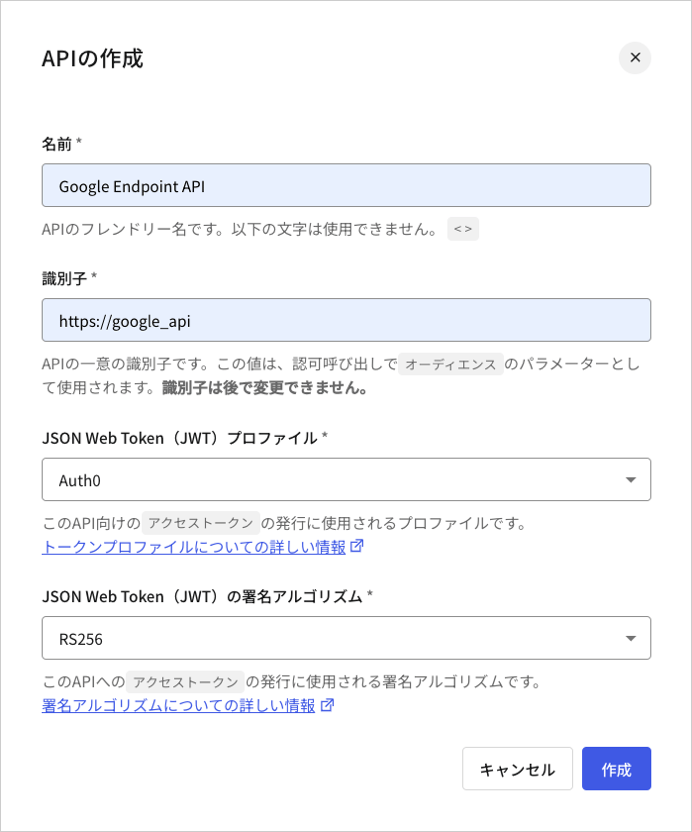 次のステップで使用するために、(上のスクリーンショットにある`http://google_api`) **[API Audience(APIオーディエンス)]** のIDをメモしておいてください。
## API構成を更新する
次に、GCE API用のOpenAPI構成ファイルを更新します。クイックスタート中に作成されたサンプルAPIでは、このファイルは`openapi.yaml`となっています。
### セキュリティ定義を追加する
この構成ファイルを開き、新しく`securityDefinitions`セクションを追加します。このセクションに、以下のフィールドを持つ新しい定義(`auth0_jwt`)を追加します。
| フィールド | 説明 |
| -------------------- | ------------------------------------------------------------------------------------------------ |
| `authorizationUrl` | 認可URLで、`"https://{yourDomain}/authorize"`に設定する必要があります。 |
| `flow` | OAuth2のセキュリティスキームで使用されるフローです。有効な値は`"implicit"`、`"password"`、`"application"`、`"accessCode"`です。 |
| `type` | セキュリティスキームの種類です。有効な値は`"basic"`、`"apiKey"`、`"oauth2"`です。 |
| `x-google-issuer` | 資格情報の発行者で、`"https://{yourDomain}/"`に設定する必要があります。 |
| `x-google-jwks_uri` | JSON Web Token(JWT)署名の検証に使用される公開鍵のURIです。これは`"https://{yourDomain}/.well-known/jwks.json"`に指定します。 |
| `x-google-audiences` | APIの識別子です。この値が、Auth0 DashboardでAPIに定義したものと一致することを確認してください。 |
export const codeExample1 = `securityDefinitions:
auth0_jwt:
authorizationUrl: "https://{yourDomain}/authorize"
flow: "implicit"
type: "oauth2"
x-google-issuer: "https://{yourDomain}/"
x-google-jwks_uri: "https://{yourDomain}/.well-known/jwks.json"
x-google-audiences: "{yourApiIdentifier}"`;
### エンドポイントを更新する
次に、前のステップで作成した`securityDefinition`を使用して`security`フィールドを追加し、エンドポイントを更新します。
```yaml lines theme={null}
paths:
"/airportName":
get:
description: "Get the airport name for a given IATA code."
operationId: "airportName"
parameters:
-
name: iataCode
in: query
required: true
type: string
responses:
200:
description: "Success."
schema:
type: string
400:
description: "The IATA code is invalid or missing."
security:
- auth0_jwt: []
```
上の例では、`security`フィールドがGCEプロキシに、`/airportName`パスが`auth0-jwt`でセキュリティ保護されていることが期待されていることを伝えています。
OpenAPIの構成が更新されると、以下のようになります。
export const codeExample2 = `---
swagger: "2.0"
info:
title: "Airport Codes"
description: "Get the name of an airport from its three-letter IATA code."
version: "1.0.0"
host: "{yourGceProject}.appspot.com"
schemes:
- "https"
paths:
"/airportName":
get:
description: "Get the airport name for a given IATA code."
operationId: "airportName"
parameters:
-
name: iataCode
in: query
required: true
type: string
responses:
200:
description: "Success."
schema:
type: string
400:
description: "The IATA code is invalid or missing."
security:
- auth0_jwt: []
securityDefinitions:
auth0_jwt:
authorizationUrl: "https://{yourDomain}/authorize"
flow: "implicit"
type: "oauth2"
x-google-issuer: "https://{yourDomain}/"
x-google-jwks_uri: "https://{yourDomain}/.well-known/jwks.json"
x-google-audiences: "{yourApiIdentifier}"`;
### APIを再デプロイする
次に、GCE APIを再デプロイして、構成変更を適用します。[Cloud Endpointsのクイックスタート](https://cloud.google.com/endpoints/docs/quickstart-endpoints)に従った場合は、GoogleのCloud Shellに以下を入力することで再デプロイすることができます。
```bash lines theme={null}
cd endpoints-quickstart/scripts
./deploy_api.sh
```
## APIをテストする
再デプロイが完了したら、セキュリティなしでAPIを再度呼び出します。
```bash cURL lines theme={null}
curl --request GET \
--url 'https://%7ByourGceProject%7D.appspot.com/airportName?iataCode=SFO'
```
```csharp C# lines theme={null}
var client = new RestClient("https://%7ByourGceProject%7D.appspot.com/airportName?iataCode=SFO");
var request = new RestRequest(Method.GET);
IRestResponse response = client.Execute(request);
```
```go Go lines theme={null}
package main
import (
"fmt"
"net/http"
"io/ioutil"
)
func main() {
url := "https://%7ByourGceProject%7D.appspot.com/airportName?iataCode=SFO"
req, _ := http.NewRequest("GET", url, nil)
res, _ := http.DefaultClient.Do(req)
defer res.Body.Close()
body, _ := ioutil.ReadAll(res.Body)
fmt.Println(res)
fmt.Println(string(body))
}
```
```java Java lines theme={null}
HttpResponse response = Unirest.get("https://%7ByourGceProject%7D.appspot.com/airportName?iataCode=SFO")
.asString();
```
```javascript Node.JS lines theme={null}
var axios = require("axios").default;
var options = {
method: 'GET',
url: 'https://%7ByourGceProject%7D.appspot.com/airportName',
params: {iataCode: 'SFO'}
};
axios.request(options).then(function (response) {
console.log(response.data);
}).catch(function (error) {
console.error(error);
});
```
```objc Obj-C lines theme={null}
#import
NSMutableURLRequest *request = [NSMutableURLRequest requestWithURL:[NSURL URLWithString:@"https://%7ByourGceProject%7D.appspot.com/airportName?iataCode=SFO"]
cachePolicy:NSURLRequestUseProtocolCachePolicy
timeoutInterval:10.0];
[request setHTTPMethod:@"GET"];
NSURLSession *session = [NSURLSession sharedSession];
NSURLSessionDataTask *dataTask = [session dataTaskWithRequest:request
completionHandler:^(NSData *data, NSURLResponse *response, NSError *error) {
if (error) {
NSLog(@"%@", error);
} else {
NSHTTPURLResponse *httpResponse = (NSHTTPURLResponse *) response;
NSLog(@"%@", httpResponse);
}
}];
[dataTask resume];
```
```php PHP lines theme={null}
$curl = curl_init();
curl_setopt_array($curl, [
CURLOPT_URL => "https://%7ByourGceProject%7D.appspot.com/airportName?iataCode=SFO",
CURLOPT_RETURNTRANSFER => true,
CURLOPT_ENCODING => "",
CURLOPT_MAXREDIRS => 10,
CURLOPT_TIMEOUT => 30,
CURLOPT_HTTP_VERSION => CURL_HTTP_VERSION_1_1,
CURLOPT_CUSTOMREQUEST => "GET",
]);
$response = curl_exec($curl);
$err = curl_error($curl);
curl_close($curl);
if ($err) {
echo "cURL Error #:" . $err;
} else {
echo $response;
}
```
```python Python lines theme={null}
import http.client
conn = http.client.HTTPSConnection("")
conn.request("GET", "%7ByourGceProject%7D.appspot.com/airportName?iataCode=SFO")
res = conn.getresponse()
data = res.read()
print(data.decode("utf-8"))
```
```ruby Ruby lines theme={null}
require 'uri'
require 'net/http'
require 'openssl'
url = URI("https://%7ByourGceProject%7D.appspot.com/airportName?iataCode=SFO")
http = Net::HTTP.new(url.host, url.port)
http.use_ssl = true
http.verify_mode = OpenSSL::SSL::VERIFY_NONE
request = Net::HTTP::Get.new(url)
response = http.request(request)
puts response.read_body
```
```swift Swift lines theme={null}
import Foundation
let request = NSMutableURLRequest(url: NSURL(string: "https://%7ByourGceProject%7D.appspot.com/airportName?iataCode=SFO")! as URL,
cachePolicy: .useProtocolCachePolicy,
timeoutInterval: 10.0)
request.httpMethod = "GET"
let session = URLSession.shared
let dataTask = session.dataTask(with: request as URLRequest, completionHandler: { (data, response, error) -> Void in
if (error != nil) {
print(error)
} else {
let httpResponse = response as? HTTPURLResponse
print(httpResponse)
}
})
dataTask.resume()
```
以下のような応答が返されます。
```json lines theme={null}
{
"code": 16,
"message": "JWT validation failed: Missing or invalid credentials",
"details": [
{
"@type": "type.googleapis.com/google.rpc.DebugInfo",
"stackEntries": [],
"detail": "auth"
}
]
}
```
期待どおりの結果です。
次に、[Auth0 Dashboard](https://manage.auth0.com/#/apis)のGoogle Endpoints API定義の **[Test(テスト)]** ページに移動し、[Response(応答)]の下にあるアクセストークンをコピーします。
Authorization Header(認可ヘッダー)に`Bearer {ACCESS_TOKEN}`を設定し、APIに対して`GET`要求を実行することで、認可されたアクセスを取得します。
```bash cURL lines theme={null}
curl --request GET \
--url 'https://%7ByourGceProject%7D.appspot.com/airportName?iataCode=SFO' \
--header 'authorization: Bearer {accessToken}'
```
```csharp C# lines theme={null}
var client = new RestClient("https://%7ByourGceProject%7D.appspot.com/airportName?iataCode=SFO");
var request = new RestRequest(Method.GET);
request.AddHeader("authorization", "Bearer {accessToken}");
IRestResponse response = client.Execute(request);
```
```go Go lines theme={null}
package main
import (
"fmt"
"net/http"
"io/ioutil"
)
func main() {
url := "https://%7ByourGceProject%7D.appspot.com/airportName?iataCode=SFO"
req, _ := http.NewRequest("GET", url, nil)
req.Header.Add("authorization", "Bearer {accessToken}")
res, _ := http.DefaultClient.Do(req)
defer res.Body.Close()
body, _ := ioutil.ReadAll(res.Body)
fmt.Println(res)
fmt.Println(string(body))
}
```
```java Java lines theme={null}
HttpResponse response = Unirest.get("https://%7ByourGceProject%7D.appspot.com/airportName?iataCode=SFO")
.header("authorization", "Bearer {accessToken}")
.asString();
```
```javascript Node.JS lines theme={null}
var axios = require("axios").default;
var options = {
method: 'GET',
url: 'https://%7ByourGceProject%7D.appspot.com/airportName',
params: {iataCode: 'SFO'},
headers: {authorization: 'Bearer {accessToken}'}
};
axios.request(options).then(function (response) {
console.log(response.data);
}).catch(function (error) {
console.error(error);
});
```
```objc Obj-C lines theme={null}
#import
NSDictionary *headers = @{ @"authorization": @"Bearer {accessToken}" };
NSMutableURLRequest *request = [NSMutableURLRequest requestWithURL:[NSURL URLWithString:@"https://%7ByourGceProject%7D.appspot.com/airportName?iataCode=SFO"]
cachePolicy:NSURLRequestUseProtocolCachePolicy
timeoutInterval:10.0];
[request setHTTPMethod:@"GET"];
[request setAllHTTPHeaderFields:headers];
NSURLSession *session = [NSURLSession sharedSession];
NSURLSessionDataTask *dataTask = [session dataTaskWithRequest:request
completionHandler:^(NSData *data, NSURLResponse *response, NSError *error) {
if (error) {
NSLog(@"%@", error);
} else {
NSHTTPURLResponse *httpResponse = (NSHTTPURLResponse *) response;
NSLog(@"%@", httpResponse);
}
}];
[dataTask resume];
```
```php PHP lines theme={null}
$curl = curl_init();
curl_setopt_array($curl, [
CURLOPT_URL => "https://%7ByourGceProject%7D.appspot.com/airportName?iataCode=SFO",
CURLOPT_RETURNTRANSFER => true,
CURLOPT_ENCODING => "",
CURLOPT_MAXREDIRS => 10,
CURLOPT_TIMEOUT => 30,
CURLOPT_HTTP_VERSION => CURL_HTTP_VERSION_1_1,
CURLOPT_CUSTOMREQUEST => "GET",
CURLOPT_HTTPHEADER => [
"authorization: Bearer {accessToken}"
],
]);
$response = curl_exec($curl);
$err = curl_error($curl);
curl_close($curl);
if ($err) {
echo "cURL Error #:" . $err;
} else {
echo $response;
}
```
```python Python lines theme={null}
import http.client
conn = http.client.HTTPSConnection("")
headers = { 'authorization': "Bearer {accessToken}" }
conn.request("GET", "%7ByourGceProject%7D.appspot.com/airportName?iataCode=SFO", headers=headers)
res = conn.getresponse()
data = res.read()
print(data.decode("utf-8"))
```
```ruby Ruby lines theme={null}
require 'uri'
require 'net/http'
require 'openssl'
url = URI("https://%7ByourGceProject%7D.appspot.com/airportName?iataCode=SFO")
http = Net::HTTP.new(url.host, url.port)
http.use_ssl = true
http.verify_mode = OpenSSL::SSL::VERIFY_NONE
request = Net::HTTP::Get.new(url)
request["authorization"] = 'Bearer {accessToken}'
response = http.request(request)
puts response.read_body
```
```swift Swift lines theme={null}
import Foundation
let headers = ["authorization": "Bearer {accessToken}"]
let request = NSMutableURLRequest(url: NSURL(string: "https://%7ByourGceProject%7D.appspot.com/airportName?iataCode=SFO")! as URL,
cachePolicy: .useProtocolCachePolicy,
timeoutInterval: 10.0)
request.httpMethod = "GET"
request.allHTTPHeaderFields = headers
let session = URLSession.shared
let dataTask = session.dataTask(with: request as URLRequest, completionHandler: { (data, response, error) -> Void in
if (error != nil) {
print(error)
} else {
let httpResponse = response as? HTTPURLResponse
print(httpResponse)
}
})
dataTask.resume()
```
これで作業完了です。
次のステップで使用するために、(上のスクリーンショットにある`http://google_api`) **[API Audience(APIオーディエンス)]** のIDをメモしておいてください。
## API構成を更新する
次に、GCE API用のOpenAPI構成ファイルを更新します。クイックスタート中に作成されたサンプルAPIでは、このファイルは`openapi.yaml`となっています。
### セキュリティ定義を追加する
この構成ファイルを開き、新しく`securityDefinitions`セクションを追加します。このセクションに、以下のフィールドを持つ新しい定義(`auth0_jwt`)を追加します。
| フィールド | 説明 |
| -------------------- | ------------------------------------------------------------------------------------------------ |
| `authorizationUrl` | 認可URLで、`"https://{yourDomain}/authorize"`に設定する必要があります。 |
| `flow` | OAuth2のセキュリティスキームで使用されるフローです。有効な値は`"implicit"`、`"password"`、`"application"`、`"accessCode"`です。 |
| `type` | セキュリティスキームの種類です。有効な値は`"basic"`、`"apiKey"`、`"oauth2"`です。 |
| `x-google-issuer` | 資格情報の発行者で、`"https://{yourDomain}/"`に設定する必要があります。 |
| `x-google-jwks_uri` | JSON Web Token(JWT)署名の検証に使用される公開鍵のURIです。これは`"https://{yourDomain}/.well-known/jwks.json"`に指定します。 |
| `x-google-audiences` | APIの識別子です。この値が、Auth0 DashboardでAPIに定義したものと一致することを確認してください。 |
export const codeExample1 = `securityDefinitions:
auth0_jwt:
authorizationUrl: "https://{yourDomain}/authorize"
flow: "implicit"
type: "oauth2"
x-google-issuer: "https://{yourDomain}/"
x-google-jwks_uri: "https://{yourDomain}/.well-known/jwks.json"
x-google-audiences: "{yourApiIdentifier}"`;
### エンドポイントを更新する
次に、前のステップで作成した`securityDefinition`を使用して`security`フィールドを追加し、エンドポイントを更新します。
```yaml lines theme={null}
paths:
"/airportName":
get:
description: "Get the airport name for a given IATA code."
operationId: "airportName"
parameters:
-
name: iataCode
in: query
required: true
type: string
responses:
200:
description: "Success."
schema:
type: string
400:
description: "The IATA code is invalid or missing."
security:
- auth0_jwt: []
```
上の例では、`security`フィールドがGCEプロキシに、`/airportName`パスが`auth0-jwt`でセキュリティ保護されていることが期待されていることを伝えています。
OpenAPIの構成が更新されると、以下のようになります。
export const codeExample2 = `---
swagger: "2.0"
info:
title: "Airport Codes"
description: "Get the name of an airport from its three-letter IATA code."
version: "1.0.0"
host: "{yourGceProject}.appspot.com"
schemes:
- "https"
paths:
"/airportName":
get:
description: "Get the airport name for a given IATA code."
operationId: "airportName"
parameters:
-
name: iataCode
in: query
required: true
type: string
responses:
200:
description: "Success."
schema:
type: string
400:
description: "The IATA code is invalid or missing."
security:
- auth0_jwt: []
securityDefinitions:
auth0_jwt:
authorizationUrl: "https://{yourDomain}/authorize"
flow: "implicit"
type: "oauth2"
x-google-issuer: "https://{yourDomain}/"
x-google-jwks_uri: "https://{yourDomain}/.well-known/jwks.json"
x-google-audiences: "{yourApiIdentifier}"`;
### APIを再デプロイする
次に、GCE APIを再デプロイして、構成変更を適用します。[Cloud Endpointsのクイックスタート](https://cloud.google.com/endpoints/docs/quickstart-endpoints)に従った場合は、GoogleのCloud Shellに以下を入力することで再デプロイすることができます。
```bash lines theme={null}
cd endpoints-quickstart/scripts
./deploy_api.sh
```
## APIをテストする
再デプロイが完了したら、セキュリティなしでAPIを再度呼び出します。
```bash cURL lines theme={null}
curl --request GET \
--url 'https://%7ByourGceProject%7D.appspot.com/airportName?iataCode=SFO'
```
```csharp C# lines theme={null}
var client = new RestClient("https://%7ByourGceProject%7D.appspot.com/airportName?iataCode=SFO");
var request = new RestRequest(Method.GET);
IRestResponse response = client.Execute(request);
```
```go Go lines theme={null}
package main
import (
"fmt"
"net/http"
"io/ioutil"
)
func main() {
url := "https://%7ByourGceProject%7D.appspot.com/airportName?iataCode=SFO"
req, _ := http.NewRequest("GET", url, nil)
res, _ := http.DefaultClient.Do(req)
defer res.Body.Close()
body, _ := ioutil.ReadAll(res.Body)
fmt.Println(res)
fmt.Println(string(body))
}
```
```java Java lines theme={null}
HttpResponse response = Unirest.get("https://%7ByourGceProject%7D.appspot.com/airportName?iataCode=SFO")
.asString();
```
```javascript Node.JS lines theme={null}
var axios = require("axios").default;
var options = {
method: 'GET',
url: 'https://%7ByourGceProject%7D.appspot.com/airportName',
params: {iataCode: 'SFO'}
};
axios.request(options).then(function (response) {
console.log(response.data);
}).catch(function (error) {
console.error(error);
});
```
```objc Obj-C lines theme={null}
#import
NSMutableURLRequest *request = [NSMutableURLRequest requestWithURL:[NSURL URLWithString:@"https://%7ByourGceProject%7D.appspot.com/airportName?iataCode=SFO"]
cachePolicy:NSURLRequestUseProtocolCachePolicy
timeoutInterval:10.0];
[request setHTTPMethod:@"GET"];
NSURLSession *session = [NSURLSession sharedSession];
NSURLSessionDataTask *dataTask = [session dataTaskWithRequest:request
completionHandler:^(NSData *data, NSURLResponse *response, NSError *error) {
if (error) {
NSLog(@"%@", error);
} else {
NSHTTPURLResponse *httpResponse = (NSHTTPURLResponse *) response;
NSLog(@"%@", httpResponse);
}
}];
[dataTask resume];
```
```php PHP lines theme={null}
$curl = curl_init();
curl_setopt_array($curl, [
CURLOPT_URL => "https://%7ByourGceProject%7D.appspot.com/airportName?iataCode=SFO",
CURLOPT_RETURNTRANSFER => true,
CURLOPT_ENCODING => "",
CURLOPT_MAXREDIRS => 10,
CURLOPT_TIMEOUT => 30,
CURLOPT_HTTP_VERSION => CURL_HTTP_VERSION_1_1,
CURLOPT_CUSTOMREQUEST => "GET",
]);
$response = curl_exec($curl);
$err = curl_error($curl);
curl_close($curl);
if ($err) {
echo "cURL Error #:" . $err;
} else {
echo $response;
}
```
```python Python lines theme={null}
import http.client
conn = http.client.HTTPSConnection("")
conn.request("GET", "%7ByourGceProject%7D.appspot.com/airportName?iataCode=SFO")
res = conn.getresponse()
data = res.read()
print(data.decode("utf-8"))
```
```ruby Ruby lines theme={null}
require 'uri'
require 'net/http'
require 'openssl'
url = URI("https://%7ByourGceProject%7D.appspot.com/airportName?iataCode=SFO")
http = Net::HTTP.new(url.host, url.port)
http.use_ssl = true
http.verify_mode = OpenSSL::SSL::VERIFY_NONE
request = Net::HTTP::Get.new(url)
response = http.request(request)
puts response.read_body
```
```swift Swift lines theme={null}
import Foundation
let request = NSMutableURLRequest(url: NSURL(string: "https://%7ByourGceProject%7D.appspot.com/airportName?iataCode=SFO")! as URL,
cachePolicy: .useProtocolCachePolicy,
timeoutInterval: 10.0)
request.httpMethod = "GET"
let session = URLSession.shared
let dataTask = session.dataTask(with: request as URLRequest, completionHandler: { (data, response, error) -> Void in
if (error != nil) {
print(error)
} else {
let httpResponse = response as? HTTPURLResponse
print(httpResponse)
}
})
dataTask.resume()
```
以下のような応答が返されます。
```json lines theme={null}
{
"code": 16,
"message": "JWT validation failed: Missing or invalid credentials",
"details": [
{
"@type": "type.googleapis.com/google.rpc.DebugInfo",
"stackEntries": [],
"detail": "auth"
}
]
}
```
期待どおりの結果です。
次に、[Auth0 Dashboard](https://manage.auth0.com/#/apis)のGoogle Endpoints API定義の **[Test(テスト)]** ページに移動し、[Response(応答)]の下にあるアクセストークンをコピーします。
Authorization Header(認可ヘッダー)に`Bearer {ACCESS_TOKEN}`を設定し、APIに対して`GET`要求を実行することで、認可されたアクセスを取得します。
```bash cURL lines theme={null}
curl --request GET \
--url 'https://%7ByourGceProject%7D.appspot.com/airportName?iataCode=SFO' \
--header 'authorization: Bearer {accessToken}'
```
```csharp C# lines theme={null}
var client = new RestClient("https://%7ByourGceProject%7D.appspot.com/airportName?iataCode=SFO");
var request = new RestRequest(Method.GET);
request.AddHeader("authorization", "Bearer {accessToken}");
IRestResponse response = client.Execute(request);
```
```go Go lines theme={null}
package main
import (
"fmt"
"net/http"
"io/ioutil"
)
func main() {
url := "https://%7ByourGceProject%7D.appspot.com/airportName?iataCode=SFO"
req, _ := http.NewRequest("GET", url, nil)
req.Header.Add("authorization", "Bearer {accessToken}")
res, _ := http.DefaultClient.Do(req)
defer res.Body.Close()
body, _ := ioutil.ReadAll(res.Body)
fmt.Println(res)
fmt.Println(string(body))
}
```
```java Java lines theme={null}
HttpResponse response = Unirest.get("https://%7ByourGceProject%7D.appspot.com/airportName?iataCode=SFO")
.header("authorization", "Bearer {accessToken}")
.asString();
```
```javascript Node.JS lines theme={null}
var axios = require("axios").default;
var options = {
method: 'GET',
url: 'https://%7ByourGceProject%7D.appspot.com/airportName',
params: {iataCode: 'SFO'},
headers: {authorization: 'Bearer {accessToken}'}
};
axios.request(options).then(function (response) {
console.log(response.data);
}).catch(function (error) {
console.error(error);
});
```
```objc Obj-C lines theme={null}
#import
NSDictionary *headers = @{ @"authorization": @"Bearer {accessToken}" };
NSMutableURLRequest *request = [NSMutableURLRequest requestWithURL:[NSURL URLWithString:@"https://%7ByourGceProject%7D.appspot.com/airportName?iataCode=SFO"]
cachePolicy:NSURLRequestUseProtocolCachePolicy
timeoutInterval:10.0];
[request setHTTPMethod:@"GET"];
[request setAllHTTPHeaderFields:headers];
NSURLSession *session = [NSURLSession sharedSession];
NSURLSessionDataTask *dataTask = [session dataTaskWithRequest:request
completionHandler:^(NSData *data, NSURLResponse *response, NSError *error) {
if (error) {
NSLog(@"%@", error);
} else {
NSHTTPURLResponse *httpResponse = (NSHTTPURLResponse *) response;
NSLog(@"%@", httpResponse);
}
}];
[dataTask resume];
```
```php PHP lines theme={null}
$curl = curl_init();
curl_setopt_array($curl, [
CURLOPT_URL => "https://%7ByourGceProject%7D.appspot.com/airportName?iataCode=SFO",
CURLOPT_RETURNTRANSFER => true,
CURLOPT_ENCODING => "",
CURLOPT_MAXREDIRS => 10,
CURLOPT_TIMEOUT => 30,
CURLOPT_HTTP_VERSION => CURL_HTTP_VERSION_1_1,
CURLOPT_CUSTOMREQUEST => "GET",
CURLOPT_HTTPHEADER => [
"authorization: Bearer {accessToken}"
],
]);
$response = curl_exec($curl);
$err = curl_error($curl);
curl_close($curl);
if ($err) {
echo "cURL Error #:" . $err;
} else {
echo $response;
}
```
```python Python lines theme={null}
import http.client
conn = http.client.HTTPSConnection("")
headers = { 'authorization': "Bearer {accessToken}" }
conn.request("GET", "%7ByourGceProject%7D.appspot.com/airportName?iataCode=SFO", headers=headers)
res = conn.getresponse()
data = res.read()
print(data.decode("utf-8"))
```
```ruby Ruby lines theme={null}
require 'uri'
require 'net/http'
require 'openssl'
url = URI("https://%7ByourGceProject%7D.appspot.com/airportName?iataCode=SFO")
http = Net::HTTP.new(url.host, url.port)
http.use_ssl = true
http.verify_mode = OpenSSL::SSL::VERIFY_NONE
request = Net::HTTP::Get.new(url)
request["authorization"] = 'Bearer {accessToken}'
response = http.request(request)
puts response.read_body
```
```swift Swift lines theme={null}
import Foundation
let headers = ["authorization": "Bearer {accessToken}"]
let request = NSMutableURLRequest(url: NSURL(string: "https://%7ByourGceProject%7D.appspot.com/airportName?iataCode=SFO")! as URL,
cachePolicy: .useProtocolCachePolicy,
timeoutInterval: 10.0)
request.httpMethod = "GET"
request.allHTTPHeaderFields = headers
let session = URLSession.shared
let dataTask = session.dataTask(with: request as URLRequest, completionHandler: { (data, response, error) -> Void in
if (error != nil) {
print(error)
} else {
let httpResponse = response as? HTTPURLResponse
print(httpResponse)
}
})
dataTask.resume()
```
これで作業完了です。