> ## Documentation Index
> Fetch the complete documentation index at: https://docs-dev-docs-event-stream-action-templates.mintlify.site/llms.txt
> Use this file to discover all available pages before exploring further.
# Passkeys on iOS
> Learn about the SDK-specific behavior, application-side entitlements, and customization for the passkey factor rendered inside the Authentication Methods Management component on iOS.
export const ReleaseStageNotice = ({feature, stage, plans, contact, terms}) => {
const stageTextMap = {
"beta": "Beta",
"ea": "Early Access"
};
const stageText = stageTextMap[stage] || "a product release stage";
const prsLink = "/docs/troubleshoot/product-lifecycle/product-release-stages";
const linkify = (text, url) => {
return {text};
};
const includeDetails = (plans, contact, terms) => {
const hasDetails = terms || plans || contact;
if (!hasDetails) return null;
return
{plans && <>This feature is available for {linkify(`${plans} plans`, "https://auth0.com/pricing")}. }
{contact && "To participate, contact " + contact + ". "}
{terms && <>By using this feature, you agree to the applicable Free Trial terms in Okta's {linkify("Master Subscription Agreement", "https://www.okta.com/legal")}.}
;
};
return
The {feature} feature is in {linkify(stageText, prsLink)}.
{includeDetails(plans, contact, terms)}
;
};
The [`MyAccountAuthMethodsView`](/docs/get-started/universal-components/ios/components/auth-methods-management) component can render the Auth0 [passkey](/docs/authenticate/database-connections/passkeys) enrollment flow.
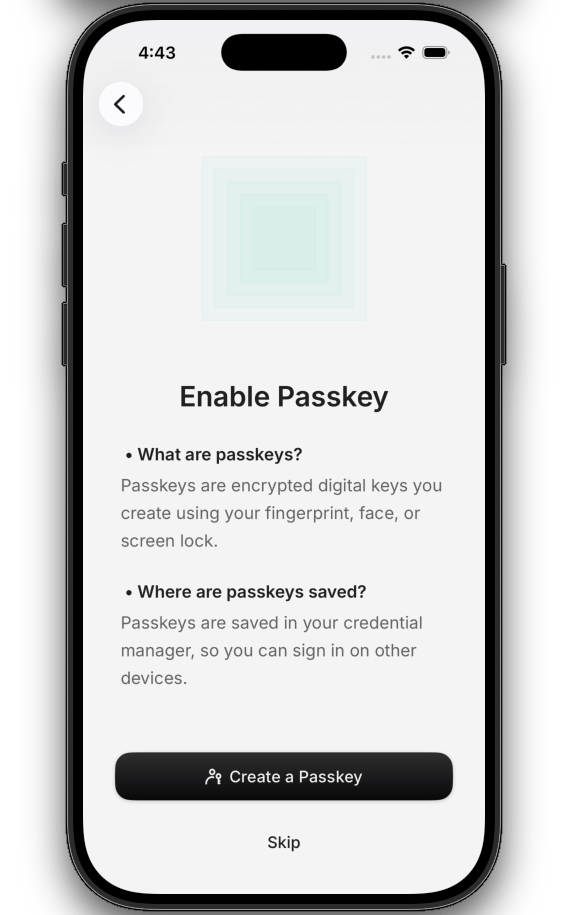
The passkey enrollment flow renders an educational screen, a WebAuthn registration handshake with the platform authenticator, and the enrolled-factor entry in the authenticator list.
Unlike other factors, passkeys require application-side platform entitlements that the Universal Components for iOS SDK cannot configure.
 ## Prerequisites
To enable passkey support in the Universal Components for iOS SDK:
* **Configure a custom domain on your Auth0 tenant**. Passkeys require a [custom domain](/docs/customize/custom-domains), which serves the [Apple App Site Association (AASA)](https://developer.apple.com/documentation/xcode/supporting-associated-domains) file that binds passkey credentials to your application.
* **Enable passkeys on your Auth0 database connection**. To learn how to enable passkeys in your Auth0 tenant, read [Configure Passkeys](/docs/authenticate/database-connections/passkeys/configure-passkey-policy#configure-passkeys).
* **Register your Apple Team ID and Bundle ID in your Auth0 application**. To learn more, read [Native Passkeys for Mobile Applications](/docs/authenticate/database-connections/passkeys/native-passkeys-for-mobile-applications#configure-auth0-dashboard).
* **Install and configure Universal Components for iOS**. To install Universal Components, configure your Auth0 tenant, and initialize the SDK, read [Build a Self-Service Account Security Interface](/docs/get-started/universal-components/ios/components/my-account-overview).
* **Confirm OS version**. Passkeys are supported on devices running **iOS 16.6+**, **macOS 13.5+**, or **visionOS 1.0+**.
## Platform setup
### Add the associated domain in Xcode
After registering your Apple Team ID and Bundle ID in your Auth0 application's Device Settings, Auth0 serves the AASA file from your custom domain. Add your Auth0 custom domain to the application:
1. Open [**Xcode**](https://developer.apple.com/documentation/xcode).
2. Select your target's **Signing & Capabilities**.
3. Add a **Capability** and select **Associated Domains**.
4. Enter your Auth0 custom domain:
```text theme={null}
webcredentials:YOUR_AUTH0_DOMAIN
```
5. Confirm that **Signing & Capabilities → Team** matches the Apple Team ID you registered in your Auth0 application's Device Settings, and that the target's **Bundle Identifier** matches the registered Bundle ID exactly. iOS performs a case-sensitive byte-for-byte match — for example, `com.example.OAuth2` is not the same as `com.example.oauth2`.
**During development**, Apple's CDN can cache stale AASA files for hours after you change Device Settings.
To fetch the AASA directly from your tenant during development, append `?mode=developer` to the entitlement (for example, `webcredentials:YOUR_AUTH0_DOMAIN?mode=developer`) and enable **Settings → Developer → Associated Domains Development** on the device.
Test on a physical device, the iOS Simulator does not reliably honor associated-domain configuration. Remove the `?mode=developer` suffix before shipping a release build.
## SDK limitations
* **Passkeys can only be enrolled from inside the `MyAccountAuthMethodsView` component**. There is no public SwiftUI API to trigger a standalone passkey enrollment from elsewhere in your application. Post-login "save a passkey" upsell prompts are not supported. You can track [ui-components-ios](https://github.com/auth0/ui-components-ios/issues) for updates.
* **Removing a passkey in the component does not purge the OS credential store**. The enrolled passkey detaches from the Auth0 account, but the private credential remains in iCloud Keychain until the user removes it from the OS-level credential manager.
* **Attestation conveyance is not surfaced**. The SDK does not let you select the attestation policy (`none` / `indirect` / `direct`) or enumerate authenticator transports. It uses the Auth0 tenant's configured [WebAuthn](/docs/secure/multi-factor-authentication/webauthn-as-mfa#webauthn-as-multi-factor-authentication) policy.
## Learn more
Review the `MyAccountAuthMethodsView` component reference and the full list of supported factors.
Initialize the SDK and wire the token provider to your Auth0 tenant.
## Prerequisites
To enable passkey support in the Universal Components for iOS SDK:
* **Configure a custom domain on your Auth0 tenant**. Passkeys require a [custom domain](/docs/customize/custom-domains), which serves the [Apple App Site Association (AASA)](https://developer.apple.com/documentation/xcode/supporting-associated-domains) file that binds passkey credentials to your application.
* **Enable passkeys on your Auth0 database connection**. To learn how to enable passkeys in your Auth0 tenant, read [Configure Passkeys](/docs/authenticate/database-connections/passkeys/configure-passkey-policy#configure-passkeys).
* **Register your Apple Team ID and Bundle ID in your Auth0 application**. To learn more, read [Native Passkeys for Mobile Applications](/docs/authenticate/database-connections/passkeys/native-passkeys-for-mobile-applications#configure-auth0-dashboard).
* **Install and configure Universal Components for iOS**. To install Universal Components, configure your Auth0 tenant, and initialize the SDK, read [Build a Self-Service Account Security Interface](/docs/get-started/universal-components/ios/components/my-account-overview).
* **Confirm OS version**. Passkeys are supported on devices running **iOS 16.6+**, **macOS 13.5+**, or **visionOS 1.0+**.
## Platform setup
### Add the associated domain in Xcode
After registering your Apple Team ID and Bundle ID in your Auth0 application's Device Settings, Auth0 serves the AASA file from your custom domain. Add your Auth0 custom domain to the application:
1. Open [**Xcode**](https://developer.apple.com/documentation/xcode).
2. Select your target's **Signing & Capabilities**.
3. Add a **Capability** and select **Associated Domains**.
4. Enter your Auth0 custom domain:
```text theme={null}
webcredentials:YOUR_AUTH0_DOMAIN
```
5. Confirm that **Signing & Capabilities → Team** matches the Apple Team ID you registered in your Auth0 application's Device Settings, and that the target's **Bundle Identifier** matches the registered Bundle ID exactly. iOS performs a case-sensitive byte-for-byte match — for example, `com.example.OAuth2` is not the same as `com.example.oauth2`.
**During development**, Apple's CDN can cache stale AASA files for hours after you change Device Settings.
To fetch the AASA directly from your tenant during development, append `?mode=developer` to the entitlement (for example, `webcredentials:YOUR_AUTH0_DOMAIN?mode=developer`) and enable **Settings → Developer → Associated Domains Development** on the device.
Test on a physical device, the iOS Simulator does not reliably honor associated-domain configuration. Remove the `?mode=developer` suffix before shipping a release build.
## SDK limitations
* **Passkeys can only be enrolled from inside the `MyAccountAuthMethodsView` component**. There is no public SwiftUI API to trigger a standalone passkey enrollment from elsewhere in your application. Post-login "save a passkey" upsell prompts are not supported. You can track [ui-components-ios](https://github.com/auth0/ui-components-ios/issues) for updates.
* **Removing a passkey in the component does not purge the OS credential store**. The enrolled passkey detaches from the Auth0 account, but the private credential remains in iCloud Keychain until the user removes it from the OS-level credential manager.
* **Attestation conveyance is not surfaced**. The SDK does not let you select the attestation policy (`none` / `indirect` / `direct`) or enumerate authenticator transports. It uses the Auth0 tenant's configured [WebAuthn](/docs/secure/multi-factor-authentication/webauthn-as-mfa#webauthn-as-multi-factor-authentication) policy.
## Learn more
Review the `MyAccountAuthMethodsView` component reference and the full list of supported factors.
Initialize the SDK and wire the token provider to your Auth0 tenant.