> ## Documentation Index
> Fetch the complete documentation index at: https://docs-dev-docs-event-stream-action-templates.mintlify.site/llms.txt
> Use this file to discover all available pages before exploring further.
# Passkeys on Android
> Learn about the SDK-specific behavior, application-side entitlements, and customization for the passkey factor rendered inside the Authentication Methods Management component on Android.
export const ReleaseStageNotice = ({feature, stage, plans, contact, terms}) => {
const stageTextMap = {
"beta": "Beta",
"ea": "Early Access"
};
const stageText = stageTextMap[stage] || "a product release stage";
const prsLink = "/docs/troubleshoot/product-lifecycle/product-release-stages";
const linkify = (text, url) => {
return {text};
};
const includeDetails = (plans, contact, terms) => {
const hasDetails = terms || plans || contact;
if (!hasDetails) return null;
return
{plans && <>This feature is available for {linkify(`${plans} plans`, "https://auth0.com/pricing")}. }
{contact && "To participate, contact " + contact + ". "}
{terms && <>By using this feature, you agree to the applicable Free Trial terms in Okta's {linkify("Master Subscription Agreement", "https://www.okta.com/legal")}.}
;
};
return
The {feature} feature is in {linkify(stageText, prsLink)}.
{includeDetails(plans, contact, terms)}
;
};
The [`AuthenticatorSettingsComponent`](/docs/get-started/universal-components/android/components/auth-methods-management) can render the Auth0 [passkey](/docs/authenticate/database-connections/passkeys) enrollment flow.
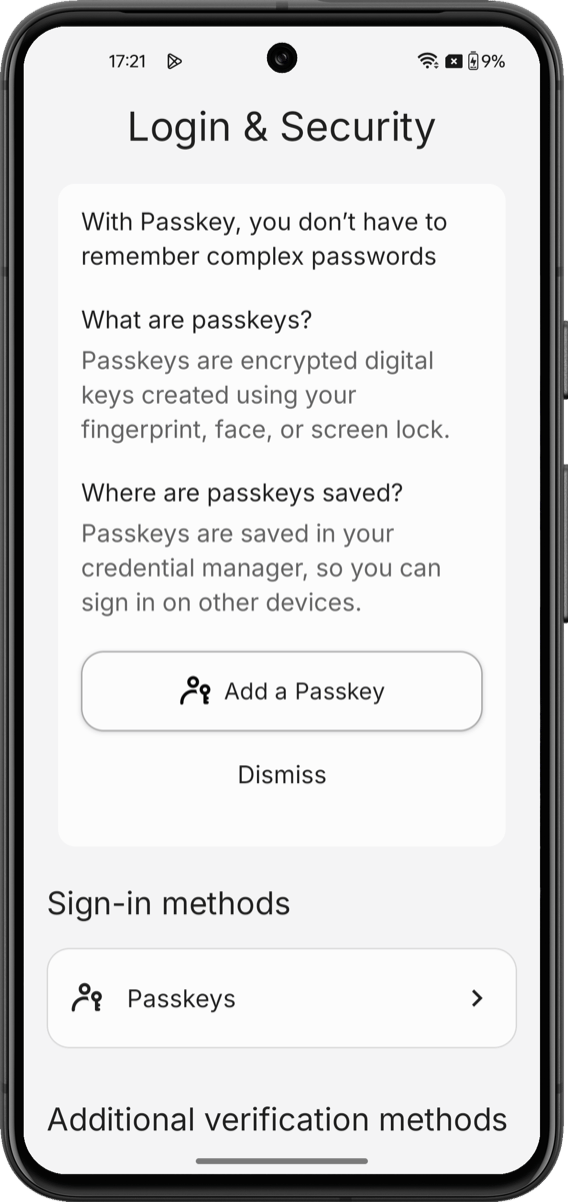
The passkey enrollment flow renders an educational screen, a WebAuthn registration handshake with the platform authenticator, and the enrolled-factor entry in the authenticator list.
Unlike other factors, passkeys require application-side platform entitlements that the Universal Components for Android SDK cannot configure.
 ## Prerequisites
To enable passkey support in the Universal Components for Android SDK:
* **Configure a custom domain on your Auth0 tenant**. To learn more, read [Custom Domains](/docs/customize/custom-domains).
* **Enable passkeys on your Auth0 database connection**. To learn how to enable passkeys in your Auth0 tenant, read [Passkeys](/docs/authenticate/database-connections/passkeys/configure-passkey-policy).
* **Register your Android application package and SHA-256 signing fingerprints in your Auth0 application**. To learn more, read [Native Passkeys for Mobile Applications](/docs/authenticate/database-connections/passkeys/native-passkeys-for-mobile-applications#configure-auth0-dashboard).
* **Install and configure Universal Components for Android**. To install Universal Components, configure your Auth0 tenant, and initialize the SDK, read [Build a Self-Service Account Security Interface](/docs/get-started/universal-components/android/components/my-account-overview).
* **Confirm Android version**. Passkeys require Android **14+** (API 34+) for the full Credential Manager experience. On Android **11–13** (API 30–33), passkeys sync through Google Password Manager on devices with up-to-date Play Services.
## Platform setup
Passkeys bind credentials to your Auth0 tenant's [custom domain](/docs/customize/custom-domains). The platform verifies this binding through Android Digital Asset Links.
**Confirm AndroidX Credentials is resolved**
The Universal Components for Android SDK depends on `androidx.credentials:credentials:1.5.0+` transitively. If you see credential manager errors, verify with `./gradlew app:dependencies`.
Google's [Credential Manager](https://developer.android.com/identity/sign-in/credential-manager) guide and the [Digital Asset Links tester](https://developers.google.com/digital-asset-links/tools/generator) are the authoritative references. Validate your `assetlinks.json` before testing on-device.
## SDK limitations
* **Passkeys can only be enrolled from inside the `AuthenticatorSettingsComponent`**. There is no public Composable API to trigger a standalone passkey enrollment from elsewhere in your application. Post-login "save a passkey" upsell prompts are not supported. You can track [universal-components-android](https://github.com/auth0/universal-components-android/issues) for updates.
* **Removing a passkey in the component does not purge the OS credential store**. The enrolled passkey detaches from the Auth0 account, but the private credential remains in Google Password Manager until the user removes it from the OS-level credential manager.
* **The `PasskeyEnableScreen` composable is informational only**. It is publicly callable, but it renders a static educational card; the `onEnableClick` callback is delegated to you. The actual enrollment logic lives inside the component's internal `PasskeyViewModel` and is not publicly exposed.
* **Attestation conveyance is not surfaced**. The SDK does not let you select the attestation policy (`none` / `indirect` / `direct`) or enumerate authenticator transports. It uses the Auth0 tenant's configured [WebAuthn](/docs/secure/multi-factor-authentication/webauthn-as-mfa#webauthn-as-multi-factor-authentication) policy.
## Learn more
Review the `AuthenticatorSettingsComponent` reference and the full list of supported factors.
Initialize the SDK and wire the token provider to your Auth0 tenant.
## Prerequisites
To enable passkey support in the Universal Components for Android SDK:
* **Configure a custom domain on your Auth0 tenant**. To learn more, read [Custom Domains](/docs/customize/custom-domains).
* **Enable passkeys on your Auth0 database connection**. To learn how to enable passkeys in your Auth0 tenant, read [Passkeys](/docs/authenticate/database-connections/passkeys/configure-passkey-policy).
* **Register your Android application package and SHA-256 signing fingerprints in your Auth0 application**. To learn more, read [Native Passkeys for Mobile Applications](/docs/authenticate/database-connections/passkeys/native-passkeys-for-mobile-applications#configure-auth0-dashboard).
* **Install and configure Universal Components for Android**. To install Universal Components, configure your Auth0 tenant, and initialize the SDK, read [Build a Self-Service Account Security Interface](/docs/get-started/universal-components/android/components/my-account-overview).
* **Confirm Android version**. Passkeys require Android **14+** (API 34+) for the full Credential Manager experience. On Android **11–13** (API 30–33), passkeys sync through Google Password Manager on devices with up-to-date Play Services.
## Platform setup
Passkeys bind credentials to your Auth0 tenant's [custom domain](/docs/customize/custom-domains). The platform verifies this binding through Android Digital Asset Links.
**Confirm AndroidX Credentials is resolved**
The Universal Components for Android SDK depends on `androidx.credentials:credentials:1.5.0+` transitively. If you see credential manager errors, verify with `./gradlew app:dependencies`.
Google's [Credential Manager](https://developer.android.com/identity/sign-in/credential-manager) guide and the [Digital Asset Links tester](https://developers.google.com/digital-asset-links/tools/generator) are the authoritative references. Validate your `assetlinks.json` before testing on-device.
## SDK limitations
* **Passkeys can only be enrolled from inside the `AuthenticatorSettingsComponent`**. There is no public Composable API to trigger a standalone passkey enrollment from elsewhere in your application. Post-login "save a passkey" upsell prompts are not supported. You can track [universal-components-android](https://github.com/auth0/universal-components-android/issues) for updates.
* **Removing a passkey in the component does not purge the OS credential store**. The enrolled passkey detaches from the Auth0 account, but the private credential remains in Google Password Manager until the user removes it from the OS-level credential manager.
* **The `PasskeyEnableScreen` composable is informational only**. It is publicly callable, but it renders a static educational card; the `onEnableClick` callback is delegated to you. The actual enrollment logic lives inside the component's internal `PasskeyViewModel` and is not publicly exposed.
* **Attestation conveyance is not surfaced**. The SDK does not let you select the attestation policy (`none` / `indirect` / `direct`) or enumerate authenticator transports. It uses the Auth0 tenant's configured [WebAuthn](/docs/secure/multi-factor-authentication/webauthn-as-mfa#webauthn-as-multi-factor-authentication) policy.
## Learn more
Review the `AuthenticatorSettingsComponent` reference and the full list of supported factors.
Initialize the SDK and wire the token provider to your Auth0 tenant.