> ## Documentation Index
> Fetch the complete documentation index at: https://docs-dev-docs-event-stream-action-templates.mintlify.site/llms.txt
> Use this file to discover all available pages before exploring further.
> Learn how the Client Credentials flow works and why you should use it for machine-to-machine (M2M) applications.
# Client Credentials Flow
The Client Credentials Flow (defined in [OAuth 2.0 RFC 6749, section 4.4](https://tools.ietf.org/html/rfc6749#section-4.4)) involves an application exchanging its application credentials, such as client ID and client secret, for an access token.
This flow is best suited for Machine-to-Machine (M2M) applications, such as CLIs, daemons, or backend services, because the system must authenticate and authorize the application instead of a user.
## How it works
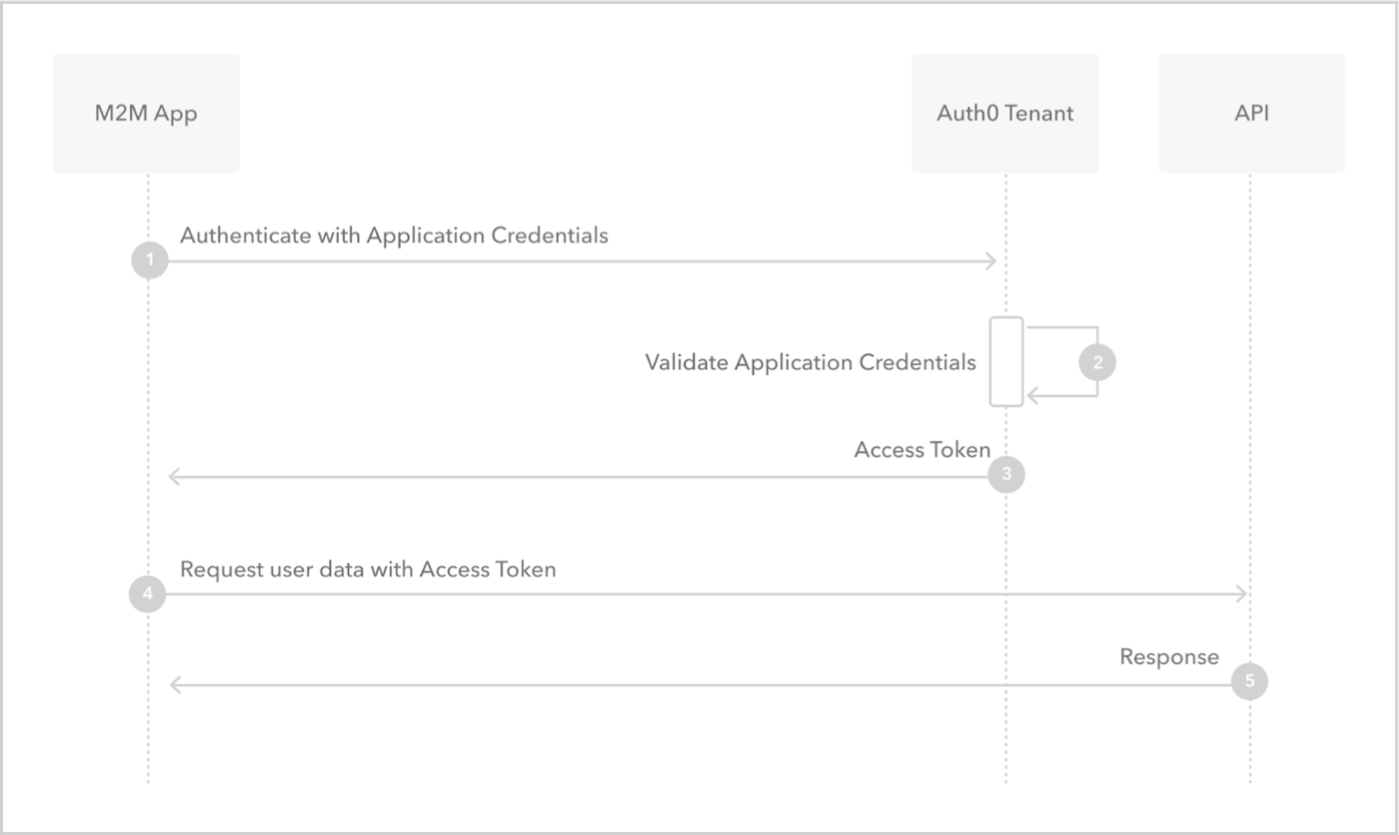 1. Application sends application's credentials to the Auth0 Authorization Server. To learn more about client authentication methods, read [Application Credentials](/docs/secure/application-credentials).
2. Auth0 Authorization Server validates application's credentials.
3. Auth0 Authorization Server responds with an access token.
4. Application can use the access token to call an API on behalf of itself. For more information on this process, see [Validate JSON Web Tokens](/docs/secure/tokens/json-web-tokens/validate-json-web-tokens).
5. API responds with requested data.
## How to implement it
The easiest way to implement the Client Credentials Flow is to follow our [Backend Quickstarts](/docs/quickstart/backend).
Alternatively, you can use the Auth0 Authentication API to implement the Client Credentials Flow. For more information, read [Call Your API Using the Client Credentials Flow](/docs/get-started/authentication-and-authorization-flow/client-credentials-flow/call-your-api-using-the-client-credentials-flow).
## Learn more
* [Auth0 Rules](/docs/customize/rules)
* [Auth0 Hooks](/docs/customize/hooks)
* [Tokens](/docs/secure/tokens)
* [Token Best Practices](/docs/secure/tokens/token-best-practices)
* [Which OAuth 2.0 Flow Should I Use?](/docs/get-started/authentication-and-authorization-flow/which-oauth-2-0-flow-should-i-use)
1. Application sends application's credentials to the Auth0 Authorization Server. To learn more about client authentication methods, read [Application Credentials](/docs/secure/application-credentials).
2. Auth0 Authorization Server validates application's credentials.
3. Auth0 Authorization Server responds with an access token.
4. Application can use the access token to call an API on behalf of itself. For more information on this process, see [Validate JSON Web Tokens](/docs/secure/tokens/json-web-tokens/validate-json-web-tokens).
5. API responds with requested data.
## How to implement it
The easiest way to implement the Client Credentials Flow is to follow our [Backend Quickstarts](/docs/quickstart/backend).
Alternatively, you can use the Auth0 Authentication API to implement the Client Credentials Flow. For more information, read [Call Your API Using the Client Credentials Flow](/docs/get-started/authentication-and-authorization-flow/client-credentials-flow/call-your-api-using-the-client-credentials-flow).
## Learn more
* [Auth0 Rules](/docs/customize/rules)
* [Auth0 Hooks](/docs/customize/hooks)
* [Tokens](/docs/secure/tokens)
* [Token Best Practices](/docs/secure/tokens/token-best-practices)
* [Which OAuth 2.0 Flow Should I Use?](/docs/get-started/authentication-and-authorization-flow/which-oauth-2-0-flow-should-i-use)