> ## Documentation Index
> Fetch the complete documentation index at: https://docs-dev-docs-event-stream-action-templates.mintlify.site/llms.txt
> Use this file to discover all available pages before exploring further.
> Learn how to use Pushed Authorization Requests (PAR) with the Authorization Code Flow.
# Authorization Code Flow with Pushed Authorization Requests (PAR)
To use Highly Regulated Identity features, you must have an Enterprise Plan with the Highly Regulated Identity add-on. Refer to [Auth0 Pricing](https://auth0.com/pricing/) for details.
[Pushed Authorization Request (PAR)](https://datatracker.ietf.org/doc/html/rfc9126) is a backend protocol to push authorization requests directly to the authorization server. It is a technical component of the [Financial-Grade API (FAPI) Security Profile 1.0](https://openid.net/specs/openid-financial-api-part-2-1_0.html) tasked with protecting APIs in high-value scenarios.
## How it works
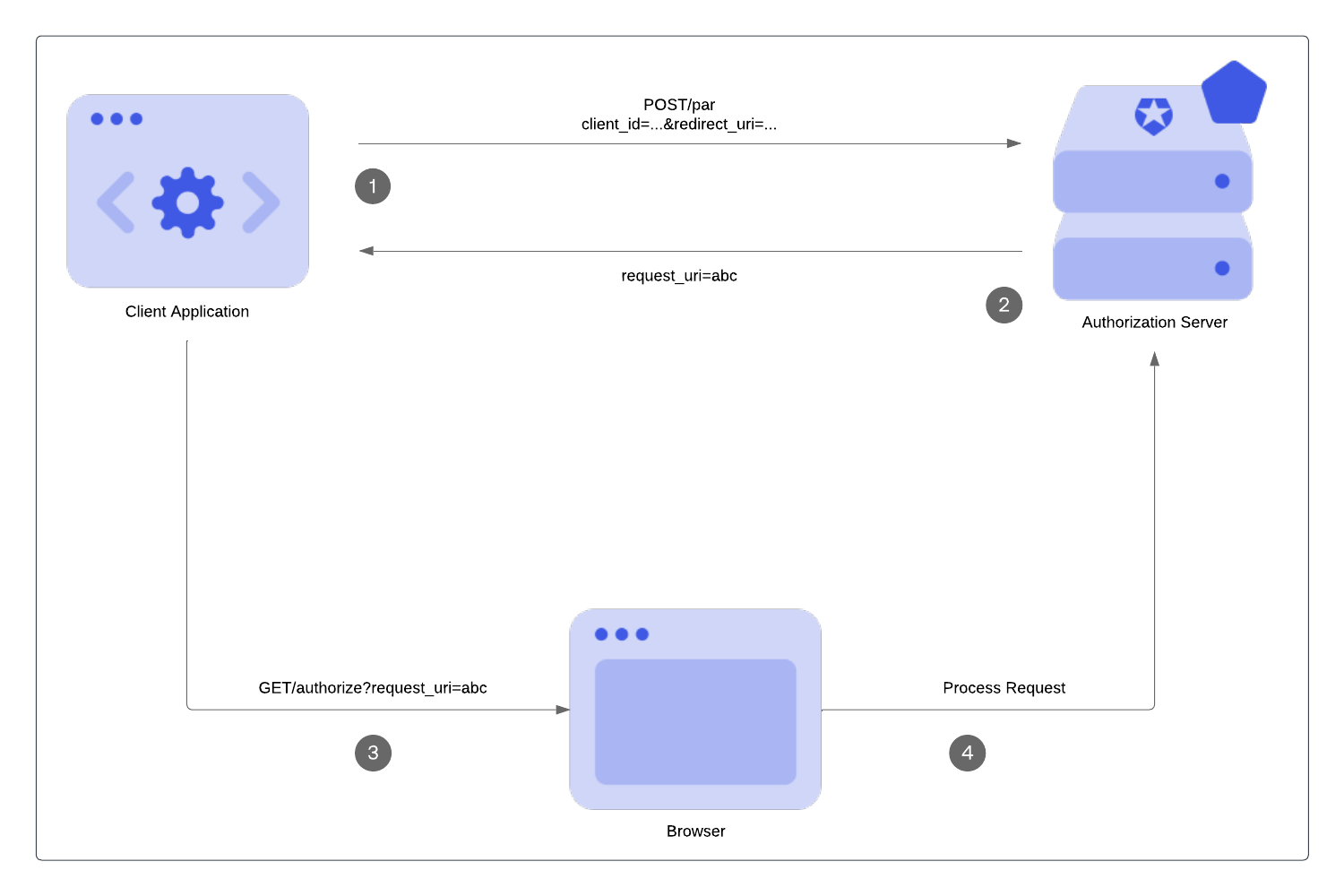
PAR allows your application to push the parameters for OAuth 2.0 authorization requests directly to the authorization server’s PAR endpoint **(1)**. In response, the authorization server sends a request URI value, `request_uri` **(2)**, to use when you call the `/authorize` endpoint **(3)**. The `request_uri` is a reference to the stored authorization requests at the `/par` endpoint so these requests are not exposed **(4)**. To learn more, read [Configure Push Authorization Requests](/docs/get-started/applications/configure-par).
 ## Benefits
One benefit of using PAR is early validation. In other OAuth 2.0 flows, such as the [Authorization Code Flow](/docs/get-started/authentication-and-authorization-flow/authorization-code-flow), end users are redirected to the authorization server for validation. In PAR, request parameters are validated at the beginning of the authorization request before the end user is redirected. It is not ideal to redirect users to show them an error page.
PAR also passes authorization requests on the back channel. Front-channel communications rely on an intermediary (e.g. a browser) via appended HTTPS query parameters (GET, POST). Messages are not sent directly. Back-channel communications are passed in the body of an authenticated backend request for a more direct approach.
Push authorization requests travel via the back-channel, which means:
* The authorization server can trust where the request is coming from, and the requests have not been modified by an end user.
* The request details have not been exposed at the browser bar or history and privacy is preserved at that point of the chain.
* Restrictions on URL length are not a constraint.
## Limitations
* Maximum request payload size is limited to 10 KB.
* Public applications are not currently supported. To learn more, read [Public and Confidential Applications](/docs/get-started/applications/confidential-and-public-applications).
## Call the PAR endpoint
### Requirements
To make a call to the PAR endpoint, you must:
* Set the request content type as `application/x-www-form-urlencoded`.
* Use strings for all passed parameters.
* Include an additional parameter for the application authentication method in the request. Only confidential clients support PAR, so the following [application authentication methods](https://auth0.com/docs/api/authentication#authentication-methods) are available: Client Secret, Private Key JWT, and mTLS. You must use the same application authentication method for the `/token` endpoint when retrieving an access token.
### Supported parameters
PAR endpoint only stores and processes:
* Standard OAuth 2.0 parameters and applicable extensions, which we recognize at the authorization endpoint.
* Up to 10 custom authorization parameters prefixed with `ext-` prefix.
PAR ignores additional custom authorization parameters. Custom authorization parameters are not available in [Auth0 Actions](/docs/customize/actions) and [Logs](/docs/deploy-monitor/logs).
If you use custom authorization parameters in Actions, you must prefix them with `ext-`. Otherwise, they will not be available.
### Example PAR request
```bash lines theme={null}
curl --location --request POST https://$tenant/oauth/par \
-H "content-type: application/x-www-form-urlencoded" \
-d "client_id=CLIENT_ID"\
"&client_secret=CLIENT_SECRET"\
"&redirect_uri=https://jwt.io"\
"&audience=urn:my-notes-api"\
"&scope=openid%20profile%20read:notes"\
"&response_type=code"
```
### Example PAR Response
In the following example PAR response:
* The `request_uri` is a reference for the stored authorization requests. The request values pass to the GET `/authorize` endpoint as the `request_uri` parameter.
* The `expires_in` is the number of seconds the `request_uri` is valid. After this time frame, the `request_uri` expires if not used. The thirty-second expiration time is a static value and can’t be configured.
```json lines theme={null}
HTTP/1.1 201 Created
Content-Type: application/json
{
"request_uri":
"urn:ietf:params:oauth:request_uri:6esc_11ACC5bwc014ltc14eY22c",
"expires_in": 30
}
```
### Rate limits
For Essential, Professional, and Enterprise production tenants, calls to the PAR endpoint are included in the standard Authentication API rate limit. For more information, see [Rate Limit Configurations](/docs/troubleshoot/customer-support/operational-policies/rate-limit-policy/rate-limit-configurations) and click your subscription type. Then, click **Authentication API**.
## Call the authorization endpoint
Your application uses the `request_uri` value returned from the `/oauth/par` endpoint in the authorization request and redirects the user agent to the authorization endpoint. To learn more about the `request_uri` parameter, read [Configure Push Authorization Requests](/docs/get-started/applications/configure-par).
The following example directs the user agent to make the following HTTP request:
```http wrap lines theme={null}
GET /authorize?client_id=CLIENT_ID&request_uri=urn%3Aietf%3Aparam...qrwSI HTTP/1.1 Host: TENANT.auth0.com
```
In the case of a valid `request_uri`, the rest of the authorization flow looks the same.
### Validation
* PAR is validated by the authorization server at this stage again like any other authorization request.
* `request_uri` value can be used only one time.
* An expired `request_uri` will be rejected by the authorization server.
* A non-PAR request is rejected if PAR is required either on the tenant or client level.
## Learn more
* [Configure Pushed Authorization Requests (PAR)](/docs/get-started/applications/configure-par)
## Benefits
One benefit of using PAR is early validation. In other OAuth 2.0 flows, such as the [Authorization Code Flow](/docs/get-started/authentication-and-authorization-flow/authorization-code-flow), end users are redirected to the authorization server for validation. In PAR, request parameters are validated at the beginning of the authorization request before the end user is redirected. It is not ideal to redirect users to show them an error page.
PAR also passes authorization requests on the back channel. Front-channel communications rely on an intermediary (e.g. a browser) via appended HTTPS query parameters (GET, POST). Messages are not sent directly. Back-channel communications are passed in the body of an authenticated backend request for a more direct approach.
Push authorization requests travel via the back-channel, which means:
* The authorization server can trust where the request is coming from, and the requests have not been modified by an end user.
* The request details have not been exposed at the browser bar or history and privacy is preserved at that point of the chain.
* Restrictions on URL length are not a constraint.
## Limitations
* Maximum request payload size is limited to 10 KB.
* Public applications are not currently supported. To learn more, read [Public and Confidential Applications](/docs/get-started/applications/confidential-and-public-applications).
## Call the PAR endpoint
### Requirements
To make a call to the PAR endpoint, you must:
* Set the request content type as `application/x-www-form-urlencoded`.
* Use strings for all passed parameters.
* Include an additional parameter for the application authentication method in the request. Only confidential clients support PAR, so the following [application authentication methods](https://auth0.com/docs/api/authentication#authentication-methods) are available: Client Secret, Private Key JWT, and mTLS. You must use the same application authentication method for the `/token` endpoint when retrieving an access token.
### Supported parameters
PAR endpoint only stores and processes:
* Standard OAuth 2.0 parameters and applicable extensions, which we recognize at the authorization endpoint.
* Up to 10 custom authorization parameters prefixed with `ext-` prefix.
PAR ignores additional custom authorization parameters. Custom authorization parameters are not available in [Auth0 Actions](/docs/customize/actions) and [Logs](/docs/deploy-monitor/logs).
If you use custom authorization parameters in Actions, you must prefix them with `ext-`. Otherwise, they will not be available.
### Example PAR request
```bash lines theme={null}
curl --location --request POST https://$tenant/oauth/par \
-H "content-type: application/x-www-form-urlencoded" \
-d "client_id=CLIENT_ID"\
"&client_secret=CLIENT_SECRET"\
"&redirect_uri=https://jwt.io"\
"&audience=urn:my-notes-api"\
"&scope=openid%20profile%20read:notes"\
"&response_type=code"
```
### Example PAR Response
In the following example PAR response:
* The `request_uri` is a reference for the stored authorization requests. The request values pass to the GET `/authorize` endpoint as the `request_uri` parameter.
* The `expires_in` is the number of seconds the `request_uri` is valid. After this time frame, the `request_uri` expires if not used. The thirty-second expiration time is a static value and can’t be configured.
```json lines theme={null}
HTTP/1.1 201 Created
Content-Type: application/json
{
"request_uri":
"urn:ietf:params:oauth:request_uri:6esc_11ACC5bwc014ltc14eY22c",
"expires_in": 30
}
```
### Rate limits
For Essential, Professional, and Enterprise production tenants, calls to the PAR endpoint are included in the standard Authentication API rate limit. For more information, see [Rate Limit Configurations](/docs/troubleshoot/customer-support/operational-policies/rate-limit-policy/rate-limit-configurations) and click your subscription type. Then, click **Authentication API**.
## Call the authorization endpoint
Your application uses the `request_uri` value returned from the `/oauth/par` endpoint in the authorization request and redirects the user agent to the authorization endpoint. To learn more about the `request_uri` parameter, read [Configure Push Authorization Requests](/docs/get-started/applications/configure-par).
The following example directs the user agent to make the following HTTP request:
```http wrap lines theme={null}
GET /authorize?client_id=CLIENT_ID&request_uri=urn%3Aietf%3Aparam...qrwSI HTTP/1.1 Host: TENANT.auth0.com
```
In the case of a valid `request_uri`, the rest of the authorization flow looks the same.
### Validation
* PAR is validated by the authorization server at this stage again like any other authorization request.
* `request_uri` value can be used only one time.
* An expired `request_uri` will be rejected by the authorization server.
* A non-PAR request is rejected if PAR is required either on the tenant or client level.
## Learn more
* [Configure Pushed Authorization Requests (PAR)](/docs/get-started/applications/configure-par)