> ## Documentation Index
> Fetch the complete documentation index at: https://docs-dev-docs-event-stream-action-templates.mintlify.site/llms.txt
> Use this file to discover all available pages before exploring further.
> Learn how the Authorization Code flow works and why you should use it for regular web apps.
# Authorization Code Flow
The Authorization Code Flow (defined in [OAuth 2.0 RFC 6749, section 4.1](https://tools.ietf.org/html/rfc6749#section-4.1)), involves exchanging an authorization code for a token.
This flow can only be used for confidential applications (such as Regular Web Applications) because the application's authentication methods are included in the exchange and must be kept secure.
## How Authorization Code Flow works
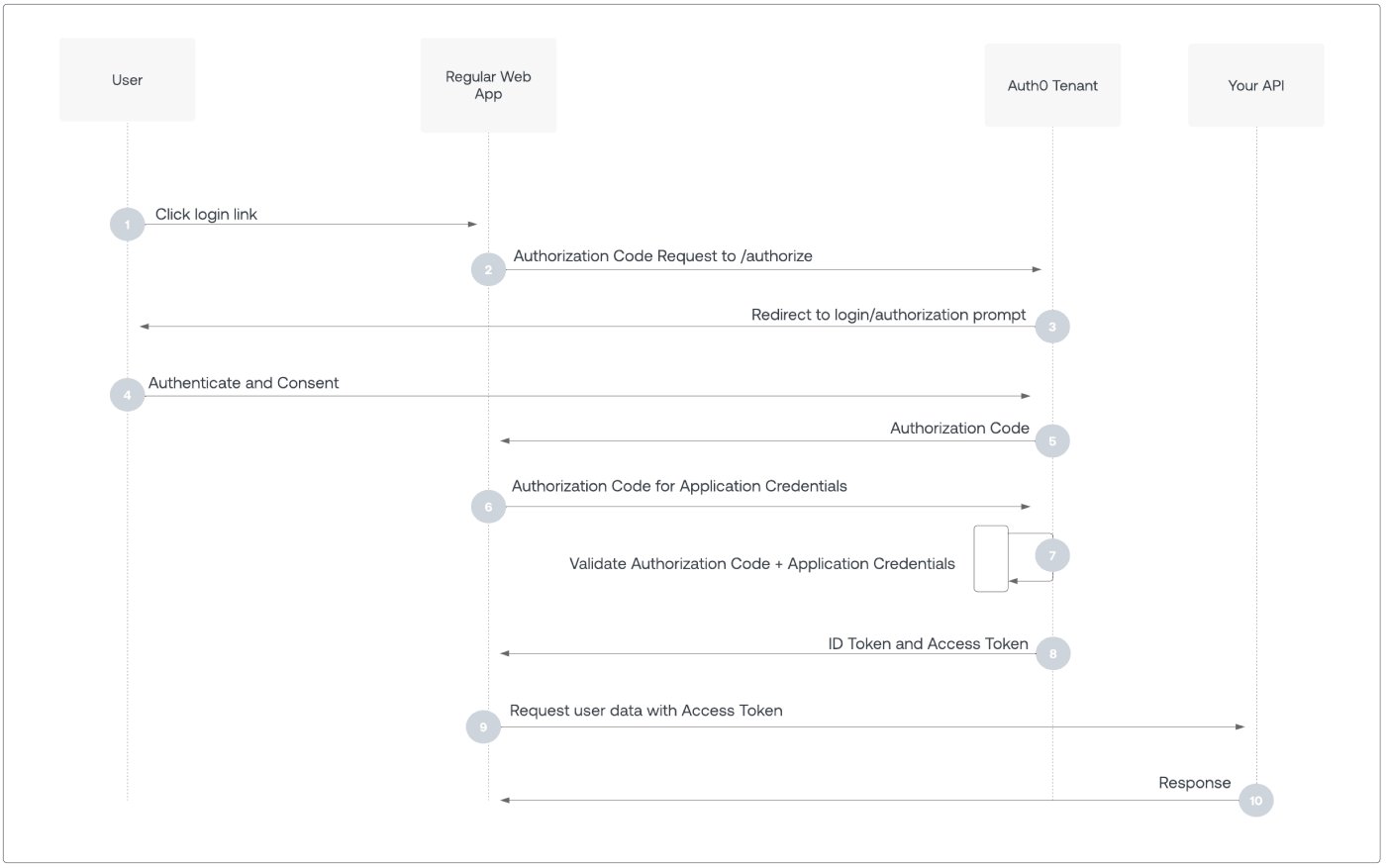 1. User selects **Login** within application.
2. Auth0's SDK redirects user to Auth0 Authorization Server ([`/authorize`](https://auth0.com/docs/api/authentication/authorization-code-flow/authorize-application) endpoint).
3. Auth0 Authorization Server redirects user to login and authorization prompt.
4. User authenticates using one of the configured login options, and may see a consent prompt listing the permissions Auth0 will give to the application.
5. Auth0 Authorization Server redirects user back to application with single-use authorization code.
6. Auth0's SDK sends authorization code, application's client ID, and application's credentials, such as client secret or Private Key JWT, to Auth0 Authorization Server ([`/oauth/token`](https://auth0.com/docs/api/authentication/authorization-code-flow/get-token) endpoint).
7. Auth0 Authorization Server verifies authorization code, application's client ID, and application's credentials.
8. Auth0 Authorization Server responds with an ID token and access token (and optionally, a refresh token).
9. Application can use the access token to call an API to access information about the user.
10. API responds with requested data.
## How to implement Authorization Code Flow
The easiest way to implement the Authorization Code Flow is to follow our [Regular Web App Quickstarts](/docs/quickstart/webapp).
Alternatively, you can use the Authentication API to implement the Authorization Code Flow. For more information, read [Add Login Using the Authorization Code Flow](/docs/get-started/authentication-and-authorization-flow/authorization-code-flow/add-login-auth-code-flow) or [Call Your API Using the Authorization Code Flow](/docs/get-started/authentication-and-authorization-flow/authorization-code-flow/call-your-api-using-the-authorization-code-flow).
If a browser application, with an Origin header, makes a `POST` request to the `/oauth/token` endpoint, Auth0 doesn’t issue refresh tokens, even if the application has [Allow Refresh Token Rotation](/docs/secure/tokens/refresh-tokens/configure-refresh-token-rotation) enabled and sends the [offline\_access](/docs/secure/tokens/refresh-tokens/configure-refresh-token-rotation#configure-with-the-auth0-spa-sdk) scope.
## Learn more
* [Auth0 Rules](/docs/customize/rules)
* [Auth0 Hooks](/docs/customize/hooks)
* [Tokens](/docs/secure/tokens)
* [Token Best Practices](/docs/secure/tokens/token-best-practices)
* [Which OAuth 2.0 Flow Should I Use?](/docs/get-started/authentication-and-authorization-flow/which-oauth-2-0-flow-should-i-use)
1. User selects **Login** within application.
2. Auth0's SDK redirects user to Auth0 Authorization Server ([`/authorize`](https://auth0.com/docs/api/authentication/authorization-code-flow/authorize-application) endpoint).
3. Auth0 Authorization Server redirects user to login and authorization prompt.
4. User authenticates using one of the configured login options, and may see a consent prompt listing the permissions Auth0 will give to the application.
5. Auth0 Authorization Server redirects user back to application with single-use authorization code.
6. Auth0's SDK sends authorization code, application's client ID, and application's credentials, such as client secret or Private Key JWT, to Auth0 Authorization Server ([`/oauth/token`](https://auth0.com/docs/api/authentication/authorization-code-flow/get-token) endpoint).
7. Auth0 Authorization Server verifies authorization code, application's client ID, and application's credentials.
8. Auth0 Authorization Server responds with an ID token and access token (and optionally, a refresh token).
9. Application can use the access token to call an API to access information about the user.
10. API responds with requested data.
## How to implement Authorization Code Flow
The easiest way to implement the Authorization Code Flow is to follow our [Regular Web App Quickstarts](/docs/quickstart/webapp).
Alternatively, you can use the Authentication API to implement the Authorization Code Flow. For more information, read [Add Login Using the Authorization Code Flow](/docs/get-started/authentication-and-authorization-flow/authorization-code-flow/add-login-auth-code-flow) or [Call Your API Using the Authorization Code Flow](/docs/get-started/authentication-and-authorization-flow/authorization-code-flow/call-your-api-using-the-authorization-code-flow).
If a browser application, with an Origin header, makes a `POST` request to the `/oauth/token` endpoint, Auth0 doesn’t issue refresh tokens, even if the application has [Allow Refresh Token Rotation](/docs/secure/tokens/refresh-tokens/configure-refresh-token-rotation) enabled and sends the [offline\_access](/docs/secure/tokens/refresh-tokens/configure-refresh-token-rotation#configure-with-the-auth0-spa-sdk) scope.
## Learn more
* [Auth0 Rules](/docs/customize/rules)
* [Auth0 Hooks](/docs/customize/hooks)
* [Tokens](/docs/secure/tokens)
* [Token Best Practices](/docs/secure/tokens/token-best-practices)
* [Which OAuth 2.0 Flow Should I Use?](/docs/get-started/authentication-and-authorization-flow/which-oauth-2-0-flow-should-i-use)