> ## Documentation Index
> Fetch the complete documentation index at: https://docs-dev-docs-event-stream-action-templates.mintlify.site/llms.txt
> Use this file to discover all available pages before exploring further.
> Learn how the Authorization Code flow with Proof Key for Code Exchange (PKCE) works and why you should use it for native and mobile apps.
# Authorization Code Flow with Proof Key for Code Exchange (PKCE)
Key Concepts
* Learn about the OAuth 2.0 grant type, Authorization Code Flow with Proof Key for Code Exchange (PKCE).
* Use this grant type for applications that cannot store a client secret, such as native or single-page apps.
* Review different implementation methods with Auth0 SDKs.
When public clients (e.g., native and single-page applications) request access tokens, some additional security concerns are posed that are not mitigated by the Authorization Code Flow alone. This is because:
**Native apps**
* Cannot securely store a Client Secret. Decompiling the app will reveal the Client Secret, which is bound to the app and is the same for all users and devices.
* Are vulnerable to authorization code interception and injection attacks. Without a client secret, an attacker who intercepts the authorization code can exchange it for tokens.
* May make use of a custom URL scheme to capture redirects (e.g., MyApp\://) potentially allowing malicious applications to receive an Authorization Code from your Authorization Server. Because of this risk, **Auth0 strongly discourages the use of custom URI schemes**. To learn more, read [Measures Against Application Impersonation](/docs/secure/security-guidance/measures-against-app-impersonation.mdx).
**Single-page apps**
* Cannot securely store a Client Secret because their entire source is available to the browser.
Given these situations, OAuth 2.0 provides a version of the Authorization Code Flow which makes use of a Proof Key for Code Exchange (PKCE) (defined in [OAuth 2.0 RFC 7636](https://tools.ietf.org/html/rfc7636)).
The PKCE-enhanced Authorization Code Flow introduces a secret created by the calling application that can be verified by the authorization server; this secret is called the Code Verifier. Additionally, the calling app creates a transform value of the Code Verifier called the Code Challenge and sends this value over HTTPS to retrieve an Authorization Code. This way, a malicious attacker can only intercept the Authorization Code, and they cannot exchange it for a token without the Code Verifier.
## How it works
Because the PKCE-enhanced Authorization Code Flow builds upon the [standard Authorization Code Flow](/docs/get-started/authentication-and-authorization-flow/authorization-code-flow), the steps are very similar.
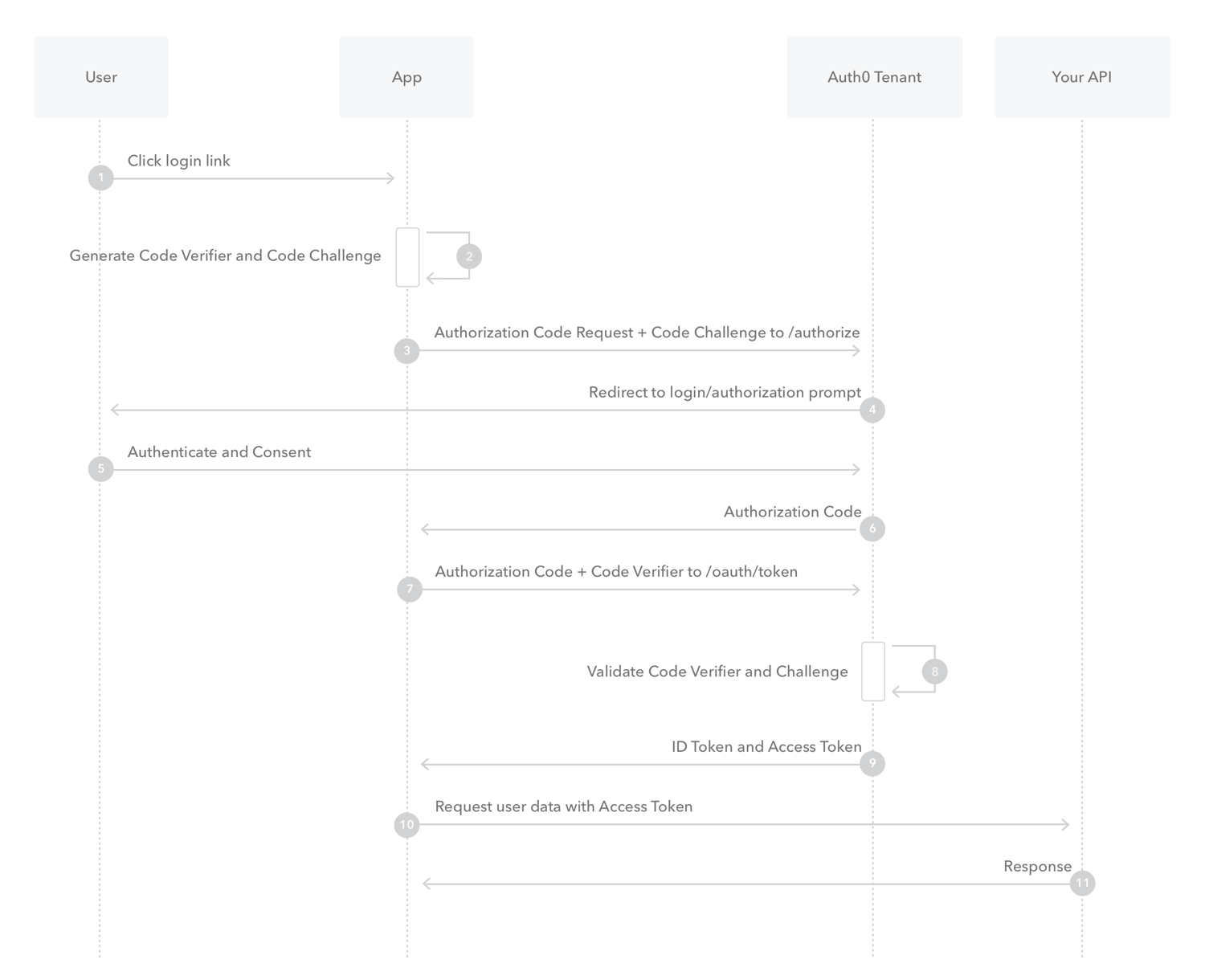 1. The user clicks **Login** within the application.
2. Auth0's SDK creates a cryptographically-random `code_verifier` and from this generates a `code_challenge`.
3. Auth0's SDK redirects the user to the Auth0 Authorization Server ([`/authorize` endpoint](https://auth0.com/docs/api/authentication#authorization-code-grant-pkce-)) along with the `code_challenge`.
4. Your Auth0 Authorization Server redirects the user to the login and authorization prompt.
5. The user authenticates using one of the configured login options and may see a consent page listing the permissions Auth0 will give to the application.
6. Your Auth0 Authorization Server stores the `code_challenge` and redirects the user back to the application with an authorization `code`, which is good for one use.
7. Auth0's SDK sends this `code` and the `code_verifier` (created in step 2) to the Auth0 Authorization Server `(`[`/oauth/token` endpoint](https://auth0.com/docs/api/authentication?http#authorization-code-flow-with-pkce44)).
8. Your Auth0 Authorization Server verifies the `code_challenge` and `code_verifier`.
9. Your Auth0 Authorization Server responds with an ID token and access token (and optionally, a refresh token).
10. Your application can use the access token to call an API to access information about the user.
11. The API responds with requested data.
If you have [Refresh Token Rotation](/docs/secure/tokens/refresh-tokens/refresh-token-rotation) enabled, a new Refresh Token is generated with each request and issued along with the Access Token. When a Refresh Token is exchanged, the previous Refresh Token is invalidated but information about the relationship is retained by the authorization server.
## How to implement it
The easiest way to implement the Authorization Code Flow with PKCE is to [follow our Native Quickstarts](/docs/quickstart/native) or [follow our Single-Page Quickstarts](/docs/quickstart/spa).
Depending on your application type, you can also use our mobile or single-page app SDKs:
**Mobile**
* [Auth0 Swift SDK](/docs/libraries/auth0-swift)
* [Auth0 Android SDK](/docs/libraries/auth0-android)
**Single-page**
* [Auth0 Single-Page App SDK](/docs/libraries/auth0-single-page-app-sdk)
* [Auth0 React SDK](/docs/libraries/auth0-react)
Recent advancements in user privacy controls in browsers adversely impact the user experience by preventing access to third-party cookies; therefore, browser-based flows must use [Refresh Token Rotation](/docs/secure/tokens/refresh-tokens/refresh-token-rotation), which provides a secure method for using refresh tokens in SPAs while providing end-users with seamless access to resources without the disruption in UX caused by browser privacy technology like ITP.
You can follow our tutorials to use our API endpoints to [Add Login Using the Authorization Code Flow with PKCE](/docs/get-started/authentication-and-authorization-flow/authorization-code-flow-with-pkce/add-login-using-the-authorization-code-flow-with-pkce) or [Call Your API Using the Authorization Code Flow with PKCE](/docs/get-started/authentication-and-authorization-flow/authorization-code-flow-with-pkce/call-your-api-using-the-authorization-code-flow-with-pkce).
## Learn more
* [Auth0 Rules](/docs/customize/rules)
* [Auth0 Hooks](/docs/customize/hooks)
* [Tokens](/docs/secure/tokens)
* [Token Best Practices](/docs/secure/tokens/token-best-practices)
* [Which OAuth 2.0 Flow Should I Use?](/docs/get-started/authentication-and-authorization-flow/which-oauth-2-0-flow-should-i-use)
1. The user clicks **Login** within the application.
2. Auth0's SDK creates a cryptographically-random `code_verifier` and from this generates a `code_challenge`.
3. Auth0's SDK redirects the user to the Auth0 Authorization Server ([`/authorize` endpoint](https://auth0.com/docs/api/authentication#authorization-code-grant-pkce-)) along with the `code_challenge`.
4. Your Auth0 Authorization Server redirects the user to the login and authorization prompt.
5. The user authenticates using one of the configured login options and may see a consent page listing the permissions Auth0 will give to the application.
6. Your Auth0 Authorization Server stores the `code_challenge` and redirects the user back to the application with an authorization `code`, which is good for one use.
7. Auth0's SDK sends this `code` and the `code_verifier` (created in step 2) to the Auth0 Authorization Server `(`[`/oauth/token` endpoint](https://auth0.com/docs/api/authentication?http#authorization-code-flow-with-pkce44)).
8. Your Auth0 Authorization Server verifies the `code_challenge` and `code_verifier`.
9. Your Auth0 Authorization Server responds with an ID token and access token (and optionally, a refresh token).
10. Your application can use the access token to call an API to access information about the user.
11. The API responds with requested data.
If you have [Refresh Token Rotation](/docs/secure/tokens/refresh-tokens/refresh-token-rotation) enabled, a new Refresh Token is generated with each request and issued along with the Access Token. When a Refresh Token is exchanged, the previous Refresh Token is invalidated but information about the relationship is retained by the authorization server.
## How to implement it
The easiest way to implement the Authorization Code Flow with PKCE is to [follow our Native Quickstarts](/docs/quickstart/native) or [follow our Single-Page Quickstarts](/docs/quickstart/spa).
Depending on your application type, you can also use our mobile or single-page app SDKs:
**Mobile**
* [Auth0 Swift SDK](/docs/libraries/auth0-swift)
* [Auth0 Android SDK](/docs/libraries/auth0-android)
**Single-page**
* [Auth0 Single-Page App SDK](/docs/libraries/auth0-single-page-app-sdk)
* [Auth0 React SDK](/docs/libraries/auth0-react)
Recent advancements in user privacy controls in browsers adversely impact the user experience by preventing access to third-party cookies; therefore, browser-based flows must use [Refresh Token Rotation](/docs/secure/tokens/refresh-tokens/refresh-token-rotation), which provides a secure method for using refresh tokens in SPAs while providing end-users with seamless access to resources without the disruption in UX caused by browser privacy technology like ITP.
You can follow our tutorials to use our API endpoints to [Add Login Using the Authorization Code Flow with PKCE](/docs/get-started/authentication-and-authorization-flow/authorization-code-flow-with-pkce/add-login-using-the-authorization-code-flow-with-pkce) or [Call Your API Using the Authorization Code Flow with PKCE](/docs/get-started/authentication-and-authorization-flow/authorization-code-flow-with-pkce/call-your-api-using-the-authorization-code-flow-with-pkce).
## Learn more
* [Auth0 Rules](/docs/customize/rules)
* [Auth0 Hooks](/docs/customize/hooks)
* [Tokens](/docs/secure/tokens)
* [Token Best Practices](/docs/secure/tokens/token-best-practices)
* [Which OAuth 2.0 Flow Should I Use?](/docs/get-started/authentication-and-authorization-flow/which-oauth-2-0-flow-should-i-use)