> ## Documentation Index
> Fetch the complete documentation index at: https://docs-dev-docs-event-stream-action-templates.mintlify.site/llms.txt
> Use this file to discover all available pages before exploring further.
> Describes how to build an assertion to use Private Key JWT Authentication.
# Authenticate with Private Key JWT
You need to create a new application in Auth0 Dashboard or convert an existing application before you continue. To learn more, read [Configure Private Key JWT Authentication](/docs/get-started/applications/configure-private-key-jwt).
You need to complete two steps when authenticating with `private_key_jwt:`
1. Build the client assertion. This assertion is a JWT signed by the private key when you generated the key pair. To learn how to generate a key pair, read [Configure Private Key JWT Authentication](/docs/get-started/applications/configure-private-key-jwt).
2. Use the assertion to authenticate against Auth0.
## Build the assertion
You can use one of Auth0’s SDKs to build an assertion automatically for you. If you don’t use our SDKs, you will need to construct the assertion yourself.
The assertion is a JSON Web Token (JWT) that should contain the following properties and claims:
All claims are required unless otherwise stated. To learn more about JWT claims, read [JSON Web Token Claims](/docs/secure/tokens/json-web-tokens/json-web-token-claims).
* Header
* `alg`: The algorithm used to sign the assertion. The algorithm must match the algorithm specified when you created your application credential.
* `kid`**:** (optional) The Auth0 generated `kid` of the credential. The `kid` is created when you created the credential.
* Payload
* `iss`**:** Your application's Client ID. You can find this value in your application settings under [Auth0 Dashboard > Applications > Applications](https://manage.auth0.com/dashboard/#/applications/) and select the **Settings** tab.
* `sub`**:** Your application's Client ID. You also can find this value in your application settings. You can find this value in your application settings under [Auth0 Dashboard > Applications > Applications](https://manage.auth0.com/dashboard/#/applications/) and select the **Settings** tab.
* `aud`**:** The URL of the Auth0 tenant or custom domain that receives the assertion. For example: `https://{yourTenant}.auth0.com/`**.** Include the trailing slash.
If you have configured a custom domain for your Auth0 tenant, this can be used as the `aud` claim. We recommend using the custom domain in this case.
* `iat` (optional), `nbf` (optional), and `exp`: Issued At, Not Before, and Expiration claims set to the correct timestamps. A clock skew of up to 10 seconds is allowed for `iat` and `nbf` (if present) to support inter-operability. The client assertion is a one-time use token, and we recommend the shortest possible expiry time. Auth0 supports a maximum of 5 minutes for the lifetime of a token.
* `jti`: A unique claim ID created by the client. We recommend using the Universally Unique Identifier (UUID) format.
This JWT is a one-time use only token and should be considered as such by having a short expiry. We recommend setting a maximum of 1 minute.
The token must then be signed with the private key you generated when you created or configured your application for Private Key JWT Authentication. To learn how, review the [JSON Web Token specification](https://www.rfc-editor.org/rfc/rfc7519#section-7.1).
We recommend you construct the token using standard tooling or third party libraries that support this functionality out of the box, rather than implementing from scratch yourself. To learn more about supporting libraries, read the listing at [JWT.io](https://jwt.io/libraries).
### Example
In the example below, the Node.js script uses a [jose package](https://github.com/panva/jose) to generate the assertion:
```javascript lines expandable theme={null}
const { SignJWT } = require('jose')
const crypto = require("crypto");
const uuid = require("uuid");
async function main() {
const privateKeyPEM = crypto.createPrivateKey(/**
Read the content of your private key here. We recommend to store your private key
in a secure infrastructure.
*/);
const jwt = await new SignJWT({})
.setProtectedHeader({
alg: 'RS256', // or RS384 or PS256
kid: '(OPTIONAL) KID_GENERATED_BY_AUTH0'
})
.setIssuedAt()
.setIssuer('CLIENT_ID')
.setSubject('CLIENT_ID')
.setAudience('https://YOUR_TENANT.auth0.com/') // or your CUSTOM_DOMAIN
.setExpirationTime('1m')
.setJti(uuid.v4())
.sign(privateKeyPEM);
console.log(jwt)
}
main();
```
Example client assertion signed with a private key:
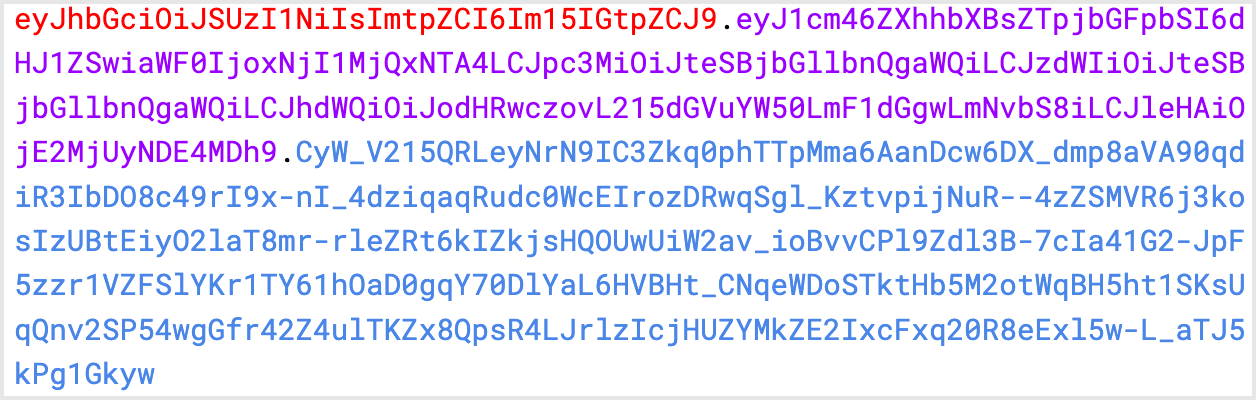 Corresponds to:
```json lines theme={null}
{
"alg": "RS256",
"kid": "my kid"
}
{
"iat": 1626684584,
"iss": "my client id",
"sub": "my client id",
"aud": "https://mytenant.auth0.com/",
"exp": 1626684644,
"jti": "e4dc8ed1-b108-4901-8bbc-c07a791817e7"
}
```
After you generate the JWT with the required information, you are ready to authenticate your application against Auth0.
## Exchange assertion for access tokens
The following example uses the [Client Credential Flow](/docs/get-started/authentication-and-authorization-flow/client-credentials-flow). Private Key JWT authentication can be used for other grant types that also allow replacing `client_secret` with `client_assertion`.
To exchange the JWT assertion for an access token, call the Authentication API [token endpoint](https://auth0.com/docs/api/authentication#authenticate-user) with the following parameters:
* `$client_assertion`: JWT assertion
* `$resource_server_identifier`: resource server identifier. To learn more, read [Register APIs](/docs/get-started/auth0-overview/set-up-apis).
```bash lines theme={null}
curl --location --request POST 'https://$tenant/oauth/token' \
--header 'Content-Type: application/x-www-form-urlencoded' \
--data-urlencode 'grant_type=client_credentials' \
--data-urlencode 'client_assertion_type=urn:ietf:params:oauth:client-assertion-type:jwt-bearer' \
--data-urlencode 'client_assertion=$client_assertion' \
--data-urlencode 'audience=$resource_server_idenifier'
```
## Supported endpoints
In addition to the [https://\$tenant/oauth/token](https://auth0.com/docs/api/authentication#get-token) endpoint, the following Auth0 Authentication API endpoints support `private_key_jwt` authentication for configured applications:
* [POST /oauth/revoke](https://auth0.com/docs/api/authentication#revoke-refresh-token)
* [POST /mfa/challenge](https://auth0.com/docs/api/authentication#challenge-request)
* [POST /passwordless/start](https://auth0.com/docs/api/authentication#get-code-or-link)
## Assertion limits
The maximum length of the JWT assertion is 2048 bytes.
Claims within the assertion have the following limits:
* `iss`: 64 characters
* `sub`: 64 characters
* `jti`: 64 characters
* `alg`: 16 characters
## Learn more
* [Configure Private Key JWT Authentication](/docs/get-started/applications/configure-private-key-jwt)
* [Private Key JWT Client Authentication for Okta and OIDC Connections](/docs/authenticate/enterprise-connections/private-key-jwt-client-auth)
Corresponds to:
```json lines theme={null}
{
"alg": "RS256",
"kid": "my kid"
}
{
"iat": 1626684584,
"iss": "my client id",
"sub": "my client id",
"aud": "https://mytenant.auth0.com/",
"exp": 1626684644,
"jti": "e4dc8ed1-b108-4901-8bbc-c07a791817e7"
}
```
After you generate the JWT with the required information, you are ready to authenticate your application against Auth0.
## Exchange assertion for access tokens
The following example uses the [Client Credential Flow](/docs/get-started/authentication-and-authorization-flow/client-credentials-flow). Private Key JWT authentication can be used for other grant types that also allow replacing `client_secret` with `client_assertion`.
To exchange the JWT assertion for an access token, call the Authentication API [token endpoint](https://auth0.com/docs/api/authentication#authenticate-user) with the following parameters:
* `$client_assertion`: JWT assertion
* `$resource_server_identifier`: resource server identifier. To learn more, read [Register APIs](/docs/get-started/auth0-overview/set-up-apis).
```bash lines theme={null}
curl --location --request POST 'https://$tenant/oauth/token' \
--header 'Content-Type: application/x-www-form-urlencoded' \
--data-urlencode 'grant_type=client_credentials' \
--data-urlencode 'client_assertion_type=urn:ietf:params:oauth:client-assertion-type:jwt-bearer' \
--data-urlencode 'client_assertion=$client_assertion' \
--data-urlencode 'audience=$resource_server_idenifier'
```
## Supported endpoints
In addition to the [https://\$tenant/oauth/token](https://auth0.com/docs/api/authentication#get-token) endpoint, the following Auth0 Authentication API endpoints support `private_key_jwt` authentication for configured applications:
* [POST /oauth/revoke](https://auth0.com/docs/api/authentication#revoke-refresh-token)
* [POST /mfa/challenge](https://auth0.com/docs/api/authentication#challenge-request)
* [POST /passwordless/start](https://auth0.com/docs/api/authentication#get-code-or-link)
## Assertion limits
The maximum length of the JWT assertion is 2048 bytes.
Claims within the assertion have the following limits:
* `iss`: 64 characters
* `sub`: 64 characters
* `jti`: 64 characters
* `alg`: 16 characters
## Learn more
* [Configure Private Key JWT Authentication](/docs/get-started/applications/configure-private-key-jwt)
* [Private Key JWT Client Authentication for Okta and OIDC Connections](/docs/authenticate/enterprise-connections/private-key-jwt-client-auth)