> ## Documentation Index
> Fetch the complete documentation index at: https://docs-dev-docs-event-stream-action-templates.mintlify.site/llms.txt
> Use this file to discover all available pages before exploring further.
> Solutions Overview for the Server + API architecture scenario
# Solution Overview (Server Apps + API)
In order to ensure that only authorized users and applications are allowed access to the Timesheets API, ExampleCo has decided to make use of the [OAuth 2.0 authorization framework](https://tools.ietf.org/html/rfc6749). The framework provides the flexibility the company wants since the different grants can allow them to easily authorize the various types of applications which need to communicate with the Timesheets API.
## OAuth 2.0
By using the OAuth 2.0 authorization framework, ExampleCo’s Regular Web application and the third-party application for external contractors can have limited access to the Timesheets API. Using Auth0, ExampleCo can easily support different [grant types](/docs/get-started/authentication-and-authorization-flow/which-oauth-2-0-flow-should-i-use) or authentication flows without worrying about the OAuth 2.0/OpenID Connect (OIDC) specification, or the many other technical aspects of API authorization.
In any OAuth 2.0 flow we can identify the following roles:
* **Resource Owner**: the entity that can grant access to a protected resource. Typically this is the end-user.
* **Resource Server**: the server hosting the protected resources. This is the API you want to access.
* **Client**: an application requesting access to a protected resource on behalf of the Resource Owner.
* **Authorization Server**: the server that authenticates the Resource Owner, and issues Access Tokens after getting proper authorization. In this case, Auth0's Authentication API.
[Grants types (or flows)](/docs/get-started/authentication-and-authorization-flow/which-oauth-2-0-flow-should-i-use) determine how these participants interact to grant to the applications limited access to the APIs you are building. As a result, the app will obtain an access token that can be used to call the API on behalf of the user.
### Client Credentials Grant
OAuth 2 provides several grant types for different use cases. In this particular use case where a cron job will be uploading timesheets via an API, there is no interactive user (or resource owner) to grant permissions to the cron job to access the API.
The cron job is also not making the API calls on behalf of any user. Instead the application (the cron job) uses machine-to-machine authorization makes calls to the Resource Server (the API) on its own behalf.
For situations like this where there is no user interaction involved, the [Client Credentials Grant](/docs/get-started/authentication-and-authorization-flow/client-credentials-flow) is ideal. With the Client Credentials Grant (defined in [RFC 6749, section 4.4](https://tools.ietf.org/html/rfc6749#section-4.4)), an application can directly request an access token from the Authorization Server by using its client credentials (a Client ID and a Client Secret). Instead of identifying a Resource Owner, this token will represent the application itself.
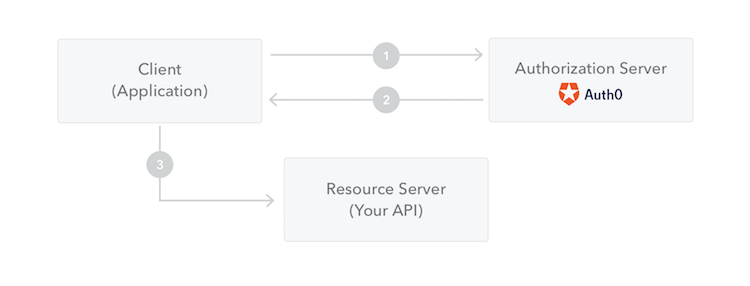 1. The application authenticates with the Authorization Server using its Client ID and Client Secret.
2. The Authorization Server validates this information and returns an access token.
3. The application can use the access token to call the Resource Server on behalf of itself.
## API Authentication and Authorization
An API is a way to expose functionality of your application to other applications. Other applications can make a request to an API endpoint and receive a response. Similarly, the external application ExampleCo’s contractors use can communicate with the Timesheet API as well as the Regular Web Application ExampleCo built for internal employees.
Since the Timesheets API handles sensitive information (such as PII and financial information), ExampleCo needs to ensure only authorized users and applications can call its' endpoints.
### Access tokens and scopes
APIs can be secured or unsecured. When an application wants to access protected endpoints on an API, it needs to provide an access token (also referred to as `access_token`) as proof that it has the required permissions.
An access token is an opaque string representing an authorization issued to the application and is obtained by authenticating the user with an Authorization Server. The user can then, in turn, authorize the application to access the API on their behalf. To learn more, read [Access Tokens](/docs/secure/tokens/access-tokens).
An API like the Timesheets API can enforce fine-grained control over who can access the various endpoints exposed by the API. These permissions are expressed as scopes.
When ExampleCo’s Regular Web Application or the third-party application authenticates with Auth0 to get an access token, the authentication request includes the list of requested scopes the application requires. If those scopes are allowed, then the access token will contain a list of authorized scopes granted to the application.
The Regular Web App or third-party application includes the access token from the Authorization Server when making requests to the Timesheets API, and the Timesheets API inspects the scope claim to ensure that the required permissions were granted in order to call the particular endpoint.
For example, the timesheet API may accept four different levels of authorization: reading timesheets (scope `read:timesheets`), creating timesheets (scope `create:timesheets`), deleting timesheets (scope `delete:timesheets`) and approving timesheets (scope `approve:timesheets`).
For more information on scopes refer to [Scopes](/docs/get-started/apis/scopes).
When the Regular Web App sends a request to the Timesheets API to create a new timesheet entry, the access token must contain the `create:timesheets` scope or the request will be denied. Similarly, to delete existing timesheets, the access token must contain the `delete:timesheets` scope.
To learn more, read [Scopes](/docs/get-started/apis/scopes).
1. The application authenticates with the Authorization Server using its Client ID and Client Secret.
2. The Authorization Server validates this information and returns an access token.
3. The application can use the access token to call the Resource Server on behalf of itself.
## API Authentication and Authorization
An API is a way to expose functionality of your application to other applications. Other applications can make a request to an API endpoint and receive a response. Similarly, the external application ExampleCo’s contractors use can communicate with the Timesheet API as well as the Regular Web Application ExampleCo built for internal employees.
Since the Timesheets API handles sensitive information (such as PII and financial information), ExampleCo needs to ensure only authorized users and applications can call its' endpoints.
### Access tokens and scopes
APIs can be secured or unsecured. When an application wants to access protected endpoints on an API, it needs to provide an access token (also referred to as `access_token`) as proof that it has the required permissions.
An access token is an opaque string representing an authorization issued to the application and is obtained by authenticating the user with an Authorization Server. The user can then, in turn, authorize the application to access the API on their behalf. To learn more, read [Access Tokens](/docs/secure/tokens/access-tokens).
An API like the Timesheets API can enforce fine-grained control over who can access the various endpoints exposed by the API. These permissions are expressed as scopes.
When ExampleCo’s Regular Web Application or the third-party application authenticates with Auth0 to get an access token, the authentication request includes the list of requested scopes the application requires. If those scopes are allowed, then the access token will contain a list of authorized scopes granted to the application.
The Regular Web App or third-party application includes the access token from the Authorization Server when making requests to the Timesheets API, and the Timesheets API inspects the scope claim to ensure that the required permissions were granted in order to call the particular endpoint.
For example, the timesheet API may accept four different levels of authorization: reading timesheets (scope `read:timesheets`), creating timesheets (scope `create:timesheets`), deleting timesheets (scope `delete:timesheets`) and approving timesheets (scope `approve:timesheets`).
For more information on scopes refer to [Scopes](/docs/get-started/apis/scopes).
When the Regular Web App sends a request to the Timesheets API to create a new timesheet entry, the access token must contain the `create:timesheets` scope or the request will be denied. Similarly, to delete existing timesheets, the access token must contain the `delete:timesheets` scope.
To learn more, read [Scopes](/docs/get-started/apis/scopes).