> ## Documentation Index
> Fetch the complete documentation index at: https://docs-dev-docs-event-stream-action-templates.mintlify.site/llms.txt
> Use this file to discover all available pages before exploring further.
> Learn how to register and authorize a test machine-to-machine application for calling Management API endpoints using Access Tokens.
# Create Machine-to-Machine Applications for Testing
When you create an account, a default Management API instance is created in the API section of the Auth0 Dashboard. A sample machine-to-machine test application is automatically created. The following instructions allow you to create another test application to use with this Management API instance and use the generated test token before building your own Production setup.
You should note, the test token located under API Explorer is for testing access to the Management API only. To learn more about Management API tokens, review [Get Management API Access Tokens for Production](/docs/secure/tokens/access-tokens/management-api-access-tokens/get-management-api-access-tokens-for-production). If you are interested in using the test token, visit [Get Management API Access Tokens for Testing](/docs/secure/tokens/access-tokens/management-api-access-tokens/get-management-api-access-tokens-for-testing)
1. Go to [Dashboard > Applications > APIs](https://manage.auth0.com/#/apis) and select **Auth0 Management API**.
2. Select the **API Explorer** tab.
3. Click **Create & Authorize a Test Application**. A new application has been created and is authorized to access the Management API.
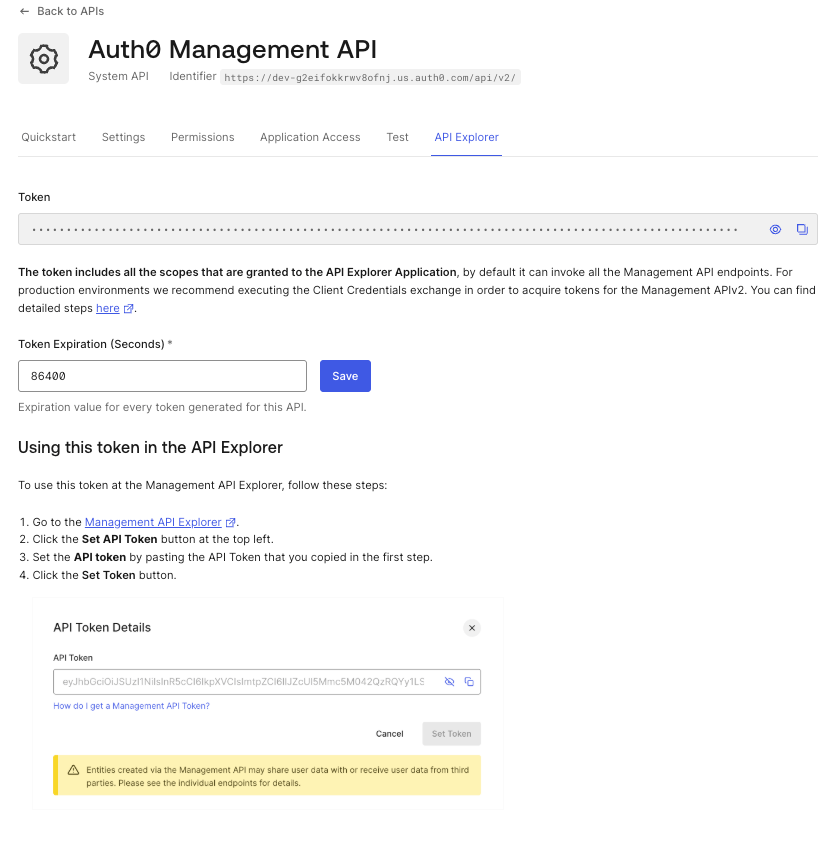 The application created in the steps above has been granted all the Management API scopes. This means that it can access all endpoints for testing purposes. However, applications do not generally allow access to all scopes but only authorizes scopes that are required.
Each machine-to-machine application that accesses an API must be granted a set of [Scopes](/docs/get-started/apis/scopes/api-scopes). Scopes are permissions that should be granted by the owner. Each [Auth0 Management API v2](https://auth0.com/docs/api/management/v2) endpoint requires specific scopes. To see the required scopes/permissions for each endpoint, go to the [Management API Explorer](https://auth0.com/docs/api/management/v2#!) and find the endpoint you want to call. Each endpoint has a section called **Scopes** listing all the scopes that the endpoint accepts.
## Example: Get All Connections endpoint
The [Get All Connections](https://auth0.com/docs/api/management/v2#!/Clients/get_connections) endpoint accepts the `read:connections` scope while the [Create a Connection](https://auth0.com/docs/api/management/v2#!/Clients/post_connections) endpoint accepts the `write:connections` scope. Our machine-to-machine token should only need the `read:connections` scope in order to access data from that endpoint.
If you have multiple applications that should access the Management API, then you should create separate machine-to-machine applications for each application in Auth0 instead of just a single machine-to-machine application.
## Learn more
* [Get Management API Access Tokens for Testing](/docs/secure/tokens/access-tokens/management-api-access-tokens/get-management-api-access-tokens-for-testing)
* [Get Management API Access Tokens for Production](/docs/secure/tokens/access-tokens/management-api-access-tokens/get-management-api-access-tokens-for-production)
* [Get Management API Access Tokens for Single-Page Applications](/docs/secure/tokens/access-tokens/management-api-access-tokens/get-management-api-tokens-for-single-page-applications)
* [Applications in Auth0](/docs/get-started/applications)
The application created in the steps above has been granted all the Management API scopes. This means that it can access all endpoints for testing purposes. However, applications do not generally allow access to all scopes but only authorizes scopes that are required.
Each machine-to-machine application that accesses an API must be granted a set of [Scopes](/docs/get-started/apis/scopes/api-scopes). Scopes are permissions that should be granted by the owner. Each [Auth0 Management API v2](https://auth0.com/docs/api/management/v2) endpoint requires specific scopes. To see the required scopes/permissions for each endpoint, go to the [Management API Explorer](https://auth0.com/docs/api/management/v2#!) and find the endpoint you want to call. Each endpoint has a section called **Scopes** listing all the scopes that the endpoint accepts.
## Example: Get All Connections endpoint
The [Get All Connections](https://auth0.com/docs/api/management/v2#!/Clients/get_connections) endpoint accepts the `read:connections` scope while the [Create a Connection](https://auth0.com/docs/api/management/v2#!/Clients/post_connections) endpoint accepts the `write:connections` scope. Our machine-to-machine token should only need the `read:connections` scope in order to access data from that endpoint.
If you have multiple applications that should access the Management API, then you should create separate machine-to-machine applications for each application in Auth0 instead of just a single machine-to-machine application.
## Learn more
* [Get Management API Access Tokens for Testing](/docs/secure/tokens/access-tokens/management-api-access-tokens/get-management-api-access-tokens-for-testing)
* [Get Management API Access Tokens for Production](/docs/secure/tokens/access-tokens/management-api-access-tokens/get-management-api-access-tokens-for-production)
* [Get Management API Access Tokens for Single-Page Applications](/docs/secure/tokens/access-tokens/management-api-access-tokens/get-management-api-tokens-for-single-page-applications)
* [Applications in Auth0](/docs/get-started/applications)