> ## Documentation Index
> Fetch the complete documentation index at: https://docs-dev-docs-event-stream-action-templates.mintlify.site/llms.txt
> Use this file to discover all available pages before exploring further.
> Learn how to add permissions to APIs using the Auth Dashboard or the Management API.
# Add API Permissions
export const AuthCodeGroup = ({children, dropdown}) => {
const [processedChildren, setProcessedChildren] = useState(children);
useEffect(() => {
let unsubscribe = null;
function init() {
unsubscribe = window.autorun(() => {
const processChildren = node => {
if (typeof node === "string") {
let processedNode = node;
for (const [key, value] of window.rootStore.variableStore.values.entries()) {
const escapedKey = key.replaceAll(/[.*+?^${}()|[\]\\]/g, (String.raw)`\$&`);
processedNode = processedNode.replaceAll(new RegExp(escapedKey, "g"), value);
}
return processedNode;
} else if (Array.isArray(node)) {
return node.map(processChildren);
} else if (node && node.props && node.props.children) {
return {
...node,
props: {
...node.props,
children: processChildren(node.props.children)
}
};
}
return node;
};
setProcessedChildren(processChildren(children));
});
}
if (window.rootStore) {
init();
} else {
window.addEventListener("adu:storeReady", init);
}
return () => {
window.removeEventListener("adu:storeReady", init);
unsubscribe?.();
};
}, [children]);
return {processedChildren};
};
export const AuthCodeBlock = ({filename, icon, language, highlight, children}) => {
const [displayText, setDisplayText] = useState(children);
const [copyText, setCopyText] = useState(children);
const wrapperRef = React.useRef(null);
useEffect(() => {
let unsubscribe = null;
function init() {
if (!window.autorun || !window.rootStore) {
return;
}
unsubscribe = window.autorun(() => {
let processedChildrenForDisplay = children;
let processedChildrenForCopy = children;
for (const [key, value] of window.rootStore.variableStore.values.entries()) {
const escapedKey = key.replaceAll(/[.*+?^${}()|[\]\\]/g, (String.raw)`\$&`);
let displayValue = value;
if (key === "{yourClientSecret}" && value !== "{yourClientSecret}") {
displayValue = value.substring(0, 3) + "*****MASKED*****";
}
processedChildrenForDisplay = processedChildrenForDisplay.replaceAll(new RegExp(escapedKey, "g"), displayValue);
processedChildrenForCopy = processedChildrenForCopy.replaceAll(new RegExp(escapedKey, "g"), value);
}
setDisplayText(processedChildrenForDisplay);
setCopyText(processedChildrenForCopy);
});
}
if (window.rootStore) {
init();
} else {
window.addEventListener("adu:storeReady", init);
}
return () => {
window.removeEventListener("adu:storeReady", init);
unsubscribe?.();
};
}, [children]);
useEffect(() => {
if (!wrapperRef.current) return;
const originalWriteText = navigator.clipboard.writeText.bind(navigator.clipboard);
let isOverriding = false;
const handleClick = e => {
const button = e.target.closest('[data-testid="copy-code-button"]');
if (!button || !wrapperRef.current.contains(button)) return;
isOverriding = true;
navigator.clipboard.writeText = text => {
if (isOverriding) {
isOverriding = false;
navigator.clipboard.writeText = originalWriteText;
return originalWriteText(copyText);
}
return originalWriteText(text);
};
setTimeout(() => {
if (isOverriding) {
isOverriding = false;
navigator.clipboard.writeText = originalWriteText;
}
}, 100);
};
const wrapper = wrapperRef.current;
wrapper.addEventListener('click', handleClick, true);
return () => {
wrapper.removeEventListener('click', handleClick, true);
if (navigator.clipboard.writeText !== originalWriteText) {
navigator.clipboard.writeText = originalWriteText;
}
};
}, [copyText]);
return
{displayText}
;
};
You can add permissions to an API using the Auth0 Dashboard or the Management API.
By default, any user of any application can ask for any permission defined here. You can implement access policies to limit this behavior via [rules](/docs/customize/rules).
## Use the Dashboard
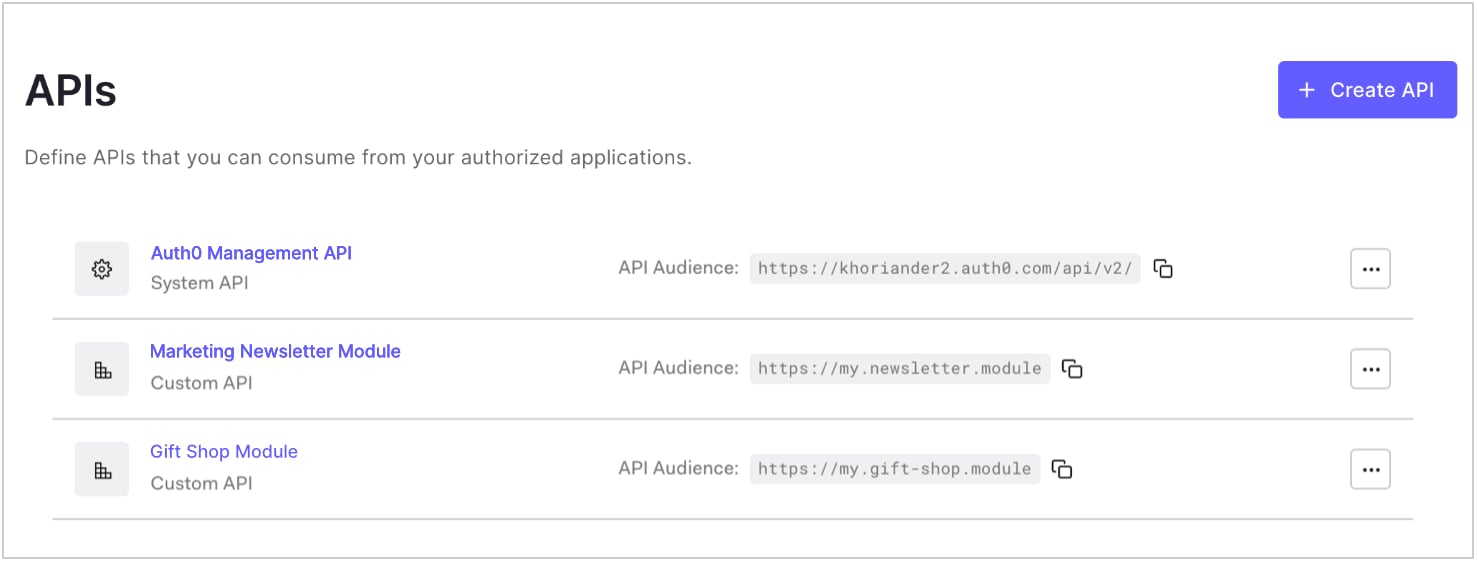
1. Go to [Dashboard > Applications > APIs](https://manage.auth0.com/#/apis) and click the name of the API to view.
 2. Go to the **Permissions** tab and enter a permission name and description for the permission you want to add. Be sure not to use any reserved permission names (see Reserved names section).
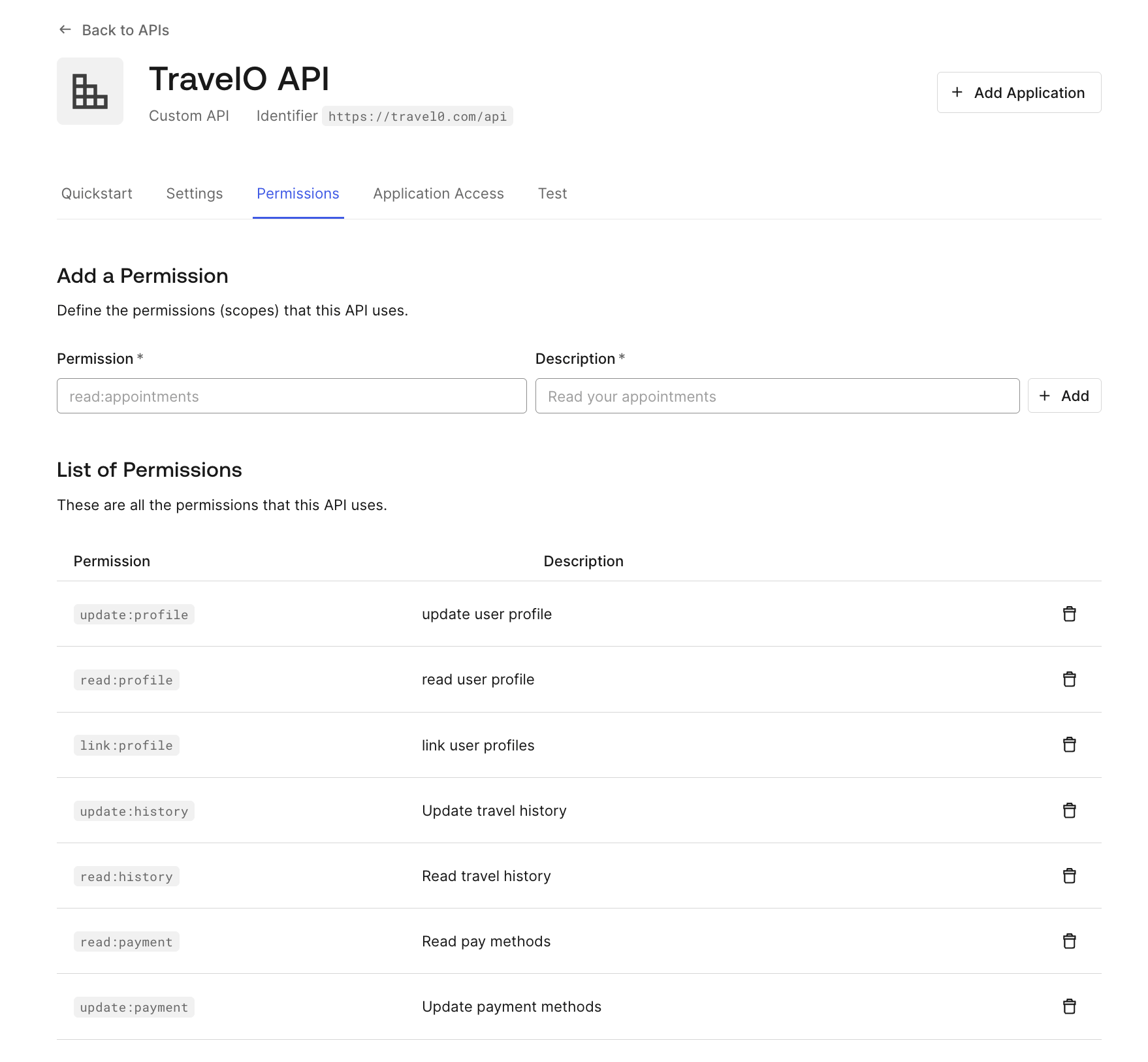 3. Click **Add**. Remember that individual Applications may need permissions and/or scopes updated to interact properly with the API.
## Use the Management API
Patching the permissions with an empty object removes the permissions completely.
Make a `PATCH` call to the [Update Resource Server endpoint](https://auth0.com/docs/api/management/v2/resource-servers/patch-resource-servers-by-id). Be sure to replace `API_ID`, `MGMT_API_ACCESS_TOKEN`, `PERMISSION_NAME`, and `PERMISSION_DESC` placeholder values with your API ID, Management API Access Token, permission name(s), and permission description(s), respectively. Be sure not to use any reserved permission names (see Reserved names section).
```bash cURL theme={null}
curl --request PATCH \
--url 'https://{yourDomain}/api/v2/resource-servers/API_ID' \
--header 'authorization: Bearer MGMT_API_ACCESS_TOKEN' \
--header 'cache-control: no-cache' \
--header 'content-type: application/json' \
--data '{ "scopes": [ { "value": "PERMISSION_NAME", "description": "PERMISSION_DESC" }, { "value": "PERMISSION_NAME", "description": "PERMISSION_DESC" } ] }'
```
```csharp C# theme={null}
var client = new RestClient("https://{yourDomain}/api/v2/resource-servers/API_ID");
var request = new RestRequest(Method.PATCH);
request.AddHeader("content-type", "application/json");
request.AddHeader("authorization", "Bearer MGMT_API_ACCESS_TOKEN");
request.AddHeader("cache-control", "no-cache");
request.AddParameter("application/json", "{ "scopes": [ { "value": "PERMISSION_NAME", "description": "PERMISSION_DESC" }, { "value": "PERMISSION_NAME", "description": "PERMISSION_DESC" } ] }", ParameterType.RequestBody);
IRestResponse response = client.Execute(request);
```
```go Go theme={null}
package main
import (
"fmt"
"strings"
"net/http"
"io/ioutil"
)
func main() {
url := "https://{yourDomain}/api/v2/resource-servers/API_ID"
payload := strings.NewReader("{ "scopes": [ { "value": "PERMISSION_NAME", "description": "PERMISSION_DESC" }, { "value": "PERMISSION_NAME", "description": "PERMISSION_DESC" } ] }")
req, _ := http.NewRequest("PATCH", url, payload)
req.Header.Add("content-type", "application/json")
req.Header.Add("authorization", "Bearer MGMT_API_ACCESS_TOKEN")
req.Header.Add("cache-control", "no-cache")
res, _ := http.DefaultClient.Do(req)
defer res.Body.Close()
body, _ := ioutil.ReadAll(res.Body)
fmt.Println(res)
fmt.Println(string(body))
}
```
```java Java theme={null}
HttpResponse response = Unirest.patch("https://{yourDomain}/api/v2/resource-servers/API_ID")
.header("content-type", "application/json")
.header("authorization", "Bearer MGMT_API_ACCESS_TOKEN")
.header("cache-control", "no-cache")
.body("{ "scopes": [ { "value": "PERMISSION_NAME", "description": "PERMISSION_DESC" }, { "value": "PERMISSION_NAME", "description": "PERMISSION_DESC" } ] }")
.asString();
```
```javascript Node.JS theme={null}
var axios = require("axios").default;
var options = {
method: 'PATCH',
url: 'https://{yourDomain}/api/v2/resource-servers/API_ID',
headers: {
'content-type': 'application/json',
authorization: 'Bearer MGMT_API_ACCESS_TOKEN',
'cache-control': 'no-cache'
},
data: {
scopes: [
{value: 'PERMISSION_NAME', description: 'PERMISSION_DESC'},
{value: 'PERMISSION_NAME', description: 'PERMISSION_DESC'}
]
}
};
axios.request(options).then(function (response) {
console.log(response.data);
}).catch(function (error) {
console.error(error);
});
```
```php PHP theme={null}
$curl = curl_init();
curl_setopt_array($curl, [
CURLOPT_URL => "https://{yourDomain}/api/v2/resource-servers/API_ID",
CURLOPT_RETURNTRANSFER => true,
CURLOPT_ENCODING => "",
CURLOPT_MAXREDIRS => 10,
CURLOPT_TIMEOUT => 30,
CURLOPT_HTTP_VERSION => CURL_HTTP_VERSION_1_1,
CURLOPT_CUSTOMREQUEST => "PATCH",
CURLOPT_POSTFIELDS => "{ "scopes": [ { "value": "PERMISSION_NAME", "description": "PERMISSION_DESC" }, { "value": "PERMISSION_NAME", "description": "PERMISSION_DESC" } ] }",
CURLOPT_HTTPHEADER => [
"authorization: Bearer MGMT_API_ACCESS_TOKEN",
"cache-control: no-cache",
"content-type: application/json"
],
]);
$response = curl_exec($curl);
$err = curl_error($curl);
curl_close($curl);
if ($err) {
echo "cURL Error #:" . $err;
} else {
echo $response;
}
```
```python Python theme={null}
import http.client
conn = http.client.HTTPSConnection("")
payload = "{ "scopes": [ { "value": "PERMISSION_NAME", "description": "PERMISSION_DESC" }, { "value": "PERMISSION_NAME", "description": "PERMISSION_DESC" } ] }"
headers = {
'content-type': "application/json",
'authorization': "Bearer MGMT_API_ACCESS_TOKEN",
'cache-control': "no-cache"
}
conn.request("PATCH", "/{yourDomain}/api/v2/resource-servers/API_ID", payload, headers)
res = conn.getresponse()
data = res.read()
print(data.decode("utf-8"))
```
```ruby Ruby theme={null}
require 'uri'
require 'net/http'
require 'openssl'
url = URI("https://{yourDomain}/api/v2/resource-servers/API_ID")
http = Net::HTTP.new(url.host, url.port)
http.use_ssl = true
http.verify_mode = OpenSSL::SSL::VERIFY_NONE
request = Net::HTTP::Patch.new(url)
request["content-type"] = 'application/json'
request["authorization"] = 'Bearer MGMT_API_ACCESS_TOKEN'
request["cache-control"] = 'no-cache'
request.body = "{ "scopes": [ { "value": "PERMISSION_NAME", "description": "PERMISSION_DESC" }, { "value": "PERMISSION_NAME", "description": "PERMISSION_DESC" } ] }"
response = http.request(request)
puts response.read_body
```
When adding or updating scopes, Management API requires that you pass all scopes you would to include. If any of the existing scopes are not passed, they will be removed.
| Value | Description |
| ----------------------- | -------------------------------------------------------------------------------------------------------------------------------- |
| `API_ID` | ID of the API for which you want to delete permissions. |
| `MGMT_API_ACCESS_TOKEN` | [Access Token for the Management API](https://auth0.com/docs/api/management/v2/tokens) with the scope `update:resource_servers`. |
| `PERMISSION_NAME` | Name(s) of the permission(s) you want to keep for the specified API. |
| `PERMISSION_DESC` | User-friendly description(s) of the permission(s) you want to keep for the specified API. |
## Reserved names
The following permission names are reserved and cannot be set as custom API permissions:
* address
* created\_at
* email
* email\_verified
* family\_name
* given\_name
* identities
* name
* nickname
* offline\_access
* openid
* phone
* picture
* profile
## Learn more
* [Customize Consent Prompts](/docs/customize/login-pages/customize-consent-prompts)
* [Configure Logical API for Multiple APIs](/docs/get-started/apis/set-logical-api)
* [Role-Based Access Control](/docs/manage-users/access-control/rbac)
* [Enable Role-Based Access Control for APIs](/docs/get-started/apis/enable-role-based-access-control-for-apis)
3. Click **Add**. Remember that individual Applications may need permissions and/or scopes updated to interact properly with the API.
## Use the Management API
Patching the permissions with an empty object removes the permissions completely.
Make a `PATCH` call to the [Update Resource Server endpoint](https://auth0.com/docs/api/management/v2/resource-servers/patch-resource-servers-by-id). Be sure to replace `API_ID`, `MGMT_API_ACCESS_TOKEN`, `PERMISSION_NAME`, and `PERMISSION_DESC` placeholder values with your API ID, Management API Access Token, permission name(s), and permission description(s), respectively. Be sure not to use any reserved permission names (see Reserved names section).
```bash cURL theme={null}
curl --request PATCH \
--url 'https://{yourDomain}/api/v2/resource-servers/API_ID' \
--header 'authorization: Bearer MGMT_API_ACCESS_TOKEN' \
--header 'cache-control: no-cache' \
--header 'content-type: application/json' \
--data '{ "scopes": [ { "value": "PERMISSION_NAME", "description": "PERMISSION_DESC" }, { "value": "PERMISSION_NAME", "description": "PERMISSION_DESC" } ] }'
```
```csharp C# theme={null}
var client = new RestClient("https://{yourDomain}/api/v2/resource-servers/API_ID");
var request = new RestRequest(Method.PATCH);
request.AddHeader("content-type", "application/json");
request.AddHeader("authorization", "Bearer MGMT_API_ACCESS_TOKEN");
request.AddHeader("cache-control", "no-cache");
request.AddParameter("application/json", "{ "scopes": [ { "value": "PERMISSION_NAME", "description": "PERMISSION_DESC" }, { "value": "PERMISSION_NAME", "description": "PERMISSION_DESC" } ] }", ParameterType.RequestBody);
IRestResponse response = client.Execute(request);
```
```go Go theme={null}
package main
import (
"fmt"
"strings"
"net/http"
"io/ioutil"
)
func main() {
url := "https://{yourDomain}/api/v2/resource-servers/API_ID"
payload := strings.NewReader("{ "scopes": [ { "value": "PERMISSION_NAME", "description": "PERMISSION_DESC" }, { "value": "PERMISSION_NAME", "description": "PERMISSION_DESC" } ] }")
req, _ := http.NewRequest("PATCH", url, payload)
req.Header.Add("content-type", "application/json")
req.Header.Add("authorization", "Bearer MGMT_API_ACCESS_TOKEN")
req.Header.Add("cache-control", "no-cache")
res, _ := http.DefaultClient.Do(req)
defer res.Body.Close()
body, _ := ioutil.ReadAll(res.Body)
fmt.Println(res)
fmt.Println(string(body))
}
```
```java Java theme={null}
HttpResponse response = Unirest.patch("https://{yourDomain}/api/v2/resource-servers/API_ID")
.header("content-type", "application/json")
.header("authorization", "Bearer MGMT_API_ACCESS_TOKEN")
.header("cache-control", "no-cache")
.body("{ "scopes": [ { "value": "PERMISSION_NAME", "description": "PERMISSION_DESC" }, { "value": "PERMISSION_NAME", "description": "PERMISSION_DESC" } ] }")
.asString();
```
```javascript Node.JS theme={null}
var axios = require("axios").default;
var options = {
method: 'PATCH',
url: 'https://{yourDomain}/api/v2/resource-servers/API_ID',
headers: {
'content-type': 'application/json',
authorization: 'Bearer MGMT_API_ACCESS_TOKEN',
'cache-control': 'no-cache'
},
data: {
scopes: [
{value: 'PERMISSION_NAME', description: 'PERMISSION_DESC'},
{value: 'PERMISSION_NAME', description: 'PERMISSION_DESC'}
]
}
};
axios.request(options).then(function (response) {
console.log(response.data);
}).catch(function (error) {
console.error(error);
});
```
```php PHP theme={null}
$curl = curl_init();
curl_setopt_array($curl, [
CURLOPT_URL => "https://{yourDomain}/api/v2/resource-servers/API_ID",
CURLOPT_RETURNTRANSFER => true,
CURLOPT_ENCODING => "",
CURLOPT_MAXREDIRS => 10,
CURLOPT_TIMEOUT => 30,
CURLOPT_HTTP_VERSION => CURL_HTTP_VERSION_1_1,
CURLOPT_CUSTOMREQUEST => "PATCH",
CURLOPT_POSTFIELDS => "{ "scopes": [ { "value": "PERMISSION_NAME", "description": "PERMISSION_DESC" }, { "value": "PERMISSION_NAME", "description": "PERMISSION_DESC" } ] }",
CURLOPT_HTTPHEADER => [
"authorization: Bearer MGMT_API_ACCESS_TOKEN",
"cache-control: no-cache",
"content-type: application/json"
],
]);
$response = curl_exec($curl);
$err = curl_error($curl);
curl_close($curl);
if ($err) {
echo "cURL Error #:" . $err;
} else {
echo $response;
}
```
```python Python theme={null}
import http.client
conn = http.client.HTTPSConnection("")
payload = "{ "scopes": [ { "value": "PERMISSION_NAME", "description": "PERMISSION_DESC" }, { "value": "PERMISSION_NAME", "description": "PERMISSION_DESC" } ] }"
headers = {
'content-type': "application/json",
'authorization': "Bearer MGMT_API_ACCESS_TOKEN",
'cache-control': "no-cache"
}
conn.request("PATCH", "/{yourDomain}/api/v2/resource-servers/API_ID", payload, headers)
res = conn.getresponse()
data = res.read()
print(data.decode("utf-8"))
```
```ruby Ruby theme={null}
require 'uri'
require 'net/http'
require 'openssl'
url = URI("https://{yourDomain}/api/v2/resource-servers/API_ID")
http = Net::HTTP.new(url.host, url.port)
http.use_ssl = true
http.verify_mode = OpenSSL::SSL::VERIFY_NONE
request = Net::HTTP::Patch.new(url)
request["content-type"] = 'application/json'
request["authorization"] = 'Bearer MGMT_API_ACCESS_TOKEN'
request["cache-control"] = 'no-cache'
request.body = "{ "scopes": [ { "value": "PERMISSION_NAME", "description": "PERMISSION_DESC" }, { "value": "PERMISSION_NAME", "description": "PERMISSION_DESC" } ] }"
response = http.request(request)
puts response.read_body
```
When adding or updating scopes, Management API requires that you pass all scopes you would to include. If any of the existing scopes are not passed, they will be removed.
| Value | Description |
| ----------------------- | -------------------------------------------------------------------------------------------------------------------------------- |
| `API_ID` | ID of the API for which you want to delete permissions. |
| `MGMT_API_ACCESS_TOKEN` | [Access Token for the Management API](https://auth0.com/docs/api/management/v2/tokens) with the scope `update:resource_servers`. |
| `PERMISSION_NAME` | Name(s) of the permission(s) you want to keep for the specified API. |
| `PERMISSION_DESC` | User-friendly description(s) of the permission(s) you want to keep for the specified API. |
## Reserved names
The following permission names are reserved and cannot be set as custom API permissions:
* address
* created\_at
* email
* email\_verified
* family\_name
* given\_name
* identities
* name
* nickname
* offline\_access
* openid
* phone
* picture
* profile
## Learn more
* [Customize Consent Prompts](/docs/customize/login-pages/customize-consent-prompts)
* [Configure Logical API for Multiple APIs](/docs/get-started/apis/set-logical-api)
* [Role-Based Access Control](/docs/manage-users/access-control/rbac)
* [Enable Role-Based Access Control for APIs](/docs/get-started/apis/enable-role-based-access-control-for-apis)