> ## Documentation Index
> Fetch the complete documentation index at: https://docs-dev-docs-event-stream-action-templates.mintlify.site/llms.txt
> Use this file to discover all available pages before exploring further.
> Describes how to configure global variables for rules using the Auth0 Dashboard.
# Configure Global Variables for Rules
The End of Life (EOL) date of Rules and Hooks will be **November 18, 2026**, and they are no longer available to new tenants created as of **October 16, 2023**. Existing tenants with active Hooks will retain Hooks product access through end of life.
We highly recommend that you use Actions to extend Auth0. With Actions, you have access to rich type information, inline documentation, and public `npm` packages, and can connect external integrations that enhance your overall extensibility experience. To learn more about what Actions offer, read [Understand How Auth0 Actions Work](/docs/customize/actions/actions-overview).
To help with your migration, we offer guides that will help you [migrate from Rules to Actions](/docs/customize/actions/migrate/migrate-from-rules-to-actions) and [migrate from Hooks to Actions](/docs/customize/actions/migrate/migrate-from-hooks-to-actions). We also have a dedicated [Move to Actions](https://auth0.com/extensibility/movetoactions) page that highlights feature comparisons, [an Actions demo](https://www.youtube.com/watch?v=UesFSY1klrI), and other resources to help you on your migration journey.
To read more about the Rules and Hooks deprecation, read our blog post: [Preparing for Rules and Hooks End of Life](https://auth0.com/blog/preparing-for-rules-and-hooks-end-of-life/).
You can configure global variables for rules using Auth0's Dashboard. To learn more, see [Auth0 Rules](/docs/customize/rules).
1. Go to [Auth0 Dashboard > Auth Pipeline > Rules](https://manage.auth0.com/#/rules) and locate the **Settings** section.
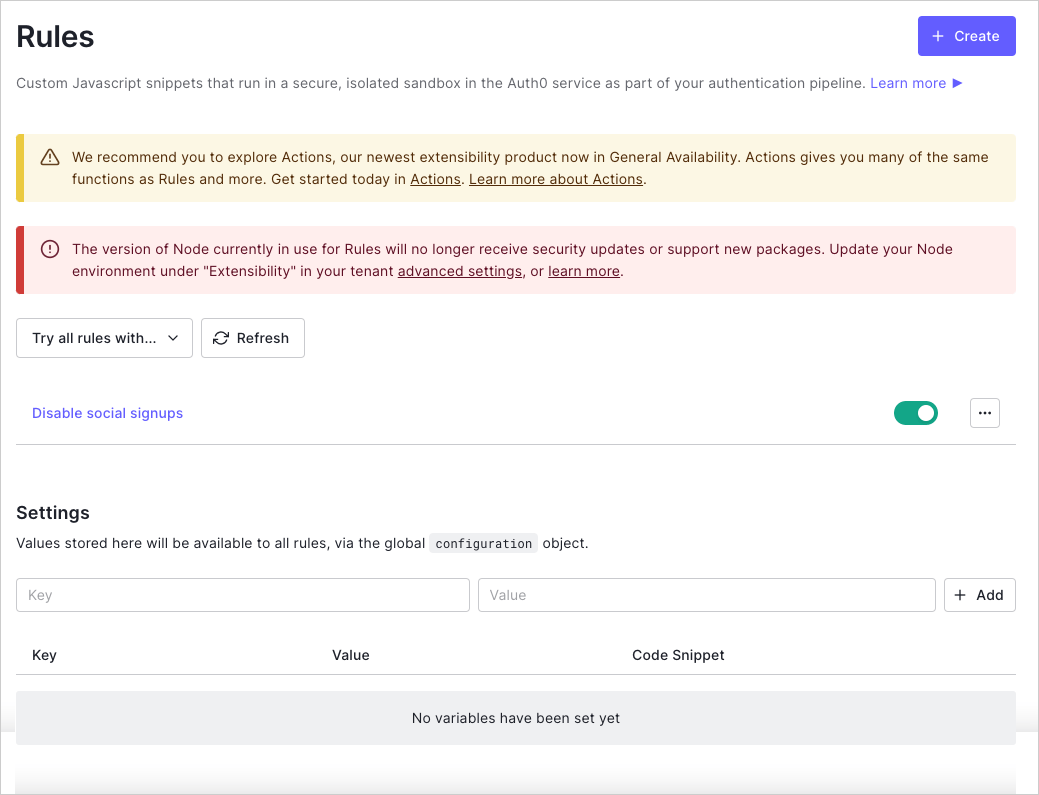 2. Enter a variable key/value pair, and select **+ Add**.
The entered value is now available to all rules via the global `configuration` object and can be referenced using the value in the **Code Snippet** column.
## Learn more
* [Create Rules](/docs/customize/rules/create-rules)
2. Enter a variable key/value pair, and select **+ Add**.
The entered value is now available to all rules via the global `configuration` object and can be referenced using the value in the **Code Snippet** column.
## Learn more
* [Create Rules](/docs/customize/rules/create-rules)