> ## Documentation Index
> Fetch the complete documentation index at: https://docs-dev-docs-event-stream-action-templates.mintlify.site/llms.txt
> Use this file to discover all available pages before exploring further.

> Configure an update policy form using Forms for Actions

# Use Cases: Configure an update policy form using Forms

<Card title="Before you start">
  1. Create a [Machine-to-Machine Application](/docs/get-started/auth0-overview/create-applications/machine-to-machine-apps) with the following scopes enabled:

  * `read:users`
  * `update:users`
  * `create:users`
  * `read:users_app_metadata`
  * `update:users_app_metadata`
  * `create:users_app_metadata`

  2. Add a [Vault connection](/docs/customize/forms/vault) using the M2M application credentials.
</Card>

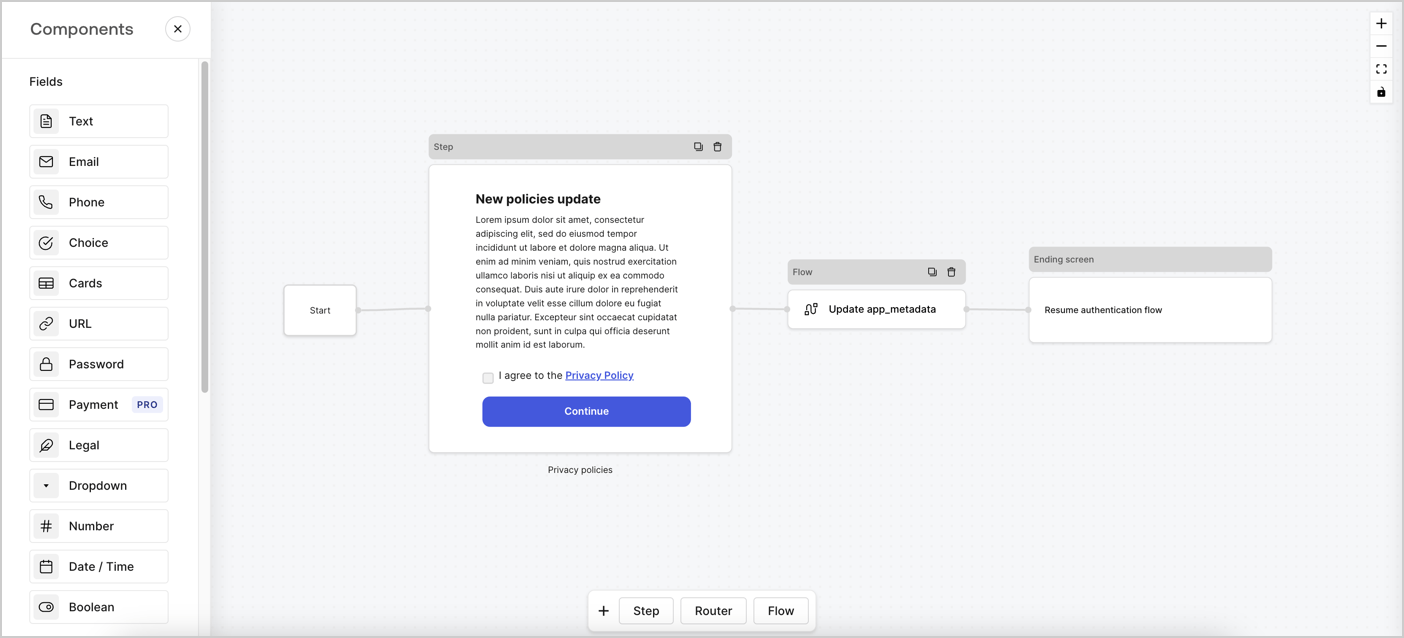
Forms for Actions allows you to create custom privacy policies flows and store the consent under the `app_metadata` object.
<Frame>
  <img src="https://mintcdn.com/docs-dev-docs-event-stream-action-templates/wYcZudKzAy7DVE3d/docs/images/cdy7uua7fh8z/6i68dMvHDTijfRmSgN1x8Q/ad900e7d4c0fb34645921435472b8684/privavy-policy-form.png?fit=max&auto=format&n=wYcZudKzAy7DVE3d&q=85&s=ecfa477ca08bc974e054d6d991d1106b" alt="Dashboard > Actions > Forms > Privacy policy use case" data-og-width="1404" width="1404" data-og-height="638" height="638" data-path="docs/images/cdy7uua7fh8z/6i68dMvHDTijfRmSgN1x8Q/ad900e7d4c0fb34645921435472b8684/privavy-policy-form.png" data-optimize="true" data-opv="3" srcset="https://mintcdn.com/docs-dev-docs-event-stream-action-templates/wYcZudKzAy7DVE3d/docs/images/cdy7uua7fh8z/6i68dMvHDTijfRmSgN1x8Q/ad900e7d4c0fb34645921435472b8684/privavy-policy-form.png?w=280&fit=max&auto=format&n=wYcZudKzAy7DVE3d&q=85&s=eca7b5dd745a52a07393b3fa3bba85f2 280w, https://mintcdn.com/docs-dev-docs-event-stream-action-templates/wYcZudKzAy7DVE3d/docs/images/cdy7uua7fh8z/6i68dMvHDTijfRmSgN1x8Q/ad900e7d4c0fb34645921435472b8684/privavy-policy-form.png?w=560&fit=max&auto=format&n=wYcZudKzAy7DVE3d&q=85&s=9d9acd9dbc13ca47761814cb328f1fe0 560w, https://mintcdn.com/docs-dev-docs-event-stream-action-templates/wYcZudKzAy7DVE3d/docs/images/cdy7uua7fh8z/6i68dMvHDTijfRmSgN1x8Q/ad900e7d4c0fb34645921435472b8684/privavy-policy-form.png?w=840&fit=max&auto=format&n=wYcZudKzAy7DVE3d&q=85&s=905a896bcf7affe3487e9d216be5fed9 840w, https://mintcdn.com/docs-dev-docs-event-stream-action-templates/wYcZudKzAy7DVE3d/docs/images/cdy7uua7fh8z/6i68dMvHDTijfRmSgN1x8Q/ad900e7d4c0fb34645921435472b8684/privavy-policy-form.png?w=1100&fit=max&auto=format&n=wYcZudKzAy7DVE3d&q=85&s=0acd22d8570128664923a2c751c929b9 1100w, https://mintcdn.com/docs-dev-docs-event-stream-action-templates/wYcZudKzAy7DVE3d/docs/images/cdy7uua7fh8z/6i68dMvHDTijfRmSgN1x8Q/ad900e7d4c0fb34645921435472b8684/privavy-policy-form.png?w=1650&fit=max&auto=format&n=wYcZudKzAy7DVE3d&q=85&s=859b072632c63660f47cb08dafb0ed26 1650w, https://mintcdn.com/docs-dev-docs-event-stream-action-templates/wYcZudKzAy7DVE3d/docs/images/cdy7uua7fh8z/6i68dMvHDTijfRmSgN1x8Q/ad900e7d4c0fb34645921435472b8684/privavy-policy-form.png?w=2500&fit=max&auto=format&n=wYcZudKzAy7DVE3d&q=85&s=4c4e6ee389e63eb238ca5c663793ce9f 2500w" />
</Frame>

The sections below outline how you can create an Update Policy form using nodes and flows, along with steps for adding your form to a [Post Login](/docs/customize/actions/explore-triggers/signup-and-login-triggers/login-trigger) Action.

## Create a form from scratch

Follow these steps to create a form to gather information:

1. Open the Form editor by selecting **Auth0 Dashboard > Actions > Forms.**
2. Select **Create Form** > **Start from scratch**.

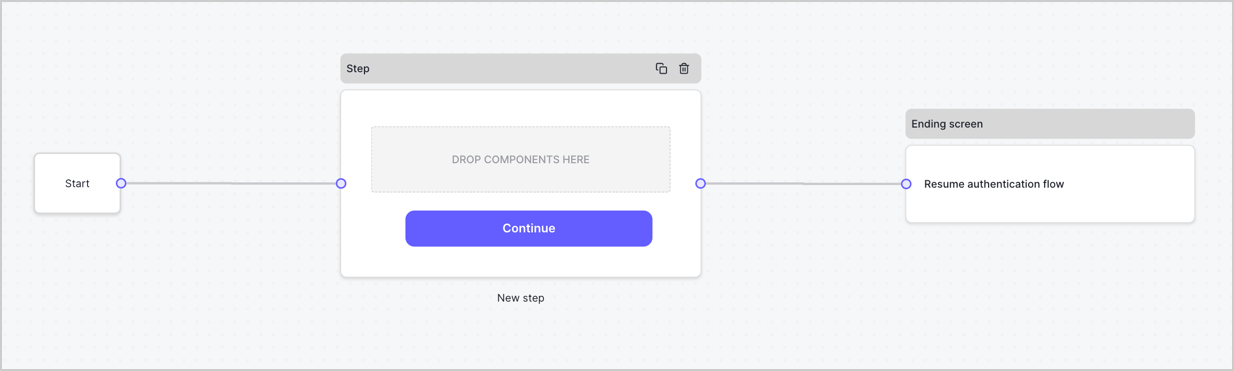
By default, a new form contains a Start node, a Step node, and an Ending screen node.
<Frame>
  <img src="https://mintcdn.com/docs-dev-docs-event-stream-action-templates/4qFzmJi6DiADu06-/docs/images/cdy7uua7fh8z/2TZ9jSjgEcARFpULI6hz4R/a4319a1bd482f2ee5cc23100fdb2f42c/New-form-Forms-for-action-use-case.png?fit=max&auto=format&n=4qFzmJi6DiADu06-&q=85&s=887dac050c8c8bd7d2232821c7b90d18" alt="Dashboard > Forms > Use Cases > Form" data-og-width="1234" width="1234" data-og-height="371" height="371" data-path="docs/images/cdy7uua7fh8z/2TZ9jSjgEcARFpULI6hz4R/a4319a1bd482f2ee5cc23100fdb2f42c/New-form-Forms-for-action-use-case.png" data-optimize="true" data-opv="3" srcset="https://mintcdn.com/docs-dev-docs-event-stream-action-templates/4qFzmJi6DiADu06-/docs/images/cdy7uua7fh8z/2TZ9jSjgEcARFpULI6hz4R/a4319a1bd482f2ee5cc23100fdb2f42c/New-form-Forms-for-action-use-case.png?w=280&fit=max&auto=format&n=4qFzmJi6DiADu06-&q=85&s=0d353511f37ad2e0a6b28863dbc04510 280w, https://mintcdn.com/docs-dev-docs-event-stream-action-templates/4qFzmJi6DiADu06-/docs/images/cdy7uua7fh8z/2TZ9jSjgEcARFpULI6hz4R/a4319a1bd482f2ee5cc23100fdb2f42c/New-form-Forms-for-action-use-case.png?w=560&fit=max&auto=format&n=4qFzmJi6DiADu06-&q=85&s=e84f2587e975b298f0b0c288f5d73e5d 560w, https://mintcdn.com/docs-dev-docs-event-stream-action-templates/4qFzmJi6DiADu06-/docs/images/cdy7uua7fh8z/2TZ9jSjgEcARFpULI6hz4R/a4319a1bd482f2ee5cc23100fdb2f42c/New-form-Forms-for-action-use-case.png?w=840&fit=max&auto=format&n=4qFzmJi6DiADu06-&q=85&s=bd9492da352c3d872580247c2804a58e 840w, https://mintcdn.com/docs-dev-docs-event-stream-action-templates/4qFzmJi6DiADu06-/docs/images/cdy7uua7fh8z/2TZ9jSjgEcARFpULI6hz4R/a4319a1bd482f2ee5cc23100fdb2f42c/New-form-Forms-for-action-use-case.png?w=1100&fit=max&auto=format&n=4qFzmJi6DiADu06-&q=85&s=e4ec967c468139bfb6881f10c46c8761 1100w, https://mintcdn.com/docs-dev-docs-event-stream-action-templates/4qFzmJi6DiADu06-/docs/images/cdy7uua7fh8z/2TZ9jSjgEcARFpULI6hz4R/a4319a1bd482f2ee5cc23100fdb2f42c/New-form-Forms-for-action-use-case.png?w=1650&fit=max&auto=format&n=4qFzmJi6DiADu06-&q=85&s=e8edfa6356e38a265637e3db5364f67a 1650w, https://mintcdn.com/docs-dev-docs-event-stream-action-templates/4qFzmJi6DiADu06-/docs/images/cdy7uua7fh8z/2TZ9jSjgEcARFpULI6hz4R/a4319a1bd482f2ee5cc23100fdb2f42c/New-form-Forms-for-action-use-case.png?w=2500&fit=max&auto=format&n=4qFzmJi6DiADu06-&q=85&s=d2598409636d15a092a26c6ea202333a 2500w" />
</Frame>

### Configure the Step node

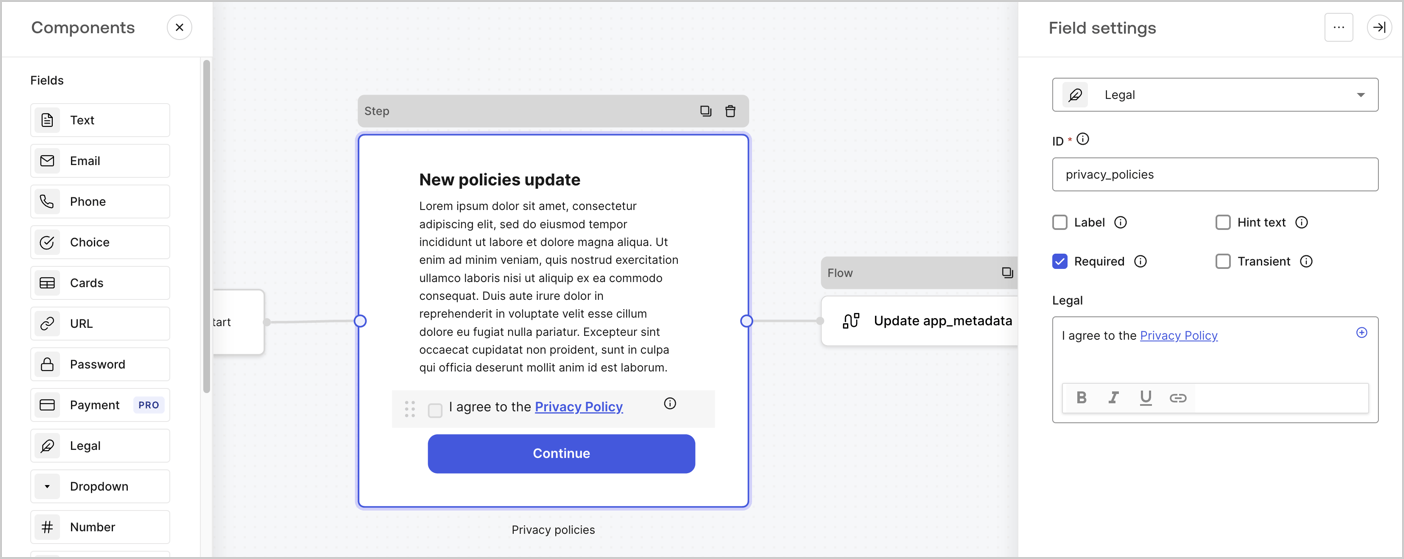
The Step node is the graphical interface visible to users. Add [Fields](/docs/customize/forms/nodes-and-components) to the Step node to collect the new agreement acceptance value by following these steps:

1. Drag a **Rich text** field from the **Components menu** into the **Step** node.

   * **Rich text**: Enter a description of your privacy policies updates.
   * Select **Save**.
2. Drag a **Legal** field into the **Step** node.

   * **ID**: Enter `privacy_policies`.
   * **Required**: Enable the checkbox.
   * **Legal**: Enter `I agree to the Privacy Policy`.
   * Select **Save**.
3. Select **Publish** to save.
<Frame>
  <img src="https://mintcdn.com/docs-dev-docs-event-stream-action-templates/DJz3781nwG6wS-wJ/docs/images/cdy7uua7fh8z/59zFFjQjAnjogkc2QGIqqJ/0ad66b1b636544122aa4e65968b76c2c/privacy-policy-step-node.png?fit=max&auto=format&n=DJz3781nwG6wS-wJ&q=85&s=58b72ac42e4d1751ccf9d7f93f753675" alt="Dashboard > Actions > Forms > Use case privacy policy step node" data-og-width="1404" width="1404" data-og-height="559" height="559" data-path="docs/images/cdy7uua7fh8z/59zFFjQjAnjogkc2QGIqqJ/0ad66b1b636544122aa4e65968b76c2c/privacy-policy-step-node.png" data-optimize="true" data-opv="3" srcset="https://mintcdn.com/docs-dev-docs-event-stream-action-templates/DJz3781nwG6wS-wJ/docs/images/cdy7uua7fh8z/59zFFjQjAnjogkc2QGIqqJ/0ad66b1b636544122aa4e65968b76c2c/privacy-policy-step-node.png?w=280&fit=max&auto=format&n=DJz3781nwG6wS-wJ&q=85&s=871ef7129578819b942aa8e80f3270be 280w, https://mintcdn.com/docs-dev-docs-event-stream-action-templates/DJz3781nwG6wS-wJ/docs/images/cdy7uua7fh8z/59zFFjQjAnjogkc2QGIqqJ/0ad66b1b636544122aa4e65968b76c2c/privacy-policy-step-node.png?w=560&fit=max&auto=format&n=DJz3781nwG6wS-wJ&q=85&s=bf6a9d2b93d7cfc26fadb04cb83842c1 560w, https://mintcdn.com/docs-dev-docs-event-stream-action-templates/DJz3781nwG6wS-wJ/docs/images/cdy7uua7fh8z/59zFFjQjAnjogkc2QGIqqJ/0ad66b1b636544122aa4e65968b76c2c/privacy-policy-step-node.png?w=840&fit=max&auto=format&n=DJz3781nwG6wS-wJ&q=85&s=75cbc2629e1755d3a721acf4fdb0d8dc 840w, https://mintcdn.com/docs-dev-docs-event-stream-action-templates/DJz3781nwG6wS-wJ/docs/images/cdy7uua7fh8z/59zFFjQjAnjogkc2QGIqqJ/0ad66b1b636544122aa4e65968b76c2c/privacy-policy-step-node.png?w=1100&fit=max&auto=format&n=DJz3781nwG6wS-wJ&q=85&s=9d366aa84b2e457cb12ab7409e9c43aa 1100w, https://mintcdn.com/docs-dev-docs-event-stream-action-templates/DJz3781nwG6wS-wJ/docs/images/cdy7uua7fh8z/59zFFjQjAnjogkc2QGIqqJ/0ad66b1b636544122aa4e65968b76c2c/privacy-policy-step-node.png?w=1650&fit=max&auto=format&n=DJz3781nwG6wS-wJ&q=85&s=51091fa5a884e52912b1e50c069c489d 1650w, https://mintcdn.com/docs-dev-docs-event-stream-action-templates/DJz3781nwG6wS-wJ/docs/images/cdy7uua7fh8z/59zFFjQjAnjogkc2QGIqqJ/0ad66b1b636544122aa4e65968b76c2c/privacy-policy-step-node.png?w=2500&fit=max&auto=format&n=DJz3781nwG6wS-wJ&q=85&s=08b8cb74d6cce677c8245640b2256660 2500w" />
</Frame>

### Configure the Flow node

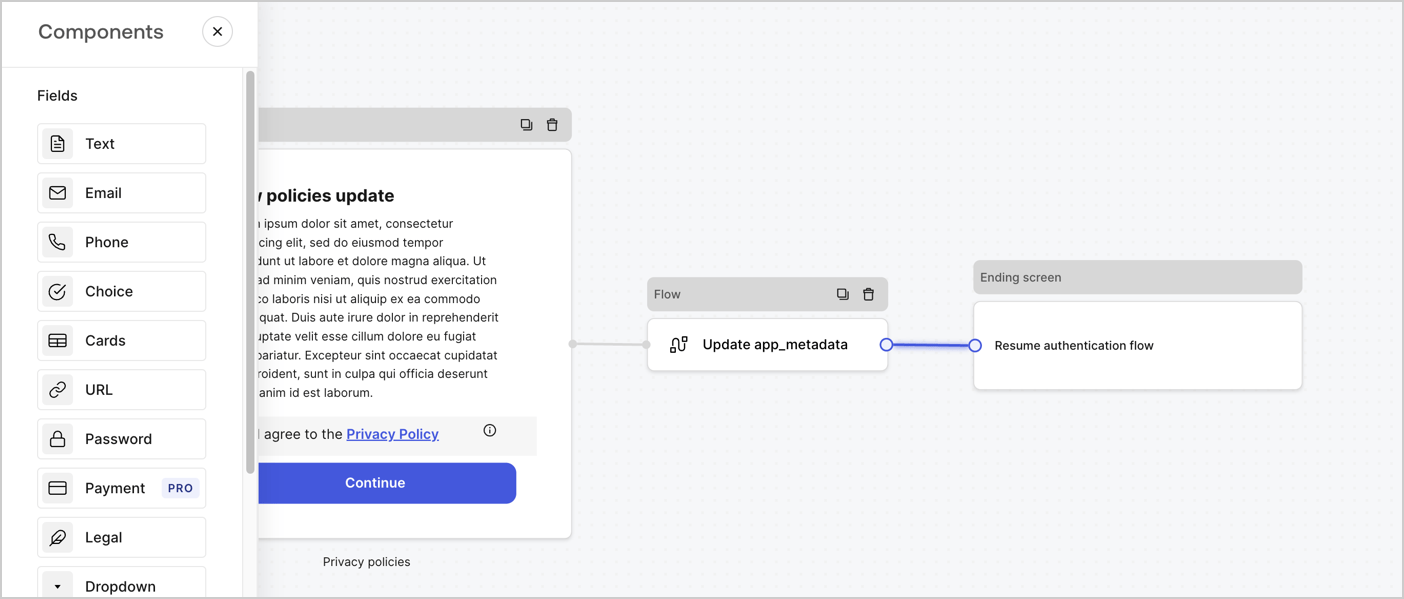
Add a **Flow** node after the **Step** node to update the `app_metadata` and resume the authentication flow by following these steps:

1. Select **Flow** from the bottom of the Form editor.
2. Remove the existing link between the **Step** and **Ending Screen** nodes.
3. Select the new **Flow** > **Click to add a flow** > **Create a new flow.**

   * Enter `Update app_metadata` in the **Name** field.
   * Select **Create**.
   * Select **Save**.
4. Link the **Flow** node to the **Step** and **Ending Screen** nodes as pictured below.
5. Select **Publish** to save.
<Frame>
  <img src="https://mintcdn.com/docs-dev-docs-event-stream-action-templates/wYcZudKzAy7DVE3d/docs/images/cdy7uua7fh8z/6YIkzm7SrpM9LW76AXuRzh/353c518fe82bbaa440836da1d83596d6/link-policies.png?fit=max&auto=format&n=wYcZudKzAy7DVE3d&q=85&s=ae0b9bd15b2814d34e2b41b22bdba61d" alt="Dashboard > Actions > Forms > Form" data-og-width="1404" width="1404" data-og-height="599" height="599" data-path="docs/images/cdy7uua7fh8z/6YIkzm7SrpM9LW76AXuRzh/353c518fe82bbaa440836da1d83596d6/link-policies.png" data-optimize="true" data-opv="3" srcset="https://mintcdn.com/docs-dev-docs-event-stream-action-templates/wYcZudKzAy7DVE3d/docs/images/cdy7uua7fh8z/6YIkzm7SrpM9LW76AXuRzh/353c518fe82bbaa440836da1d83596d6/link-policies.png?w=280&fit=max&auto=format&n=wYcZudKzAy7DVE3d&q=85&s=dc5d40572d42d8d35dbc6dba2d423a52 280w, https://mintcdn.com/docs-dev-docs-event-stream-action-templates/wYcZudKzAy7DVE3d/docs/images/cdy7uua7fh8z/6YIkzm7SrpM9LW76AXuRzh/353c518fe82bbaa440836da1d83596d6/link-policies.png?w=560&fit=max&auto=format&n=wYcZudKzAy7DVE3d&q=85&s=8c4caf3d5b9fea5905a151a22a6fe7eb 560w, https://mintcdn.com/docs-dev-docs-event-stream-action-templates/wYcZudKzAy7DVE3d/docs/images/cdy7uua7fh8z/6YIkzm7SrpM9LW76AXuRzh/353c518fe82bbaa440836da1d83596d6/link-policies.png?w=840&fit=max&auto=format&n=wYcZudKzAy7DVE3d&q=85&s=91550feaa62d13655f62a231269a8650 840w, https://mintcdn.com/docs-dev-docs-event-stream-action-templates/wYcZudKzAy7DVE3d/docs/images/cdy7uua7fh8z/6YIkzm7SrpM9LW76AXuRzh/353c518fe82bbaa440836da1d83596d6/link-policies.png?w=1100&fit=max&auto=format&n=wYcZudKzAy7DVE3d&q=85&s=0495f7a49adea5086fb265c973b9d454 1100w, https://mintcdn.com/docs-dev-docs-event-stream-action-templates/wYcZudKzAy7DVE3d/docs/images/cdy7uua7fh8z/6YIkzm7SrpM9LW76AXuRzh/353c518fe82bbaa440836da1d83596d6/link-policies.png?w=1650&fit=max&auto=format&n=wYcZudKzAy7DVE3d&q=85&s=8100279bde186ce6e36b1266c6298524 1650w, https://mintcdn.com/docs-dev-docs-event-stream-action-templates/wYcZudKzAy7DVE3d/docs/images/cdy7uua7fh8z/6YIkzm7SrpM9LW76AXuRzh/353c518fe82bbaa440836da1d83596d6/link-policies.png?w=2500&fit=max&auto=format&n=wYcZudKzAy7DVE3d&q=85&s=0d13a2097bd2247cd276007314871309 2500w" />
</Frame>

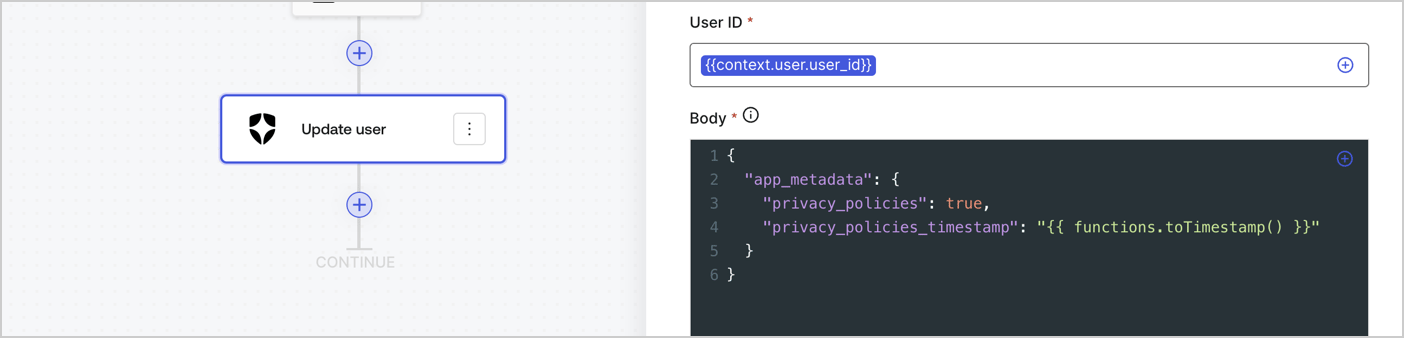
Add an Auth0 Update user action to the flow by following these steps:

1. Select the **Flow** **Update app\_metadata** > **Edit flow** to open the Flow editor in a new tab.
2. Below the StartAction, select the **+** icon to add an **Update user** action. Complete the fields below, then select **Save** to continue.

   * **Connection**: Select from the dropdown the Vault connection to your M2M application.

   * **User ID**: Enter `{{context.user.user_id}}`.

   * **Body**: Copy and paste the following code to update the app\_metadata with the privacy\_policies and privacy\_policies\_timestamp properties.

     ```text lines theme={null}
     {
       "app_metadata": {
         "privacy_policies": true,
         "privacy_policies_timestamp": "{{ functions.toTimestamp() }}"
       }
     }
     ```

   * Select **Save**.
3. Select **Publish** to save.
<Frame>
  <img src="https://mintcdn.com/docs-dev-docs-event-stream-action-templates/RjB12i6aOVmBONJv/docs/images/cdy7uua7fh8z/CvMNIwWrOUwaFW4X3G28p/1fb70ae57a20749d9ffaaba8dc0b7e26/update-user-privacy.png?fit=max&auto=format&n=RjB12i6aOVmBONJv&q=85&s=0a16cec9305dc2532569ac42bf1f78d9" alt="Dashboard > Actions > Forms > User case privacy policy code" data-og-width="1404" width="1404" data-og-height="338" height="338" data-path="docs/images/cdy7uua7fh8z/CvMNIwWrOUwaFW4X3G28p/1fb70ae57a20749d9ffaaba8dc0b7e26/update-user-privacy.png" data-optimize="true" data-opv="3" srcset="https://mintcdn.com/docs-dev-docs-event-stream-action-templates/RjB12i6aOVmBONJv/docs/images/cdy7uua7fh8z/CvMNIwWrOUwaFW4X3G28p/1fb70ae57a20749d9ffaaba8dc0b7e26/update-user-privacy.png?w=280&fit=max&auto=format&n=RjB12i6aOVmBONJv&q=85&s=399cba3a307e0c1fbf05983b6f516a9b 280w, https://mintcdn.com/docs-dev-docs-event-stream-action-templates/RjB12i6aOVmBONJv/docs/images/cdy7uua7fh8z/CvMNIwWrOUwaFW4X3G28p/1fb70ae57a20749d9ffaaba8dc0b7e26/update-user-privacy.png?w=560&fit=max&auto=format&n=RjB12i6aOVmBONJv&q=85&s=0412990a5bdca3ca53b15885196a6673 560w, https://mintcdn.com/docs-dev-docs-event-stream-action-templates/RjB12i6aOVmBONJv/docs/images/cdy7uua7fh8z/CvMNIwWrOUwaFW4X3G28p/1fb70ae57a20749d9ffaaba8dc0b7e26/update-user-privacy.png?w=840&fit=max&auto=format&n=RjB12i6aOVmBONJv&q=85&s=5aedf41bc63b3597aebc92166e91c891 840w, https://mintcdn.com/docs-dev-docs-event-stream-action-templates/RjB12i6aOVmBONJv/docs/images/cdy7uua7fh8z/CvMNIwWrOUwaFW4X3G28p/1fb70ae57a20749d9ffaaba8dc0b7e26/update-user-privacy.png?w=1100&fit=max&auto=format&n=RjB12i6aOVmBONJv&q=85&s=71945549687314d910fba502d198fa0e 1100w, https://mintcdn.com/docs-dev-docs-event-stream-action-templates/RjB12i6aOVmBONJv/docs/images/cdy7uua7fh8z/CvMNIwWrOUwaFW4X3G28p/1fb70ae57a20749d9ffaaba8dc0b7e26/update-user-privacy.png?w=1650&fit=max&auto=format&n=RjB12i6aOVmBONJv&q=85&s=a4552ca15fd0e44d16f2c70440d9fcb1 1650w, https://mintcdn.com/docs-dev-docs-event-stream-action-templates/RjB12i6aOVmBONJv/docs/images/cdy7uua7fh8z/CvMNIwWrOUwaFW4X3G28p/1fb70ae57a20749d9ffaaba8dc0b7e26/update-user-privacy.png?w=2500&fit=max&auto=format&n=RjB12i6aOVmBONJv&q=85&s=5060ac3974225302ff9b88db25f5a2b8 2500w" />
</Frame>

<Callout icon="file-lines" color="#0EA5E9" iconType="regular">
  The flow **Update app\_metadata** adds a `privacy_policies true` value to the app`_metadata` object and also generates a timestamp with a [helper function.](/docs/customize/forms/variables)
</Callout>

## Retrieve the form render code

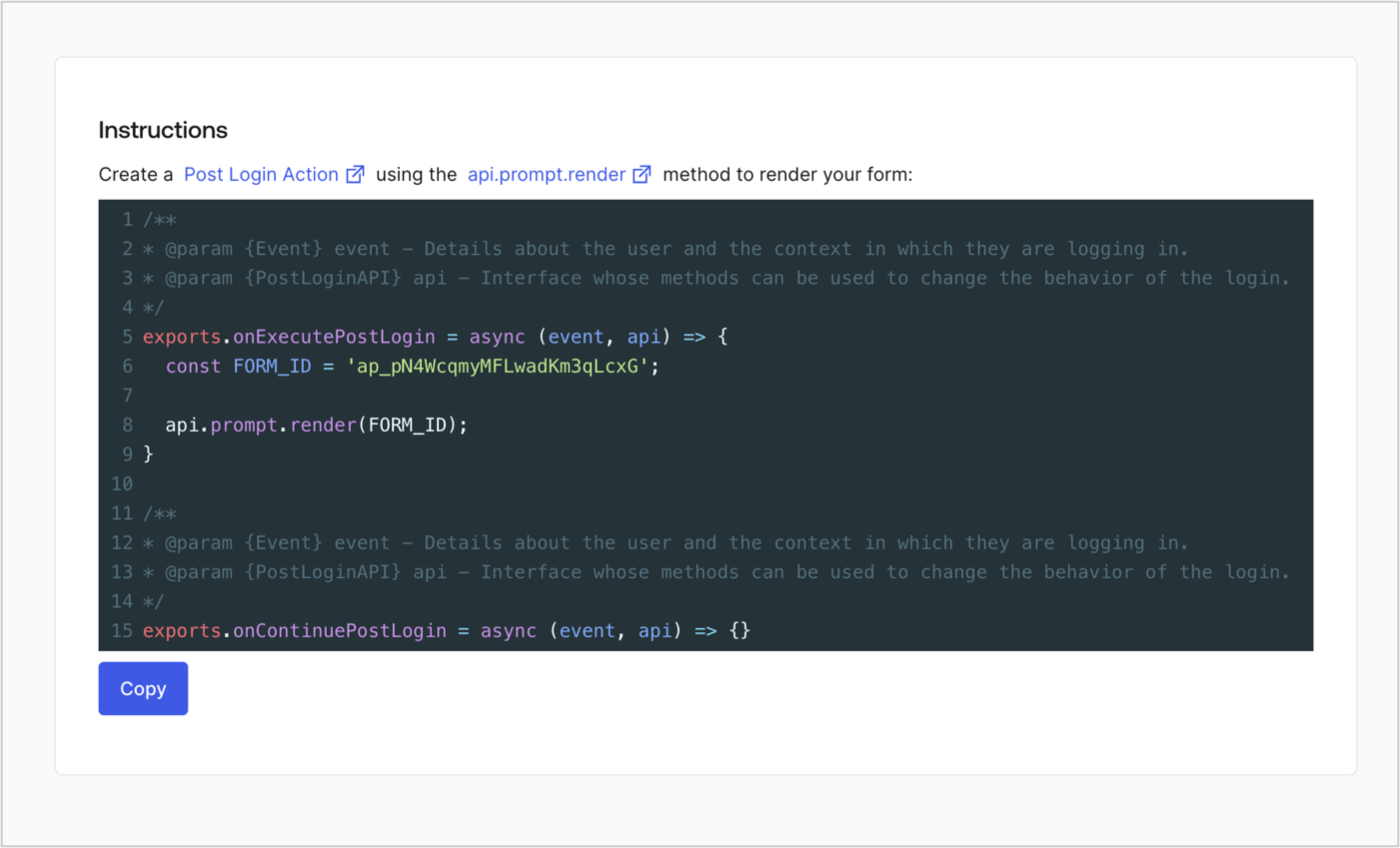
Retrieve your form render code to visually render the form with a custom Post Login Action by following these steps:

* From the Form editor, select **`<> Render`**.
* Select **Copy**.
<Frame>
  <img src="https://mintcdn.com/docs-dev-docs-event-stream-action-templates/B7hSimOXFe7dopGk/docs/images/cdy7uua7fh8z/2EIUzc539sq9lwoTKbjoJv/496a864c0fc44a782c9cadca119dbfb0/embed.png?fit=max&auto=format&n=B7hSimOXFe7dopGk&q=85&s=2996132725ea63d97c16affb351e156b" alt="Dashboard > Actions > Forms > Form > Embed" data-og-width="1400" width="1400" data-og-height="848" height="848" data-path="docs/images/cdy7uua7fh8z/2EIUzc539sq9lwoTKbjoJv/496a864c0fc44a782c9cadca119dbfb0/embed.png" data-optimize="true" data-opv="3" srcset="https://mintcdn.com/docs-dev-docs-event-stream-action-templates/B7hSimOXFe7dopGk/docs/images/cdy7uua7fh8z/2EIUzc539sq9lwoTKbjoJv/496a864c0fc44a782c9cadca119dbfb0/embed.png?w=280&fit=max&auto=format&n=B7hSimOXFe7dopGk&q=85&s=e98430e99982479d6ec52d5c1339c535 280w, https://mintcdn.com/docs-dev-docs-event-stream-action-templates/B7hSimOXFe7dopGk/docs/images/cdy7uua7fh8z/2EIUzc539sq9lwoTKbjoJv/496a864c0fc44a782c9cadca119dbfb0/embed.png?w=560&fit=max&auto=format&n=B7hSimOXFe7dopGk&q=85&s=a3b3925581423fa058fb76ba61839c8a 560w, https://mintcdn.com/docs-dev-docs-event-stream-action-templates/B7hSimOXFe7dopGk/docs/images/cdy7uua7fh8z/2EIUzc539sq9lwoTKbjoJv/496a864c0fc44a782c9cadca119dbfb0/embed.png?w=840&fit=max&auto=format&n=B7hSimOXFe7dopGk&q=85&s=749e75ac988e84b2f05b0d14cfffc9cd 840w, https://mintcdn.com/docs-dev-docs-event-stream-action-templates/B7hSimOXFe7dopGk/docs/images/cdy7uua7fh8z/2EIUzc539sq9lwoTKbjoJv/496a864c0fc44a782c9cadca119dbfb0/embed.png?w=1100&fit=max&auto=format&n=B7hSimOXFe7dopGk&q=85&s=43792547d977d541cdaac6902f706168 1100w, https://mintcdn.com/docs-dev-docs-event-stream-action-templates/B7hSimOXFe7dopGk/docs/images/cdy7uua7fh8z/2EIUzc539sq9lwoTKbjoJv/496a864c0fc44a782c9cadca119dbfb0/embed.png?w=1650&fit=max&auto=format&n=B7hSimOXFe7dopGk&q=85&s=845a039a76545b4eb6627cd61cc9f7ef 1650w, https://mintcdn.com/docs-dev-docs-event-stream-action-templates/B7hSimOXFe7dopGk/docs/images/cdy7uua7fh8z/2EIUzc539sq9lwoTKbjoJv/496a864c0fc44a782c9cadca119dbfb0/embed.png?w=2500&fit=max&auto=format&n=B7hSimOXFe7dopGk&q=85&s=26df126fc0a8c1f2313b8421234dae27 2500w" />
</Frame>

## Create a Post Login Action

Create a post-login Action to render your form by following these steps:

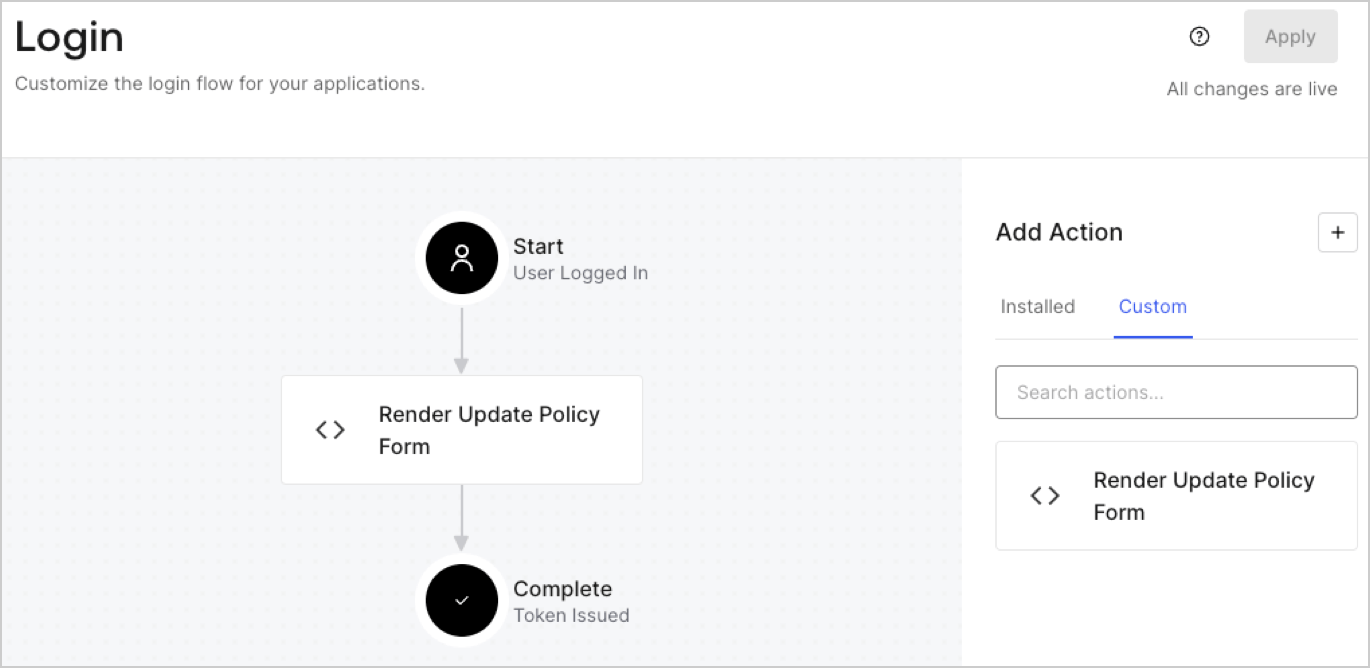
1. Navigate to **Auth0 Dashboard > Actions > Flows > Login.**
2. Select the **+** icon and Select **Build from scratch**:

   * **Name**: Enter `Render Update Policy Form`.
   * **Trigger**: Select `Login / Post Login`.
   * **Runtime**: Select the recommended version.
3. Select **Create**.

To configure the post-login Action:

1. Delete the existing code from the Code editor.
2. Paste the form render code into the Code editor.
3. Edit the code to define the conditional logic that will render the form.

   ```javascript lines theme={null}
   /**
   * @param {Event} event - Details about the user and the context in which they are logging in.
   * @param {PostLoginAPI} api - Interface whose methods can be used to change the behavior of the login.
   */
   exports.onExecutePostLogin = async (event, api) => {
     const FORM_ID = 'REPLACE_WITH_YOUR_FORM_ID';

     if (event.user.app_metadata.privacy_policies !== true) {
       api.prompt.render(FORM_ID);
     }
   }

   exports.onContinuePostLogin = async (event, api) => { }
   ```

   <Callout icon="file-lines" color="#0EA5E9" iconType="regular">
     The example code above will render the form when a user is missing the app metadata `privacy_policies` property.
   </Callout>
4. Select **Deploy.**
5. Drag and Drop the **Render Update Policy Form** Action to the **Login** flow.
   <Frame>
     <img src="https://mintcdn.com/docs-dev-docs-event-stream-action-templates/tcenw4jcNpftRqWN/docs/images/cdy7uua7fh8z/5TOwDgevZsBqd7yZynUYWU/41ca909dc3007aed4f40ff794a05efa5/postlogin.png?fit=max&auto=format&n=tcenw4jcNpftRqWN&q=85&s=d2043b4b8a8ef3cd20683ac6a84c6646" alt="Dashboard > Forms > Use Case > Render update policy form login action" data-og-width="1370" width="1370" data-og-height="668" height="668" data-path="docs/images/cdy7uua7fh8z/5TOwDgevZsBqd7yZynUYWU/41ca909dc3007aed4f40ff794a05efa5/postlogin.png" data-optimize="true" data-opv="3" srcset="https://mintcdn.com/docs-dev-docs-event-stream-action-templates/tcenw4jcNpftRqWN/docs/images/cdy7uua7fh8z/5TOwDgevZsBqd7yZynUYWU/41ca909dc3007aed4f40ff794a05efa5/postlogin.png?w=280&fit=max&auto=format&n=tcenw4jcNpftRqWN&q=85&s=79f3a7c654395c0223366b464d9ed965 280w, https://mintcdn.com/docs-dev-docs-event-stream-action-templates/tcenw4jcNpftRqWN/docs/images/cdy7uua7fh8z/5TOwDgevZsBqd7yZynUYWU/41ca909dc3007aed4f40ff794a05efa5/postlogin.png?w=560&fit=max&auto=format&n=tcenw4jcNpftRqWN&q=85&s=e2c13ae2586f3b352da2cfbddb0a88cd 560w, https://mintcdn.com/docs-dev-docs-event-stream-action-templates/tcenw4jcNpftRqWN/docs/images/cdy7uua7fh8z/5TOwDgevZsBqd7yZynUYWU/41ca909dc3007aed4f40ff794a05efa5/postlogin.png?w=840&fit=max&auto=format&n=tcenw4jcNpftRqWN&q=85&s=b05675c97fa16fa96e293b2568fd7ccb 840w, https://mintcdn.com/docs-dev-docs-event-stream-action-templates/tcenw4jcNpftRqWN/docs/images/cdy7uua7fh8z/5TOwDgevZsBqd7yZynUYWU/41ca909dc3007aed4f40ff794a05efa5/postlogin.png?w=1100&fit=max&auto=format&n=tcenw4jcNpftRqWN&q=85&s=d325235f264f12a6249a799cc626ceb5 1100w, https://mintcdn.com/docs-dev-docs-event-stream-action-templates/tcenw4jcNpftRqWN/docs/images/cdy7uua7fh8z/5TOwDgevZsBqd7yZynUYWU/41ca909dc3007aed4f40ff794a05efa5/postlogin.png?w=1650&fit=max&auto=format&n=tcenw4jcNpftRqWN&q=85&s=992b603c27b80750c2340ae93c641bdf 1650w, https://mintcdn.com/docs-dev-docs-event-stream-action-templates/tcenw4jcNpftRqWN/docs/images/cdy7uua7fh8z/5TOwDgevZsBqd7yZynUYWU/41ca909dc3007aed4f40ff794a05efa5/postlogin.png?w=2500&fit=max&auto=format&n=tcenw4jcNpftRqWN&q=85&s=a6c2989c404065aeb07a089dfbf146f1 2500w" />
   </Frame>
6. Select **Apply.**

### Test implementation

Test the implementation by following these steps:

1. Log in with an existing user whose app`_metadata` attribute `privacy_policies` does not have a value.
2. The post-login Action in the Login flow will render the form and prompt for acceptance.
3. Select **Auth0 Dashboard > User Management > Users,** locate the user and verify that the `app_metadata` attribute `privacy_policies` contains a `true` value and a timestamp.
