> ## Documentation Index
> Fetch the complete documentation index at: https://docs-dev-docs-event-stream-action-templates.mintlify.site/llms.txt
> Use this file to discover all available pages before exploring further.
> Learn how how to use Passwordless connections with the email authentication factor.
# Passwordless Authentication with Email
You can configure a Passwordless connection to send a one-time password (OTP) to a user through email to complete authentication.
To learn more, read [Configure Email or SMS for Passwordless Authentication](/docs/authenticate/login/auth0-universal-login/passwordless-login/email-or-sms).
## How it works
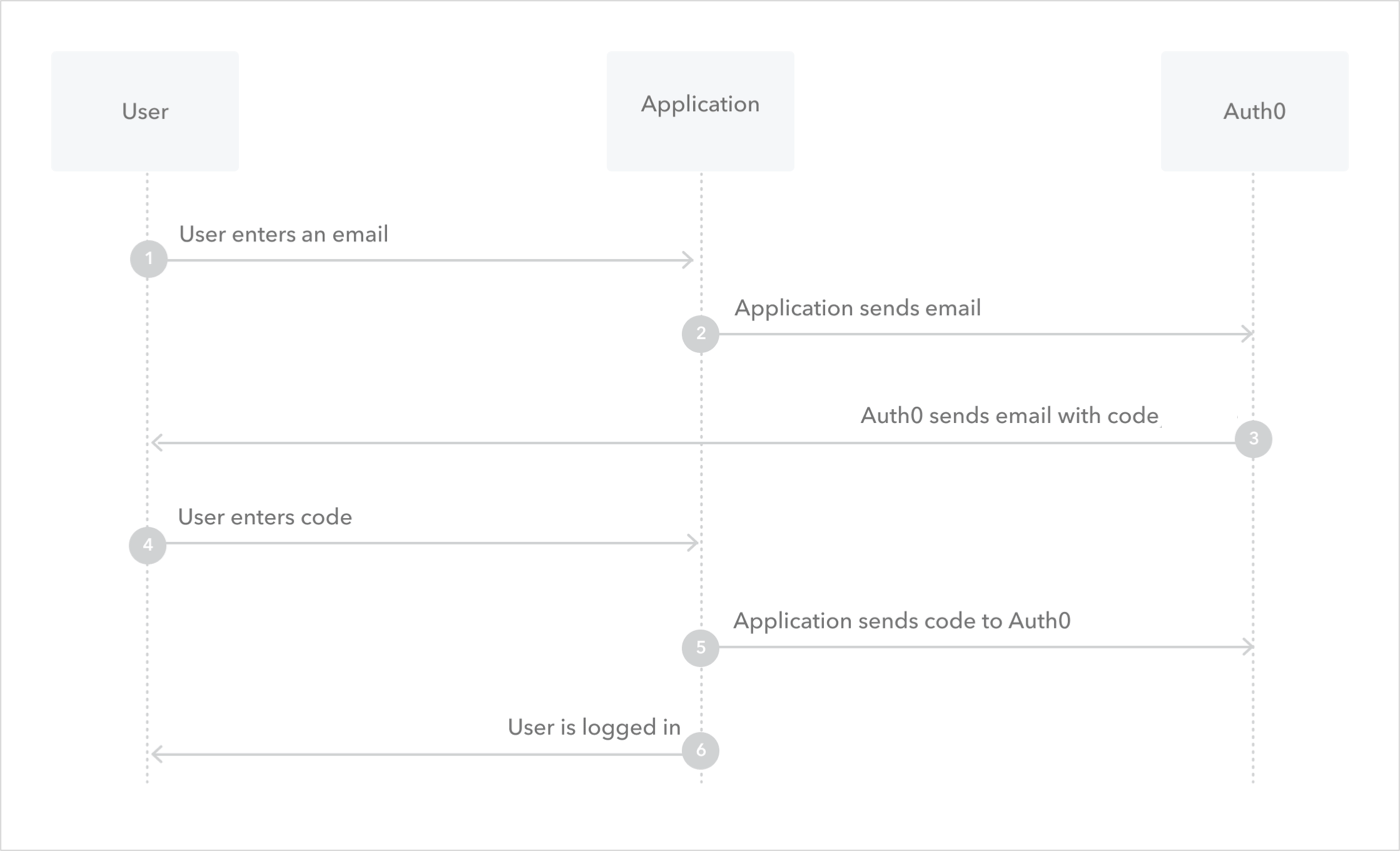
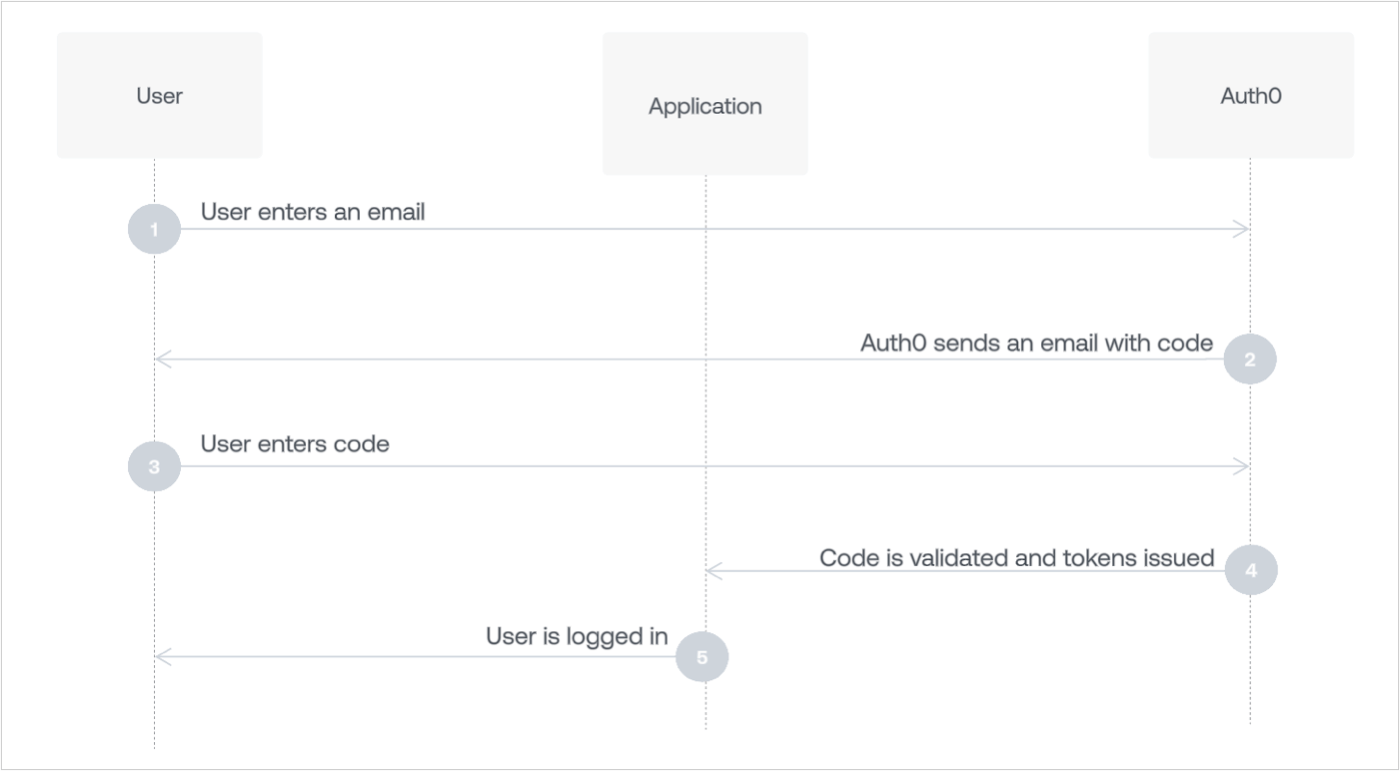
When a new user receives an OTP and enters it for the first time on your website, their user profile is created on the `email` connection before being authenticated by Auth0.
If the email address that the OTP was sent to matches an existing user, Auth0 authenticates the user:
### Embedded Login
 ### Universal Login
 ## Configure the connection
1. Navigate to [Auth0 Dashboard > Authentication > Passwordless](https://manage.auth0.com/#/connections/passwordless), and enable the **Email** toggle.
2. Select **Email** to open the configuration window, switch to the **Settings** view, and then enter your email's **From**, **Subject**, and **Message** text.
You must change the **From** value to an email address that does not use the `auth0.com` domain for Auth0 to send your custom email templates. If you do not, Auth0 sends the default email template.
3. Configure **OTP Expiry** and **OTP Length.**
* Only the last OTP (or link) issued will be accepted. Once the latest one is issued, any others are invalidated. Once used, the latest one is also invalidated.
* Only three failed attempts to input the OTP are allowed. After this, a new code will need to be requested.
* The OTP issued will be valid (by default) for three minutes before it expires.
* If you choose to extend the amount of time it takes for your OTP to expire, you should also extend the length of the OTP. Otherwise, an attacker has a larger window of time to attempt to guess a short code.
4. Decide if you want to **Disable Sign Ups**. If you enable this setting, you can allow passwordless access for only existing users, but may expose your application to the threat of user enumeration attacks. To learn more, read [Passwordless Connections Best Practices](/docs/authenticate/passwordless/best-practices).
5. Select **Save**.
### Multi-language support
The **Message** area supports multiple languages.
To specify a language, call the [Auth0 Authentication API Get Code or Link endpoint](https://auth0.com/docs/api/authentication#get-code-or-link) and set the value of the `x-request-language` header. When this header is not set, the language is extracted from the `accept-language` header, which is automatically set by the browser.
### Message syntax
The **Message** area accepts Liquid syntax. You can use this syntax, combined with parameter values, to programmatically construct elements of the message.
For example, you can reference the `request_language` parameter to change the language of the message:
```liquid lines theme={null}
{% if request_language contains 'dutch' %}
Hier is uw verificatie code: {{ code }}
{% endif %}
{% if request_language contains 'fr-FR' %}
Ceci est votre code: {{ code }}
{% endif %}
```
The following parameters are available when defining the message template:
| Parameter | Description |
| ------------------ | ------------------------------------------------------------------------------------------------------------------------------------------------------------------- |
| `code` | The password to use. |
| `link` | The generated sign-in link. |
| `application.name` | The name of the application with which the user is signing up. |
| `request_language` | The requested language for message content. |
| `operation` | Indicates when the template has been triggered by an update to a user's email through the API. When triggered, the value is `change_email`, otherwise it is `null`. |
If the user is logged in through an [Organization](/docs/manage-users/organizations/organizations-overview), the following parameters are also available:
* `organization.id`
* `organization.display_name`
* `organization.name`
* `organization.metadata`
* `organization.branding.logo_url`
* `organization.branding.colors.primary`
* `organization.branding.colors.page_background`
For more information on these parameters and their values, read the Auth0 Management API [Get organization](https://auth0.com/docs/api/management/v2#!/Organizations/get_organizations_by_id) endpoint.
## Enable applications
Switch to the **Applications** view, and enable the applications for which you would like to use Passwordless Email.
## Email providers
Auth0 sends emails from its own SMTP provider by default. Auth0's built-in email provider is designed solely for testing purposes and does not support customization of email templates.
[Configure your own SMTP email provider](/docs/customize/email/smtp-email-providers) to manage, monitor, and troubleshoot your email communications, and customize email templates.
Auth0 supports the following email providers:
* [Mandrill](/docs/customize/email/smtp-email-providers/configure-mandrill-as-external-smtp-email-provider)
* [Amazon SES](/docs/customize/email/smtp-email-providers/configure-amazon-ses-as-external-smtp-email-provider)
* [Azure Communication Services](/docs/customize/email/smtp-email-providers/configure-azure-comm-service-as-smtp-email-provider)
* [SendGrid](/docs/customize/email/smtp-email-providers/configure-sendgrid-as-external-smtp-email-provider)
* [SparkPost](/docs/customize/email/smtp-email-providers/configure-sparkpost-as-external-smtp-email-provider)
* [Mailgun](/docs/customize/email/smtp-email-providers/configure-mailgun-as-external-smtp-email-provider)
* [Custom SMTP external email provider](/docs/customize/email/smtp-email-providers/configure-custom-external-smtp-email-provider)
## Configure the connection
1. Navigate to [Auth0 Dashboard > Authentication > Passwordless](https://manage.auth0.com/#/connections/passwordless), and enable the **Email** toggle.
2. Select **Email** to open the configuration window, switch to the **Settings** view, and then enter your email's **From**, **Subject**, and **Message** text.
You must change the **From** value to an email address that does not use the `auth0.com` domain for Auth0 to send your custom email templates. If you do not, Auth0 sends the default email template.
3. Configure **OTP Expiry** and **OTP Length.**
* Only the last OTP (or link) issued will be accepted. Once the latest one is issued, any others are invalidated. Once used, the latest one is also invalidated.
* Only three failed attempts to input the OTP are allowed. After this, a new code will need to be requested.
* The OTP issued will be valid (by default) for three minutes before it expires.
* If you choose to extend the amount of time it takes for your OTP to expire, you should also extend the length of the OTP. Otherwise, an attacker has a larger window of time to attempt to guess a short code.
4. Decide if you want to **Disable Sign Ups**. If you enable this setting, you can allow passwordless access for only existing users, but may expose your application to the threat of user enumeration attacks. To learn more, read [Passwordless Connections Best Practices](/docs/authenticate/passwordless/best-practices).
5. Select **Save**.
### Multi-language support
The **Message** area supports multiple languages.
To specify a language, call the [Auth0 Authentication API Get Code or Link endpoint](https://auth0.com/docs/api/authentication#get-code-or-link) and set the value of the `x-request-language` header. When this header is not set, the language is extracted from the `accept-language` header, which is automatically set by the browser.
### Message syntax
The **Message** area accepts Liquid syntax. You can use this syntax, combined with parameter values, to programmatically construct elements of the message.
For example, you can reference the `request_language` parameter to change the language of the message:
```liquid lines theme={null}
{% if request_language contains 'dutch' %}
Hier is uw verificatie code: {{ code }}
{% endif %}
{% if request_language contains 'fr-FR' %}
Ceci est votre code: {{ code }}
{% endif %}
```
The following parameters are available when defining the message template:
| Parameter | Description |
| ------------------ | ------------------------------------------------------------------------------------------------------------------------------------------------------------------- |
| `code` | The password to use. |
| `link` | The generated sign-in link. |
| `application.name` | The name of the application with which the user is signing up. |
| `request_language` | The requested language for message content. |
| `operation` | Indicates when the template has been triggered by an update to a user's email through the API. When triggered, the value is `change_email`, otherwise it is `null`. |
If the user is logged in through an [Organization](/docs/manage-users/organizations/organizations-overview), the following parameters are also available:
* `organization.id`
* `organization.display_name`
* `organization.name`
* `organization.metadata`
* `organization.branding.logo_url`
* `organization.branding.colors.primary`
* `organization.branding.colors.page_background`
For more information on these parameters and their values, read the Auth0 Management API [Get organization](https://auth0.com/docs/api/management/v2#!/Organizations/get_organizations_by_id) endpoint.
## Enable applications
Switch to the **Applications** view, and enable the applications for which you would like to use Passwordless Email.
## Email providers
Auth0 sends emails from its own SMTP provider by default. Auth0's built-in email provider is designed solely for testing purposes and does not support customization of email templates.
[Configure your own SMTP email provider](/docs/customize/email/smtp-email-providers) to manage, monitor, and troubleshoot your email communications, and customize email templates.
Auth0 supports the following email providers:
* [Mandrill](/docs/customize/email/smtp-email-providers/configure-mandrill-as-external-smtp-email-provider)
* [Amazon SES](/docs/customize/email/smtp-email-providers/configure-amazon-ses-as-external-smtp-email-provider)
* [Azure Communication Services](/docs/customize/email/smtp-email-providers/configure-azure-comm-service-as-smtp-email-provider)
* [SendGrid](/docs/customize/email/smtp-email-providers/configure-sendgrid-as-external-smtp-email-provider)
* [SparkPost](/docs/customize/email/smtp-email-providers/configure-sparkpost-as-external-smtp-email-provider)
* [Mailgun](/docs/customize/email/smtp-email-providers/configure-mailgun-as-external-smtp-email-provider)
* [Custom SMTP external email provider](/docs/customize/email/smtp-email-providers/configure-custom-external-smtp-email-provider)