> ## Documentation Index
> Fetch the complete documentation index at: https://docs-dev-docs-event-stream-action-templates.mintlify.site/llms.txt
> Use this file to discover all available pages before exploring further.
> Describes how relying parties are able to confirm re-authentication has taken place at a specific time interval by using the `max_age` request parameter.
# Force Reauthentication in OIDC
The `prompt=login` mechanism can be subverted by simply stripping the parameter as it passes through the user agent (browser) and is only good for providing a UX hint to the OpenID provider (OP) in cases when the relying party (RP) wants to display a link like:
**“Hi Josh. Not you? Click here.”**
However, you should not rely on it to validate that a fresh authentication took place. To mitigate this, the client must validate that re-authentication has taken place using the `auth_time` claim. This claim will be included automatically in the ID token when `prompt=login` or `max_age=0` parameters are given in the authentication request.
You need to pass the `max_age` parameter to the Authorization API [`/authorize` endpoint](https://auth0.com/docs/api/authentication). If you use [Auth0.js](/docs/libraries/auth0js) or [Lock](/docs/libraries/lock/lock-authentication-parameters), you can set the parameter in the appropriate options of the library.
How you implement re-authentication depends on your specific use-case. Make a distinction between simple re-authentication for sensitive operations vs. [step-up](/docs/secure/multi-factor-authentication/step-up-authentication) (i.e. multi-factor authentication) for sensitive operations. Both are valid security measures. The former requires the end user to re-enter their password, whereas the latter requires them to use a pre-configured means of multifactor authentication as well.
## Limitations of prompt=login parameters
The [OIDC spec](https://openid.net/specs/openid-connect-core-1_0.html#AuthRequest) defines the `prompt=login` parameter that can be used to trigger re-authentication UI (usually a login prompt):
**prompt**
OPTIONAL: Space delimited, case sensitive list of ASCII string values that specifies whether the authorization server prompts the end-user for re-authentication and consent. The defined values are:
**login**
The authorization server should prompt the end-user for re-authentication. If it cannot re-authenticate the end-user, it must return an error, typically `login_required`.
However, there is an issue with using this parameter to ensure re-authentication: **the RP has no way to validate that a re-authentication action has taken place**. Let's inspect the traffic to understand why. The flow for an authentication request from the RP is as follows:
```http lines theme={null}
https://mydomain.auth0.com/authorize?
client_id=abcd1234
&redirect_uri= https://mydomain.com/callback
&scope=openid profile
&response_type=id_token
&prompt=login
```
Upon successful authentication by the AS, the RP will have an ID token delivered:
```json JSON lines theme={null}
{
"nickname": "user",
"name": "user@mydomain.auth0.com",
"updated_at": "2019-04-01T14:43:03.445Z",
"iss": "https://jcain0.auth0.com/",
"sub": "auth0|l33t",
"aud": "abcd1234",
"iat": 1554129793,
"exp": 1554165793
}
```
The trusted identity document returned by the AS **has no claims that validate when the last login occurred**. This becomes a problem when the initial authorization request comes in the form of a 302 redirect through the end user’s browser. If a malicious actor wants to skip the re-authentication step requested by the RP, they simply have to remove the `prompt=login` parameter and the RP doesn't know the difference in the fields contained in the ID token.
Here’s a diagram of a simplified implicit flow using the `prompt=login`parameter:
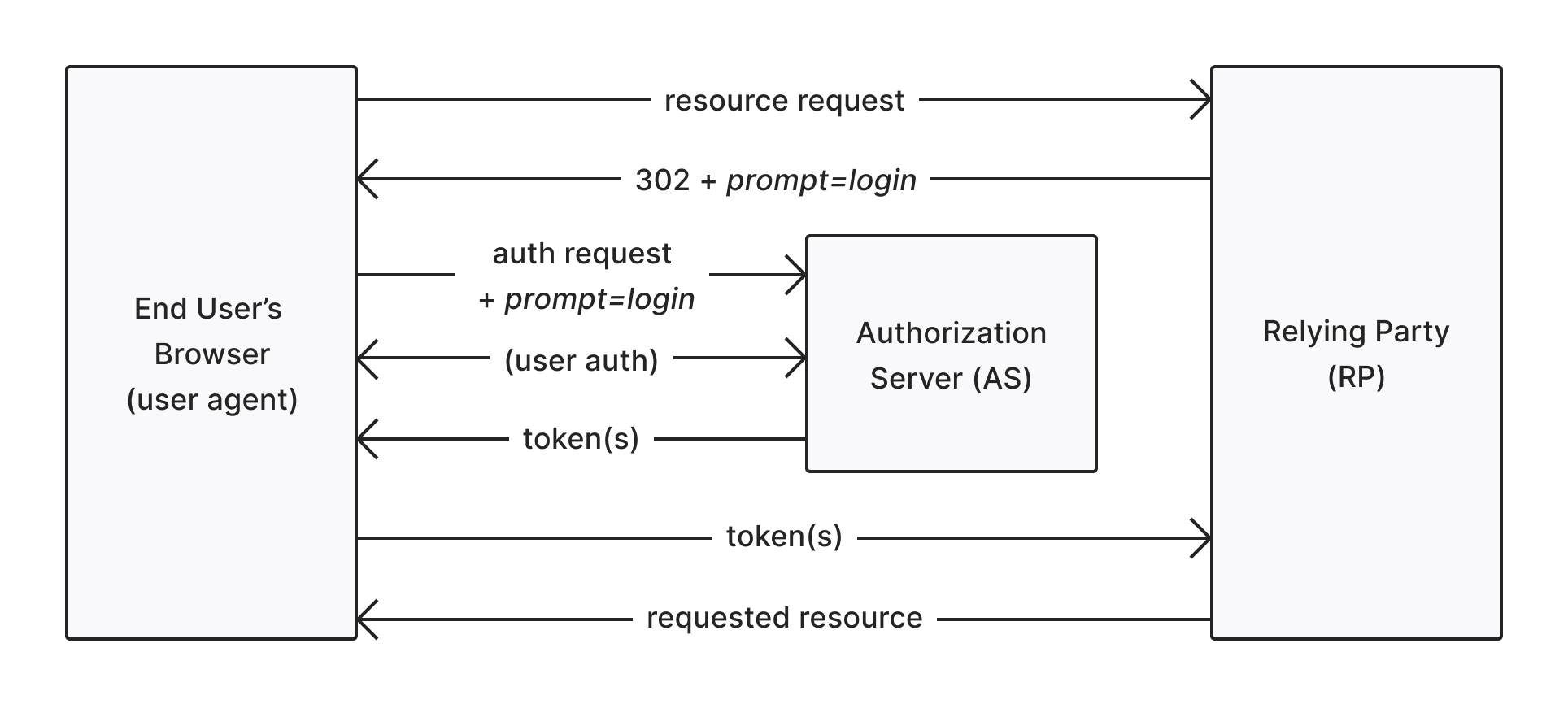 Note that all the end-user has to do is remove the `prompt=login` parameter and the re-authentication step can be skipped:
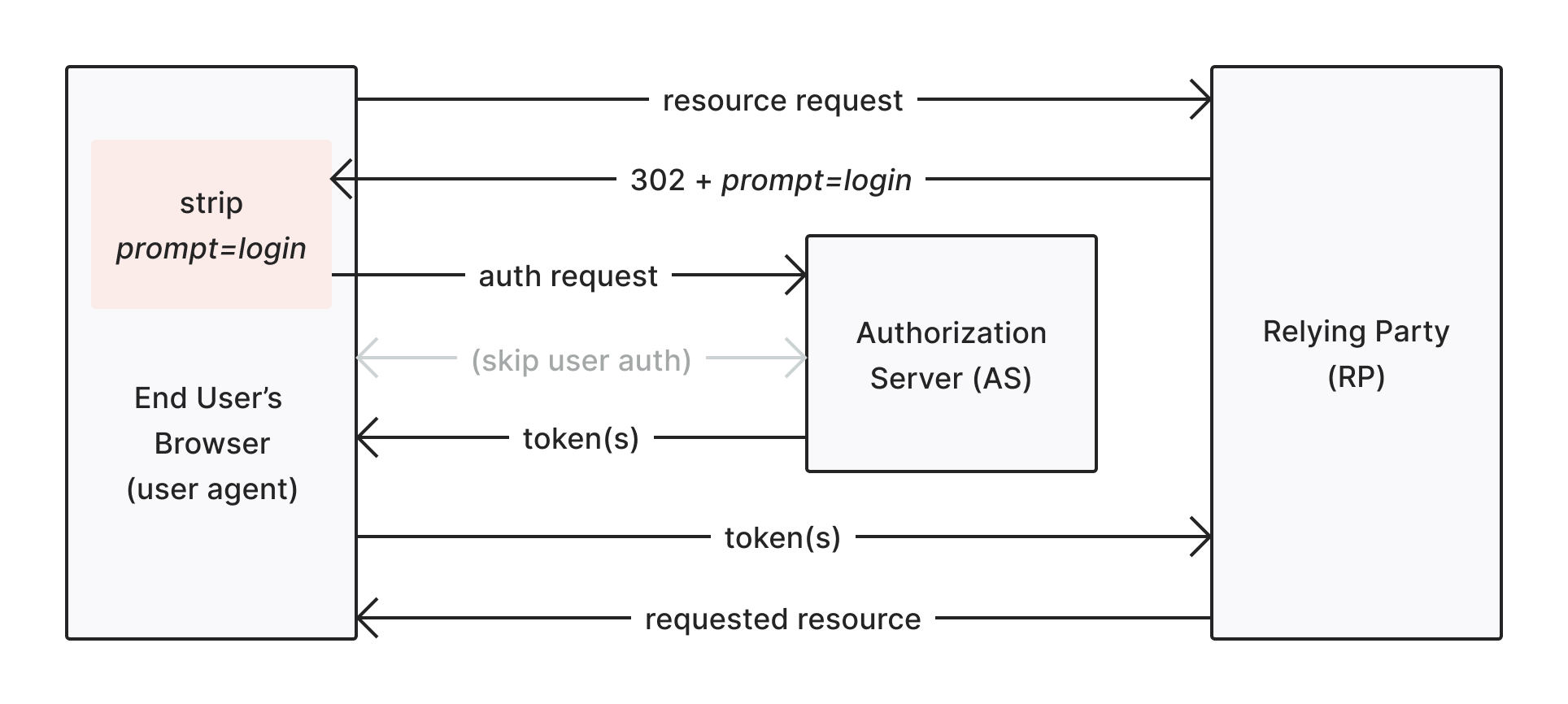 The token(s) returned from the first flow above will be identical to the token(s) returned from the second flow. The RP has no specification-defined way of verifying that re-authentication has taken place, and therefore cannot trust that a `prompt=login` has actually yielded a re-authentication.
## max\_age authentication request parameter
Unlike `prompt=login`, the `max_age` authentication request parameter provides a mechanism whereby RPs can positively confirm that re-authentication has taken place within a given time interval. The [OIDC spec](https://openid.net/specs/openid-connect-core-1_0.html#AuthRequest) states:
**max\_age**
OPTIONAL: Maximum Authentication Age. Specifies the allowable elapsed time in seconds since the last time the end-user was actively authenticated by the OP. If the elapsed time is greater than this value, the OP must attempt to actively re-authenticate the end-user. (The `max_age` request parameter corresponds to the OpenID 2.0 PAPE `max_auth_age` request parameter.) When `max_age` is used, the ID token returned must include an `auth_time` claim value.
The last sentence in the definition is the most important part. When `max_age` is requested by the RP, an `auth_time` claim must be present in the RP. This means that `max_age` can be used in one of two ways:
* **To enforce a minimum session freshness**: If an app has a requirement that users must re-authenticate once per day, this can be enforced in the context of a much longer SSO session by providing `max_age` with a value. These are defined in seconds.
* **To force an immediate re-authentication**: If an app requires that a user re-authenticate prior to access, provide a value of 0 for the `max_age` parameter and the AS will force a fresh login.
This requirement is described as follows:
The token(s) returned from the first flow above will be identical to the token(s) returned from the second flow. The RP has no specification-defined way of verifying that re-authentication has taken place, and therefore cannot trust that a `prompt=login` has actually yielded a re-authentication.
## max\_age authentication request parameter
Unlike `prompt=login`, the `max_age` authentication request parameter provides a mechanism whereby RPs can positively confirm that re-authentication has taken place within a given time interval. The [OIDC spec](https://openid.net/specs/openid-connect-core-1_0.html#AuthRequest) states:
**max\_age**
OPTIONAL: Maximum Authentication Age. Specifies the allowable elapsed time in seconds since the last time the end-user was actively authenticated by the OP. If the elapsed time is greater than this value, the OP must attempt to actively re-authenticate the end-user. (The `max_age` request parameter corresponds to the OpenID 2.0 PAPE `max_auth_age` request parameter.) When `max_age` is used, the ID token returned must include an `auth_time` claim value.
The last sentence in the definition is the most important part. When `max_age` is requested by the RP, an `auth_time` claim must be present in the RP. This means that `max_age` can be used in one of two ways:
* **To enforce a minimum session freshness**: If an app has a requirement that users must re-authenticate once per day, this can be enforced in the context of a much longer SSO session by providing `max_age` with a value. These are defined in seconds.
* **To force an immediate re-authentication**: If an app requires that a user re-authenticate prior to access, provide a value of 0 for the `max_age` parameter and the AS will force a fresh login.
This requirement is described as follows:
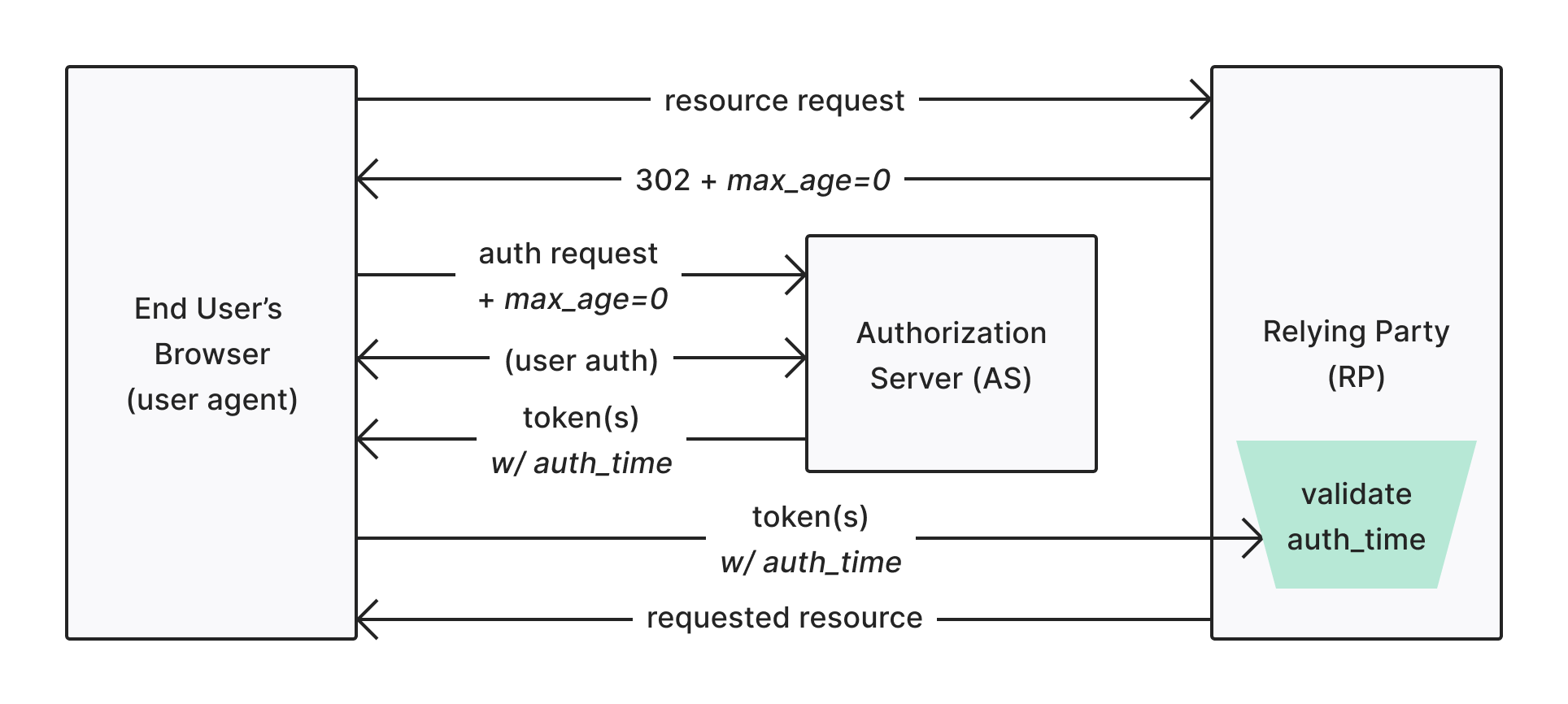 Note that the RP receives a token with the proper amount of information to validate whether or not re-authentication has taken place. The RP can now consult the `auth_time` claim in the ID token to determine whether or not the `max_age` parameter it requested was fulfilled. In this way, the `max_age=0` parameter is impervious to the same kind of client tampering that could subvert the `prompt=login` parameter.
Keep in mind that it’s solely up to the RP to validate that it is receiving an ID token with an appropriate `auth_time`. This extra validation will need to be covered by application authors and frameworks making use of the `max_age` parameter.
## Use auth\_time claims
We've established that the OIDC spec provides the `max_age` parameter as a way to positively confirm a re-authentication has taken place, but `prompt=login` does not. This does not present very secure options if you want to force a re-authentication:
* **prompt=login**: Only include the `prompt` parameter and not validate that the AS actually re-authenticated.
* **prompt=login & max\_age=999999**: Include an arbitrary `max_age` such that an `auth_time` claim is present. You can validate a re-authentication took place, but the parameters get messy.
* **max\_age=0**: Effectively force a login prompt using only the `max_age` parameter. Note that a recent spec update further clarified this parameter, stating it is effectively the same as `prompt=login`. This one is not feasible since it blends what should be a UX parameter with a session maintenance parameter.
Instead, Auth0 has made a choice to send the `auth_time` claim in the ID token when responding to a`prompt=login`request parameter. This means that you have the option use `prompt=login` AND validate that a re-authentication took place.
### auth\_time validation example
You must be sure to implement validation to ensure a re-authentication has taken place. You must validate that a proper `auth_time` has been returned.
The following example uses the [passport-auth0-openidconnect](https://github.com/auth0/passport-auth0-openidconnect) module to demonstrate how to validate re-authentication. The first (and simplest) way is to add the `max_age=0` option to the `Auth0OidcStrategy`:
```javascript JavaScript lines theme={null}
var strategy = new Auth0OidcStrategy(
{
domain: process.env.AUTH0_DOMAIN,
clientID: process.env.AUTH0_CLIENT_ID,
clientSecret: process.env.AUTH0_CLIENT_SECRET,
callbackURL: process.env.AUTH0_CALLBACK_URL || 'http://localhost:5000/callback',
max_age: 0
},
function(req, issuer, audience, profile, accessToken, refreshToken, params, cb) {
// No extra validation required!
return cb(null, profile);
});
```
Notice that no further validation steps are required as the strategy already handles validation of the `max_age` parameter:
```javascript JavaScript lines theme={null}
// https://openid.net/specs/openid-connect-basic-1_0.html#IDTokenValidation - check 8.
if (meta.params.max_age && (!jwtClaims.auth_time || ((meta.timestamp - meta.params.max_age) > jwtClaims.auth_time))) {
return self.error(new Error('auth_time in id_token not included or too old'));
}
```
You can also use `prompt=login` in the same context, but since the standard does not require an `auth_time` to accompany the ID token response, you must handle the validation manually. So, the strategy constructor would be:
```javascript JavaScript lines theme={null}
var strategy = new Auth0OidcStrategy(
{
domain: process.env.AUTH0_DOMAIN,
clientID: process.env.AUTH0_CLIENT_ID,
clientSecret: process.env.AUTH0_CLIENT_SECRET,
callbackURL: process.env.AUTH0_CALLBACK_URL || 'http://localhost:5000/callback',
prompt: 'login'
},
function(req, issuer, audience, profile, accessToken, refreshToken, params, cb) {
const tenSecondsAgo = (Date.now() / 1000) - 10;
if (isNaN(profile.auth_time) || profile.auth_time < tenSecondsAgo) {
return cb('prompt=login requested, but auth_time is greater than 10 seconds old', null);
}
return cb(null, profile);
});
```
Unlike `max_age=0`, the client must manually perform validation on the `auth_time` parameter. To learn more, read [Use auth\_time claims](/docs/authenticate/login/max-age-reauthentication#use-auth_time-claims).
The example above represents a simplified proof-of-concept (it must have authenticated in the last 10 seconds). Ideally, if you want to validate that a re-authentication has occurred, you would need to:
1. Store the time that the initial authentication request was made.
2. Upon authentication response, retrieve the time at which the request was sent.
3. Compare the original authentication request time with the `auth_time` claim to ensure `auth_time` is a later timestamp.
**Auth0 does not recommend that the approach used in the example be followed in any production systems.**
## Known issues
Auth0 can only guarantee that an exchange took place with the upstream identity provider. This may be through the user actually signing in to a third-party identity provider or perhaps the user already had a session and didn't have to sign in again. Either way, Auth0’s exchange with the upstream identity provider will result in an updated `auth_time`.
Forcing re-authentication within the upstream identity provider is not something Auth0 supports because not all providers support this.
The diagram below presents an example flow for a user who chooses to reauthenticate with a federated connection:
Note that the RP receives a token with the proper amount of information to validate whether or not re-authentication has taken place. The RP can now consult the `auth_time` claim in the ID token to determine whether or not the `max_age` parameter it requested was fulfilled. In this way, the `max_age=0` parameter is impervious to the same kind of client tampering that could subvert the `prompt=login` parameter.
Keep in mind that it’s solely up to the RP to validate that it is receiving an ID token with an appropriate `auth_time`. This extra validation will need to be covered by application authors and frameworks making use of the `max_age` parameter.
## Use auth\_time claims
We've established that the OIDC spec provides the `max_age` parameter as a way to positively confirm a re-authentication has taken place, but `prompt=login` does not. This does not present very secure options if you want to force a re-authentication:
* **prompt=login**: Only include the `prompt` parameter and not validate that the AS actually re-authenticated.
* **prompt=login & max\_age=999999**: Include an arbitrary `max_age` such that an `auth_time` claim is present. You can validate a re-authentication took place, but the parameters get messy.
* **max\_age=0**: Effectively force a login prompt using only the `max_age` parameter. Note that a recent spec update further clarified this parameter, stating it is effectively the same as `prompt=login`. This one is not feasible since it blends what should be a UX parameter with a session maintenance parameter.
Instead, Auth0 has made a choice to send the `auth_time` claim in the ID token when responding to a`prompt=login`request parameter. This means that you have the option use `prompt=login` AND validate that a re-authentication took place.
### auth\_time validation example
You must be sure to implement validation to ensure a re-authentication has taken place. You must validate that a proper `auth_time` has been returned.
The following example uses the [passport-auth0-openidconnect](https://github.com/auth0/passport-auth0-openidconnect) module to demonstrate how to validate re-authentication. The first (and simplest) way is to add the `max_age=0` option to the `Auth0OidcStrategy`:
```javascript JavaScript lines theme={null}
var strategy = new Auth0OidcStrategy(
{
domain: process.env.AUTH0_DOMAIN,
clientID: process.env.AUTH0_CLIENT_ID,
clientSecret: process.env.AUTH0_CLIENT_SECRET,
callbackURL: process.env.AUTH0_CALLBACK_URL || 'http://localhost:5000/callback',
max_age: 0
},
function(req, issuer, audience, profile, accessToken, refreshToken, params, cb) {
// No extra validation required!
return cb(null, profile);
});
```
Notice that no further validation steps are required as the strategy already handles validation of the `max_age` parameter:
```javascript JavaScript lines theme={null}
// https://openid.net/specs/openid-connect-basic-1_0.html#IDTokenValidation - check 8.
if (meta.params.max_age && (!jwtClaims.auth_time || ((meta.timestamp - meta.params.max_age) > jwtClaims.auth_time))) {
return self.error(new Error('auth_time in id_token not included or too old'));
}
```
You can also use `prompt=login` in the same context, but since the standard does not require an `auth_time` to accompany the ID token response, you must handle the validation manually. So, the strategy constructor would be:
```javascript JavaScript lines theme={null}
var strategy = new Auth0OidcStrategy(
{
domain: process.env.AUTH0_DOMAIN,
clientID: process.env.AUTH0_CLIENT_ID,
clientSecret: process.env.AUTH0_CLIENT_SECRET,
callbackURL: process.env.AUTH0_CALLBACK_URL || 'http://localhost:5000/callback',
prompt: 'login'
},
function(req, issuer, audience, profile, accessToken, refreshToken, params, cb) {
const tenSecondsAgo = (Date.now() / 1000) - 10;
if (isNaN(profile.auth_time) || profile.auth_time < tenSecondsAgo) {
return cb('prompt=login requested, but auth_time is greater than 10 seconds old', null);
}
return cb(null, profile);
});
```
Unlike `max_age=0`, the client must manually perform validation on the `auth_time` parameter. To learn more, read [Use auth\_time claims](/docs/authenticate/login/max-age-reauthentication#use-auth_time-claims).
The example above represents a simplified proof-of-concept (it must have authenticated in the last 10 seconds). Ideally, if you want to validate that a re-authentication has occurred, you would need to:
1. Store the time that the initial authentication request was made.
2. Upon authentication response, retrieve the time at which the request was sent.
3. Compare the original authentication request time with the `auth_time` claim to ensure `auth_time` is a later timestamp.
**Auth0 does not recommend that the approach used in the example be followed in any production systems.**
## Known issues
Auth0 can only guarantee that an exchange took place with the upstream identity provider. This may be through the user actually signing in to a third-party identity provider or perhaps the user already had a session and didn't have to sign in again. Either way, Auth0’s exchange with the upstream identity provider will result in an updated `auth_time`.
Forcing re-authentication within the upstream identity provider is not something Auth0 supports because not all providers support this.
The diagram below presents an example flow for a user who chooses to reauthenticate with a federated connection:
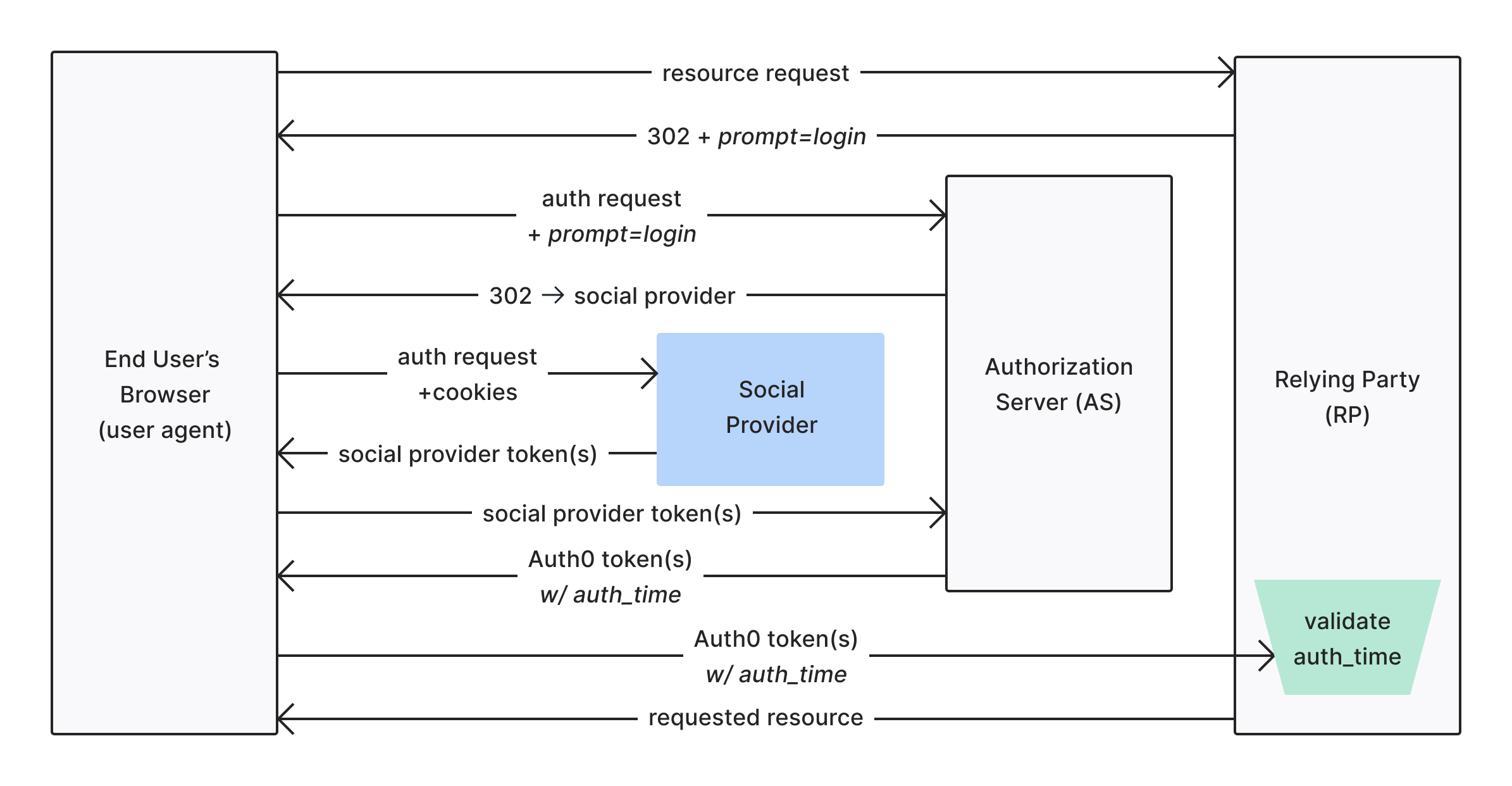 This method assumes you use [database connections](/docs/authenticate/database-connections). External identity providers may or may not support forcing re-authentication. Using `prompt=login` or `prompt=consent` is generally a way to indicate an external (social) identity provider to reauthenticate a user, but Auth0 cannot enforce this.
Don’t rely on client-side verification (i.e. in the browser) of the ID token or `auth_time` to prevent sensitive operations.
## Learn more
* [Implicit Flow with Form Post](/docs/get-started/authentication-and-authorization-flow/implicit-flow-with-form-post)
* [OpenID Connect Protocol](/docs/authenticate/protocols/openid-connect-protocol)
This method assumes you use [database connections](/docs/authenticate/database-connections). External identity providers may or may not support forcing re-authentication. Using `prompt=login` or `prompt=consent` is generally a way to indicate an external (social) identity provider to reauthenticate a user, but Auth0 cannot enforce this.
Don’t rely on client-side verification (i.e. in the browser) of the ID token or `auth_time` to prevent sensitive operations.
## Learn more
* [Implicit Flow with Form Post](/docs/get-started/authentication-and-authorization-flow/implicit-flow-with-form-post)
* [OpenID Connect Protocol](/docs/authenticate/protocols/openid-connect-protocol)