> ## Documentation Index
> Fetch the complete documentation index at: https://docs-dev-docs-event-stream-action-templates.mintlify.site/llms.txt
> Use this file to discover all available pages before exploring further.
> Learn how to configure global token revocation for Auth0 connections.
# Universal Logout
Auth0 supports Universal Logout integrations with Okta Workforce Identity, which logs users out of applications when an administrative or security event occurs.
Universal Logout implements the [Global Token Revocation](https://www.ietf.org/archive/id/draft-parecki-oauth-global-token-revocation-02.html) specification, which goes beyond the established OpenID Connect back-channel logout standards by revoking refresh tokens in addition to user sessions. This comprehensive logout solution spans traditional web applications, single-page applications (SPAs), and native applications that use a mix of refresh tokens, application sessions, and identity provider sessions to get new tokens and keep the user logged in.
If you use the [Okta](/docs/authenticate/identity-providers/enterprise-identity-providers/okta), [SAML](/docs/authenticate/identity-providers/enterprise-identity-providers/saml), or [OpenID Connect](/docs/authenticate/identity-providers/enterprise-identity-providers/oidc) connection types to federate with Workforce Identity, you no longer need to build a [global token revocation](https://developer.okta.com/docs/guides/oin-universal-logout-overview/) endpoint to work with Okta Universal Logout. You can instead provide Auth0’s connection-specific endpoint URL to the Okta Workforce administrator, and leverage Auth0’s [OpenID Connect Back-Channel Logout](/docs/authenticate/login/logout/back-channel-logout) to terminate application sessions if necessary.
## How it works
The Auth0 global token revocation endpoint follows the profile documented at [Build Logout for your app](https://developer.okta.com/docs/guides/oin-universal-logout-overview/). It uses the `iss_sub` format to identify users in the logout request, and uses the following URL format:
`https://{yourDomain}/oauth/global-token-revocation/connection/{yourConnectionName}`
When Auth0 receives a request to log out a user, it validates the request using the same key set used to validate ID tokens or SAML assertions issued from Okta Workforce Identity. It then terminates all [Auth0 sessions](/docs/manage-users/sessions/session-layers) for the user, revokes Auth0-issued [refresh tokens](/docs/secure/tokens/refresh-tokens), and, if configured, triggers [OpenID Connect Back-Channel Logout](/docs/authenticate/login/logout/back-channel-logout) to revoke application sessions.
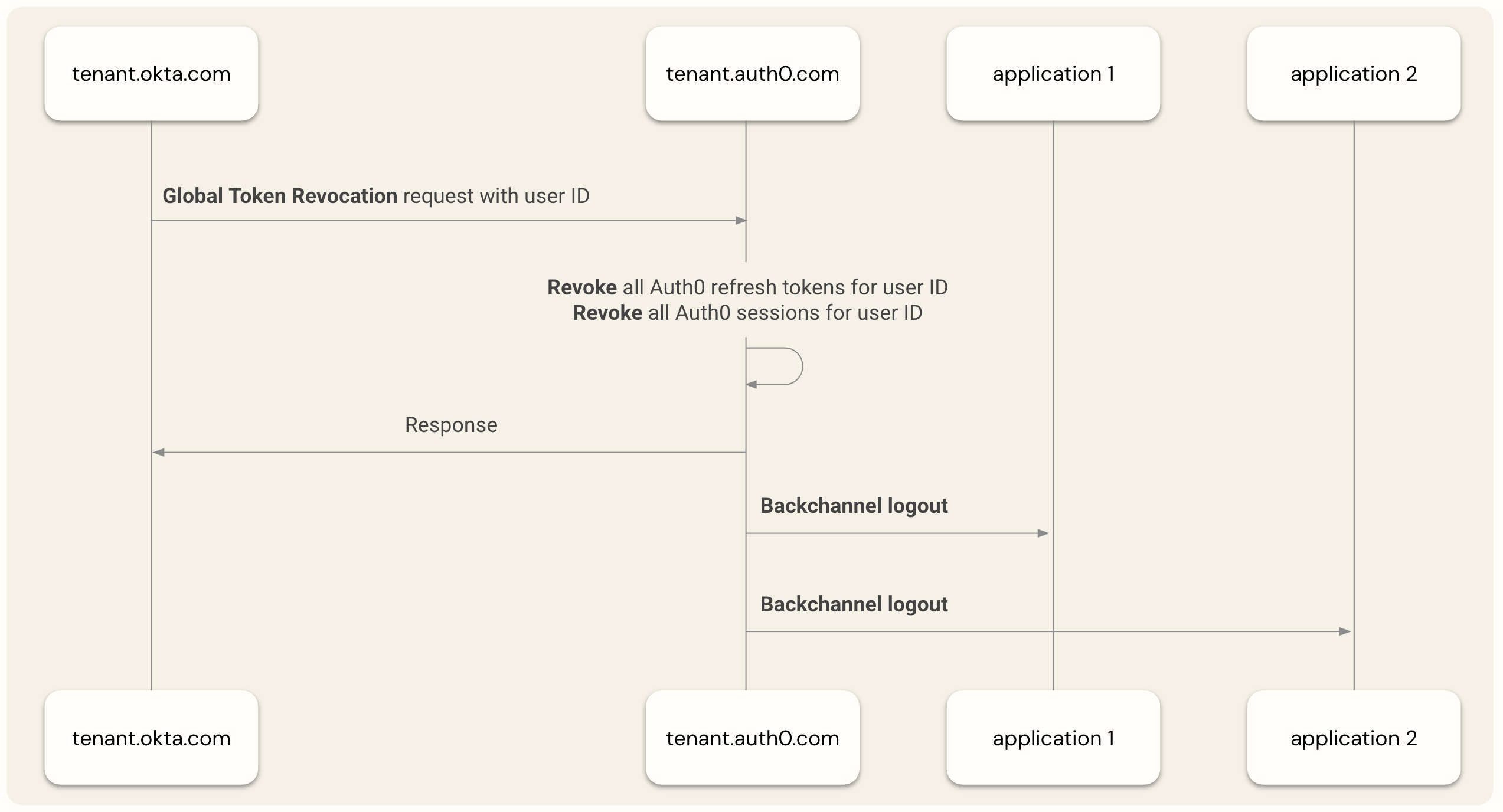 The time it takes for an application user to lose access depends on the application's type and how it is integrated with Auth0. Auth0 supports a wide range of [application architectures](/docs/get-started/applications) via support for the OIDC and OAuth 2.0 identity standards and Auth0's [Quickstarts and SDKs](/docs/quickstarts). This includes:
* Traditional Web applications that create their own [application sessions](/docs/manage-users/sessions/session-layers) may use refresh tokens and access tokens to access APIs through a secure backend.
* Browser-based JavaScript applications that leverage the [Auth0 session layer](/docs/authenticate/login/configure-silent-authentication) or use techniques like [refresh token rotation](/docs/secure/tokens/refresh-tokens/refresh-token-rotation) to get access tokens needed to access APIs within a Web browser.
* Native or Mobile applications that don’t run in a Web browser and use refresh tokens and access tokens as the primary method of keeping users signed in.
### Revoke refresh tokens and Auth0 user sessions
Applications using refresh tokens or leveraging Auth0 sessions get the following security benefits when the Universal Logout integration is enabled:
* For browser-based apps leveraging [the Auth0 session](/docs/authenticate/login/configure-silent-authentication), the user loses access the next time the application [polls the Auth0 session](/docs/authenticate/login/configure-silent-authentication#poll-with-checksession-), and Auth0 prompts the user to sign in again when redirected
* For apps that use refresh tokens, the user loses access as soon as their current access token expires, which ranges from a few seconds up to the [maximum access token lifetime](/docs/secure/tokens/access-tokens/update-access-token-lifetime) configured in Auth0.
### Revoke application user sessions
For sessions created by web applications, you should use Auth0’s existing [OpenID Connect Back-Channel Logout](/docs/authenticate/login/logout/back-channel-logout/configure-back-channel-logout) feature to terminate those sessions when Universal Logout terminates the Auth0 user session. To learn more, read the [Auth0 SDK implementation examples](/docs/authenticate/login/logout/back-channel-logout#auth0-sdks).
## Configure Universal Logout in Auth0
Configure Universal Logout by the Auth0 connection type.
### Okta Workforce
1. [Connect your Auth0 tenant to Okta Workforce Identity](/docs/authenticate/identity-providers/enterprise-identity-providers/okta).
2. In Auth0 Dashboard, navigate to [**Authentication > Enterprise > Okta Workforce**](https://manage.auth0.com/#/connections/enterprise/okta). Select your connection and choose **Settings**.
3. Copy the **Revocation Endpoint URL** you will provide to the Okta Workforce administrator.
### OpenID Connect
We strongly recommend using the branded **Okta Workforce** connection type for new OpenID Connect integrations. However, Universal Logout can still be enabled on older integrations using the generic OpenID Connect connection type in the OpenID Connect **Settings** of Auth0 Dashboard.
1. In Auth0 Dashboard, navigate to [**Authentication > Enterprise > OpenID Connect**](https://manage.auth0.com/#/connections/enterprise/oidc)**.** Select your connection and choose **Settings**.
2. Copy the **Revocation Endpoint URL** you will provide to the Okta Workforce administrator.
### SAML
1. [Configure Okta as a SAML identity provider](/docs/authenticate/protocols/saml/saml-sso-integrations/configure-auth0-saml-service-provider/configure-okta-as-saml-identity-provider).
2. In Auth0 Dashboard, navigate to [**Authentication > Enterprise > SAML**](https://manage.auth0.com/#/connections/enterprise/samlp). Select your connection and choose **Settings**.
3. For **Subject**, enter the Application ID of the SAML application registered in Okta Workforce Identity. Example: `0oagcc12354688xxxx`. To learn more, read [How to Obtain an Application ID](https://support.okta.com/help/s/article/How-to-obtain-an-application-ID?language=en_US).
4. For **Issuer**, navigate to the registered SAML application in the Okta Workforce Identity organization and copy the [issuer URI](https://developer.okta.com/docs/guides/oin-universal-logout-overview/#endpoint-authentication).
To retrieve this value, WIC admins can navigate to the **Applications** > **Applications > \[Application] > Authentication > Sign-on settings > Sign-on methods > SAML 2.0 > More details** section of the Okta portal.
5. Copy the **Revocation Endpoint URL**, which you will provide to the Okta Workforce administrator.
## Configure Universal Logout in Okta Workforce Identity
Configure Universal Logout in Okta Workforce Identity to send logout signals to the application using the Auth0 connection. This must be performed by an Okta administrator.
### Prerequisites
You need:
* An Okta Workforce Identity organization with [Identity Threat Protection](https://www.okta.com/products/identity-threat-protection/) enabled, or a [free trial](https://www.okta.com/free-trial/).
* Early access to Universal Logout for Generic SAML and OIDC apps must be enabled for your Okta Workforce Identity organization. To learn more, read [Configure Universal Logout for supported apps](https://help.okta.com/oie/en-us/content/topics/itp/config-universal-logout.htm).
### Configure Okta
Enable Universal Logout in an [Okta Workforce organization](/docs/authenticate/identity-providers/enterprise-identity-providers/okta) for the Auth0 connection.
1. In the Okta portal, select **Applications** > **Applications**.
2. Select the application you registered for the Auth0 integration.
3. Under the **General** tab, select **Logout > Edit**.
The time it takes for an application user to lose access depends on the application's type and how it is integrated with Auth0. Auth0 supports a wide range of [application architectures](/docs/get-started/applications) via support for the OIDC and OAuth 2.0 identity standards and Auth0's [Quickstarts and SDKs](/docs/quickstarts). This includes:
* Traditional Web applications that create their own [application sessions](/docs/manage-users/sessions/session-layers) may use refresh tokens and access tokens to access APIs through a secure backend.
* Browser-based JavaScript applications that leverage the [Auth0 session layer](/docs/authenticate/login/configure-silent-authentication) or use techniques like [refresh token rotation](/docs/secure/tokens/refresh-tokens/refresh-token-rotation) to get access tokens needed to access APIs within a Web browser.
* Native or Mobile applications that don’t run in a Web browser and use refresh tokens and access tokens as the primary method of keeping users signed in.
### Revoke refresh tokens and Auth0 user sessions
Applications using refresh tokens or leveraging Auth0 sessions get the following security benefits when the Universal Logout integration is enabled:
* For browser-based apps leveraging [the Auth0 session](/docs/authenticate/login/configure-silent-authentication), the user loses access the next time the application [polls the Auth0 session](/docs/authenticate/login/configure-silent-authentication#poll-with-checksession-), and Auth0 prompts the user to sign in again when redirected
* For apps that use refresh tokens, the user loses access as soon as their current access token expires, which ranges from a few seconds up to the [maximum access token lifetime](/docs/secure/tokens/access-tokens/update-access-token-lifetime) configured in Auth0.
### Revoke application user sessions
For sessions created by web applications, you should use Auth0’s existing [OpenID Connect Back-Channel Logout](/docs/authenticate/login/logout/back-channel-logout/configure-back-channel-logout) feature to terminate those sessions when Universal Logout terminates the Auth0 user session. To learn more, read the [Auth0 SDK implementation examples](/docs/authenticate/login/logout/back-channel-logout#auth0-sdks).
## Configure Universal Logout in Auth0
Configure Universal Logout by the Auth0 connection type.
### Okta Workforce
1. [Connect your Auth0 tenant to Okta Workforce Identity](/docs/authenticate/identity-providers/enterprise-identity-providers/okta).
2. In Auth0 Dashboard, navigate to [**Authentication > Enterprise > Okta Workforce**](https://manage.auth0.com/#/connections/enterprise/okta). Select your connection and choose **Settings**.
3. Copy the **Revocation Endpoint URL** you will provide to the Okta Workforce administrator.
### OpenID Connect
We strongly recommend using the branded **Okta Workforce** connection type for new OpenID Connect integrations. However, Universal Logout can still be enabled on older integrations using the generic OpenID Connect connection type in the OpenID Connect **Settings** of Auth0 Dashboard.
1. In Auth0 Dashboard, navigate to [**Authentication > Enterprise > OpenID Connect**](https://manage.auth0.com/#/connections/enterprise/oidc)**.** Select your connection and choose **Settings**.
2. Copy the **Revocation Endpoint URL** you will provide to the Okta Workforce administrator.
### SAML
1. [Configure Okta as a SAML identity provider](/docs/authenticate/protocols/saml/saml-sso-integrations/configure-auth0-saml-service-provider/configure-okta-as-saml-identity-provider).
2. In Auth0 Dashboard, navigate to [**Authentication > Enterprise > SAML**](https://manage.auth0.com/#/connections/enterprise/samlp). Select your connection and choose **Settings**.
3. For **Subject**, enter the Application ID of the SAML application registered in Okta Workforce Identity. Example: `0oagcc12354688xxxx`. To learn more, read [How to Obtain an Application ID](https://support.okta.com/help/s/article/How-to-obtain-an-application-ID?language=en_US).
4. For **Issuer**, navigate to the registered SAML application in the Okta Workforce Identity organization and copy the [issuer URI](https://developer.okta.com/docs/guides/oin-universal-logout-overview/#endpoint-authentication).
To retrieve this value, WIC admins can navigate to the **Applications** > **Applications > \[Application] > Authentication > Sign-on settings > Sign-on methods > SAML 2.0 > More details** section of the Okta portal.
5. Copy the **Revocation Endpoint URL**, which you will provide to the Okta Workforce administrator.
## Configure Universal Logout in Okta Workforce Identity
Configure Universal Logout in Okta Workforce Identity to send logout signals to the application using the Auth0 connection. This must be performed by an Okta administrator.
### Prerequisites
You need:
* An Okta Workforce Identity organization with [Identity Threat Protection](https://www.okta.com/products/identity-threat-protection/) enabled, or a [free trial](https://www.okta.com/free-trial/).
* Early access to Universal Logout for Generic SAML and OIDC apps must be enabled for your Okta Workforce Identity organization. To learn more, read [Configure Universal Logout for supported apps](https://help.okta.com/oie/en-us/content/topics/itp/config-universal-logout.htm).
### Configure Okta
Enable Universal Logout in an [Okta Workforce organization](/docs/authenticate/identity-providers/enterprise-identity-providers/okta) for the Auth0 connection.
1. In the Okta portal, select **Applications** > **Applications**.
2. Select the application you registered for the Auth0 integration.
3. Under the **General** tab, select **Logout > Edit**.
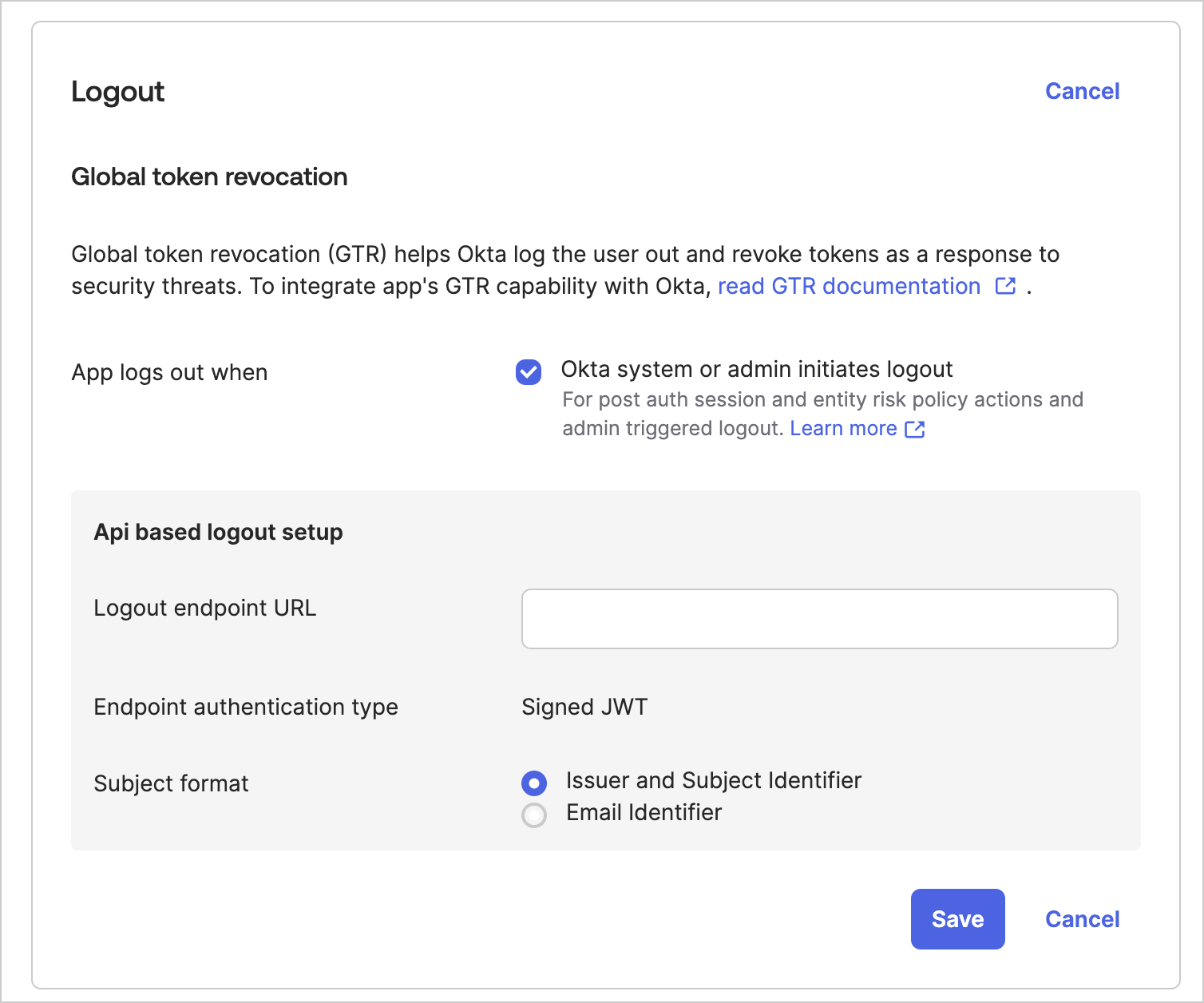 4. Choose **Okta system or admin initiates logout**.
5. Enter the URL copied from Auth0 in **Logout Endpoint URL**.
6. Select **Issuer and Subject Identifier** as the **Subject Format**.
7. Select **Save**.
### Test Universal Logout
Test Universal Logout in Okta Workforce Identity by revoking the sessions for a selected user.
1. In the Okta portal, select **Directory > People**.
2. Select a user that is signed into an Auth0 application.
3. Select **More Actions > Clear User Sessions**.
4. Choose **Okta system or admin initiates logout**.
5. Enter the URL copied from Auth0 in **Logout Endpoint URL**.
6. Select **Issuer and Subject Identifier** as the **Subject Format**.
7. Select **Save**.
### Test Universal Logout
Test Universal Logout in Okta Workforce Identity by revoking the sessions for a selected user.
1. In the Okta portal, select **Directory > People**.
2. Select a user that is signed into an Auth0 application.
3. Select **More Actions > Clear User Sessions**.
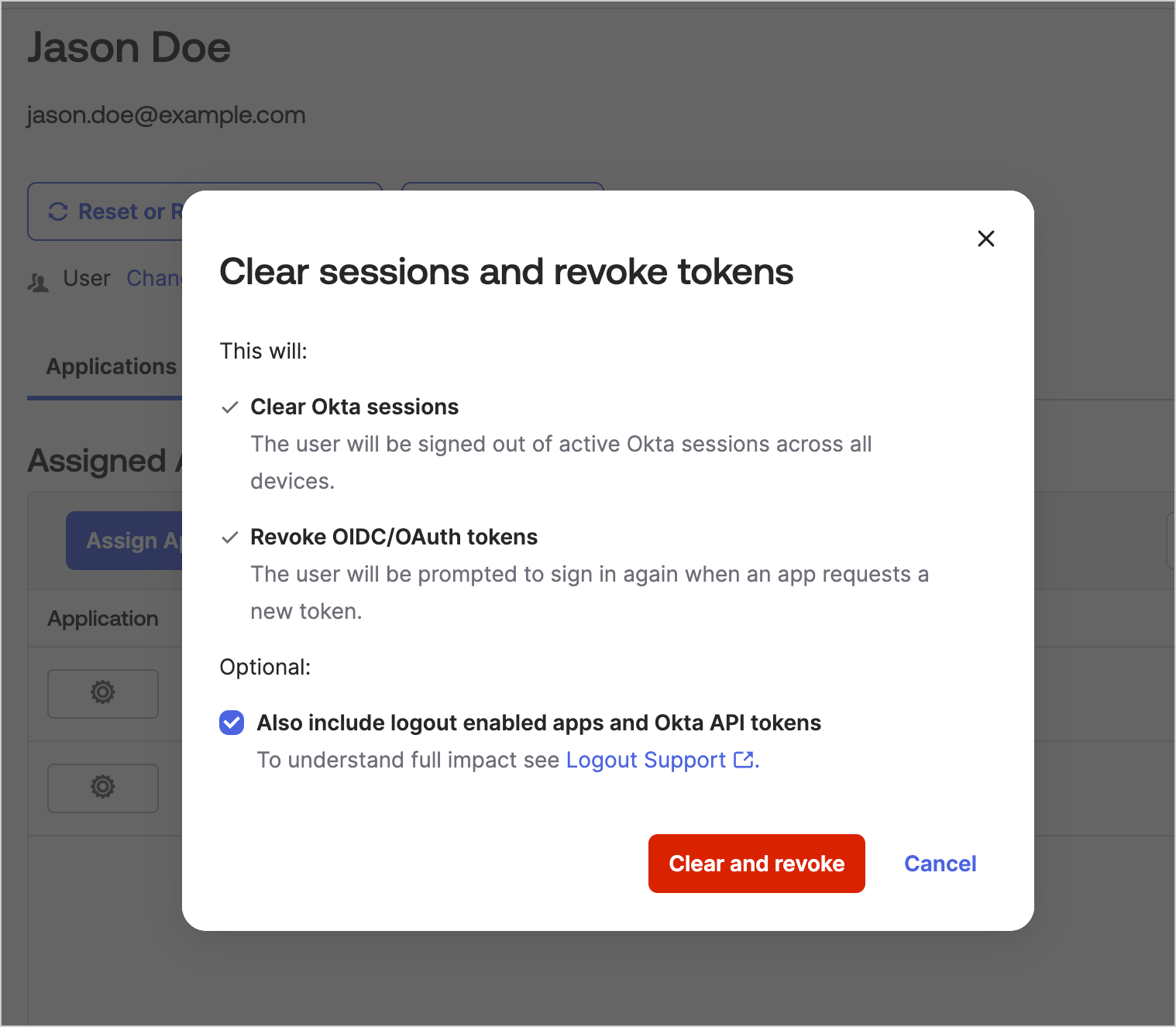 4. In the dialog, select **Also include logout enabled apps and Okta API tokens**.
5. Select **Clear and Revoke**.
## Logs and Notifications
Auth0 tenant administrators can view the status and details of each Universal Logout request Auth0 receives in [Auth0 Dashboard > Monitoring > Logs](https://manage.auth0.com/#/*/logs). The emitted log event types for Universal Logout are documented in [Log Event Type Codes](/docs/deploy-monitor/logs/log-event-type-codes).
You can also integrate with [Custom Log Streams](/docs/customize/log-streams) to notify external systems when Universal Logout events occur.
## Management API
You can also use the [Management API](https://auth0.com/docs/api/management/v2) to configure Universal Logout programatically. This is useful for automating configurations or building your own configuration outside of the Auth0 Dashboard.
For Okta Workforce and OpenID Connections, no input into the Management API is required, as only the Auth0 global token revocation endpoint needs to be presented to the Okta Workforce administrator.
For SAML connections, in addition to sharing the endpoint URL, Universal Logout must be configured by setting these attributes on the `connection` object:
* **options.global\_token\_revocation\_jwt\_iss** - The [issuer ID](https://developer.okta.com/docs/guides/oin-universal-logout-overview/#endpoint-authentication) of the SAML application registered in Okta Workforce Identity. Example value: `http://www.okta.com/exkhwkmkwhZUnuA6xxxx`.
* **options.global\_token\_revocation\_jwt\_sub** - The [application ID](https://support.okta.com/help/s/article/How-to-obtain-an-application-ID?language=en_US) of the SAML application registered in Okta Workforce Identity. Example value: `0oagcc12354688xxxx`.
You can use these attributes in Management API calls to [update](https://auth0.com/docs/api/management/v2#!/Connections/patch_connections_by_id) or [create](https://auth0.com/docs/api/management/v2/connections/post-connections) SAML connections. Review the following JSON example to create a request:
```json JSON lines theme={null}
{
"strategy": "samlp",
"name": "CONNECTION_NAME",
"options": {
"global_token_revocation_jwt_iss": "ISS_VALUE",
"global_token_revocation_jwt_sub": "SUB_VALUE",
"signInEndpoint": "SIGN_IN_ENDPOINT_URL",
"signOutEndpoint": "SIGN_OUT_ENDPOINT_URL",
"signatureAlgorithm": "rsa-sha256",
"digestAlgorithm": "sha256",
"fieldsMap": {
...
},
"signingCert": "BASE64_SIGNING_CERT"
}
}
```
To learn more, read [Create an Enterprise connection using the Management API](/docs/authenticate/identity-providers/enterprise-identity-providers/saml#create-an-enterprise-connection-using-the-management-api).
4. In the dialog, select **Also include logout enabled apps and Okta API tokens**.
5. Select **Clear and Revoke**.
## Logs and Notifications
Auth0 tenant administrators can view the status and details of each Universal Logout request Auth0 receives in [Auth0 Dashboard > Monitoring > Logs](https://manage.auth0.com/#/*/logs). The emitted log event types for Universal Logout are documented in [Log Event Type Codes](/docs/deploy-monitor/logs/log-event-type-codes).
You can also integrate with [Custom Log Streams](/docs/customize/log-streams) to notify external systems when Universal Logout events occur.
## Management API
You can also use the [Management API](https://auth0.com/docs/api/management/v2) to configure Universal Logout programatically. This is useful for automating configurations or building your own configuration outside of the Auth0 Dashboard.
For Okta Workforce and OpenID Connections, no input into the Management API is required, as only the Auth0 global token revocation endpoint needs to be presented to the Okta Workforce administrator.
For SAML connections, in addition to sharing the endpoint URL, Universal Logout must be configured by setting these attributes on the `connection` object:
* **options.global\_token\_revocation\_jwt\_iss** - The [issuer ID](https://developer.okta.com/docs/guides/oin-universal-logout-overview/#endpoint-authentication) of the SAML application registered in Okta Workforce Identity. Example value: `http://www.okta.com/exkhwkmkwhZUnuA6xxxx`.
* **options.global\_token\_revocation\_jwt\_sub** - The [application ID](https://support.okta.com/help/s/article/How-to-obtain-an-application-ID?language=en_US) of the SAML application registered in Okta Workforce Identity. Example value: `0oagcc12354688xxxx`.
You can use these attributes in Management API calls to [update](https://auth0.com/docs/api/management/v2#!/Connections/patch_connections_by_id) or [create](https://auth0.com/docs/api/management/v2/connections/post-connections) SAML connections. Review the following JSON example to create a request:
```json JSON lines theme={null}
{
"strategy": "samlp",
"name": "CONNECTION_NAME",
"options": {
"global_token_revocation_jwt_iss": "ISS_VALUE",
"global_token_revocation_jwt_sub": "SUB_VALUE",
"signInEndpoint": "SIGN_IN_ENDPOINT_URL",
"signOutEndpoint": "SIGN_OUT_ENDPOINT_URL",
"signatureAlgorithm": "rsa-sha256",
"digestAlgorithm": "sha256",
"fieldsMap": {
...
},
"signingCert": "BASE64_SIGNING_CERT"
}
}
```
To learn more, read [Create an Enterprise connection using the Management API](/docs/authenticate/identity-providers/enterprise-identity-providers/saml#create-an-enterprise-connection-using-the-management-api).