> ## Documentation Index
> Fetch the complete documentation index at: https://docs-dev-docs-event-stream-action-templates.mintlify.site/llms.txt
> Use this file to discover all available pages before exploring further.
> Add additional OAuth scopes to an Auth0 connection for a configured social or enterprise identity provider to return profile fields and API permissions.
# Add Scopes/Permissions to Call Identity Provider APIs
export const AuthCodeBlock = ({filename, icon, language, highlight, children}) => {
const [displayText, setDisplayText] = useState(children);
const [copyText, setCopyText] = useState(children);
const wrapperRef = React.useRef(null);
useEffect(() => {
let unsubscribe = null;
function init() {
if (!window.autorun || !window.rootStore) {
return;
}
unsubscribe = window.autorun(() => {
let processedChildrenForDisplay = children;
let processedChildrenForCopy = children;
for (const [key, value] of window.rootStore.variableStore.values.entries()) {
const escapedKey = key.replaceAll(/[.*+?^${}()|[\]\\]/g, (String.raw)`\$&`);
let displayValue = value;
if (key === "{yourClientSecret}" && value !== "{yourClientSecret}") {
displayValue = value.substring(0, 3) + "*****MASKED*****";
}
processedChildrenForDisplay = processedChildrenForDisplay.replaceAll(new RegExp(escapedKey, "g"), displayValue);
processedChildrenForCopy = processedChildrenForCopy.replaceAll(new RegExp(escapedKey, "g"), value);
}
setDisplayText(processedChildrenForDisplay);
setCopyText(processedChildrenForCopy);
});
}
if (window.rootStore) {
init();
} else {
window.addEventListener("adu:storeReady", init);
}
return () => {
window.removeEventListener("adu:storeReady", init);
unsubscribe?.();
};
}, [children]);
useEffect(() => {
if (!wrapperRef.current) return;
const originalWriteText = navigator.clipboard.writeText.bind(navigator.clipboard);
let isOverriding = false;
const handleClick = e => {
const button = e.target.closest('[data-testid="copy-code-button"]');
if (!button || !wrapperRef.current.contains(button)) return;
isOverriding = true;
navigator.clipboard.writeText = text => {
if (isOverriding) {
isOverriding = false;
navigator.clipboard.writeText = originalWriteText;
return originalWriteText(copyText);
}
return originalWriteText(text);
};
setTimeout(() => {
if (isOverriding) {
isOverriding = false;
navigator.clipboard.writeText = originalWriteText;
}
}, 100);
};
const wrapper = wrapperRef.current;
wrapper.addEventListener('click', handleClick, true);
return () => {
wrapper.removeEventListener('click', handleClick, true);
if (navigator.clipboard.writeText !== originalWriteText) {
navigator.clipboard.writeText = originalWriteText;
}
};
}, [copyText]);
return
{displayText}
;
};
Once a user is logged in, you can get their user profile and then the associated `accessToken` to call the Identity Provider (IdP) APIs as described in [Call an Identity Provider API](/docs/authenticate/identity-providers/calling-an-external-idp-api).
However, if you are receiving `Access Denied` when calling the IdP API, you probably have not requested the correct permissions for the user during login. You can request the correct permissions in one of two ways.
## Change Identity Provider Settings
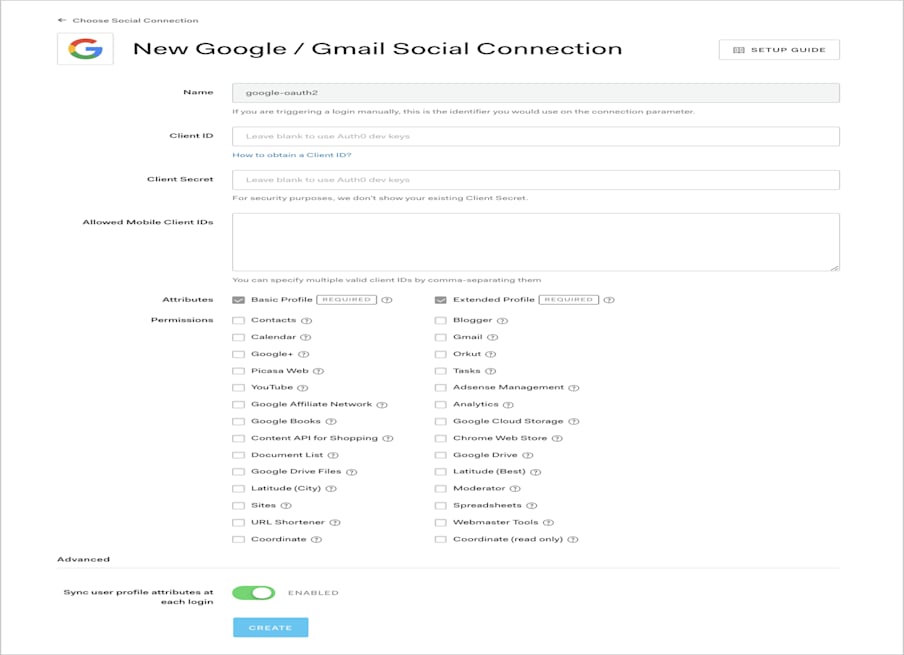
To configure the scopes/permissions needed from the user, go to [Auth0 Dashboard > Authentication > Social](https://manage.auth0.com/#/connections/social), and select an IdP. You can select the required permissions listed on the configuration screen.
For example, if you click the **Google / Gmail** connection, you can configure Google-specific permissions:
 ## Pass Scopes to Authorize endpoint
You can also pass the scopes/permissions you wish to request as a comma-separated list in the `connection_scope` parameter when calling the [authorize endpoint](https://auth0.com/docs/api/authentication#login). For example, if you want to request the `https://www.googleapis.com/auth/contacts.readonly` and `https://www.googleapis.com/auth/analytics` scopes from Google, you can pass these along with the `connection` parameter to ensure the user logs in with their Google account:
export const codeExample = `https://{yourDomain}/authorize
?response_type=id_token
&client_id={yourClientId}
&redirect_uri={https://yourApp/callback}
&scope=openid%20profile
&connection=google-oauth2
&connection_scope=https%3A%2F%2Fwww.googleapis.com%2Fauth%2Fanalytics%2Chttps%3A%2F%2Fwww.googleapis.com%2Fauth%2Fcontacts.readonly
&nonce=abc`;
Please note that in the example request above, the value of the `connection_scope` parameter is URL encoded. The decoded value that is passed to Google is `https://www.googleapis.com/auth/analytics, https://www.googleapis.com/auth/contacts.readonly`
## Pass Scopes to Authorize endpoint
You can also pass the scopes/permissions you wish to request as a comma-separated list in the `connection_scope` parameter when calling the [authorize endpoint](https://auth0.com/docs/api/authentication#login). For example, if you want to request the `https://www.googleapis.com/auth/contacts.readonly` and `https://www.googleapis.com/auth/analytics` scopes from Google, you can pass these along with the `connection` parameter to ensure the user logs in with their Google account:
export const codeExample = `https://{yourDomain}/authorize
?response_type=id_token
&client_id={yourClientId}
&redirect_uri={https://yourApp/callback}
&scope=openid%20profile
&connection=google-oauth2
&connection_scope=https%3A%2F%2Fwww.googleapis.com%2Fauth%2Fanalytics%2Chttps%3A%2F%2Fwww.googleapis.com%2Fauth%2Fcontacts.readonly
&nonce=abc`;
Please note that in the example request above, the value of the `connection_scope` parameter is URL encoded. The decoded value that is passed to Google is `https://www.googleapis.com/auth/analytics, https://www.googleapis.com/auth/contacts.readonly`