> ## Documentation Index
> Fetch the complete documentation index at: https://docs-dev-docs-event-stream-action-templates.mintlify.site/llms.txt
> Use this file to discover all available pages before exploring further.
> Learn how to add a username field for login to database connections.
# Adding Username for Database Connections
For database connections, you can have your users sign in with a username instead of their email address.
## Require username
1. Go to [Auth0 Dashboard > Authentication > Database](https://manage.auth0.com/#/connections/database), and select the name of the connection you want to edit.
2. Locate **Requires Username**, and use the toggle to enable or disable requiring a username.
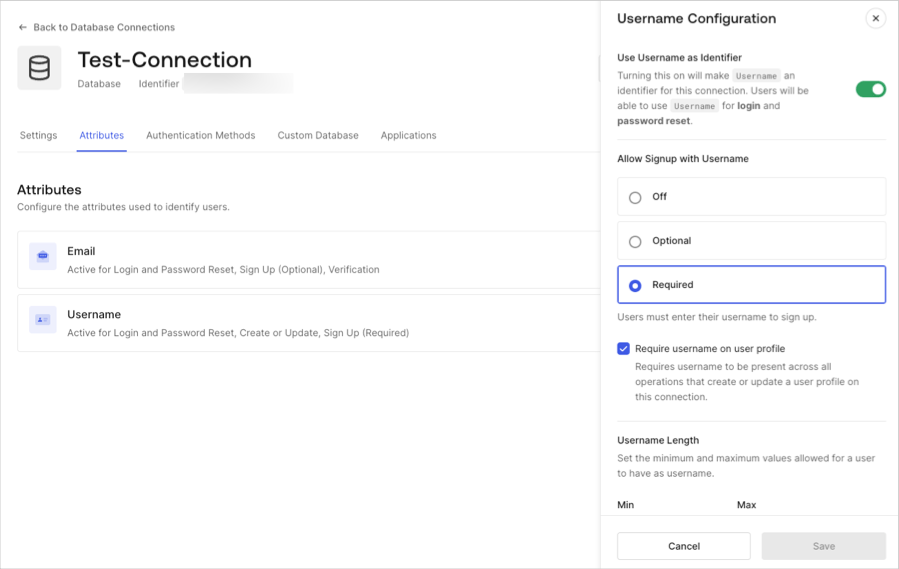 To see how this will affect the login screen, select the **Try Connection** view. Notice that once **Requires Username** is enabled, new users must enter a username and their email address to sign up.
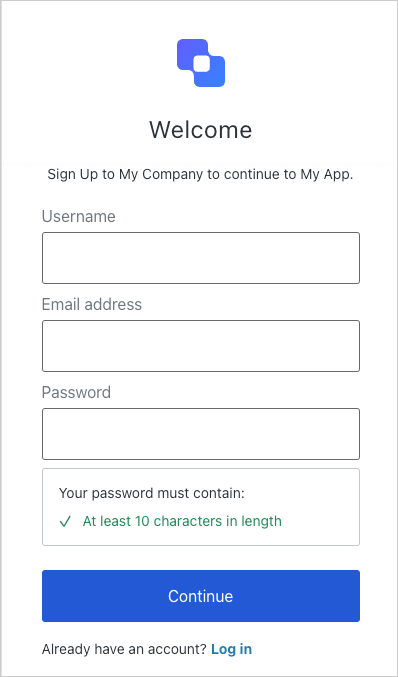 Users can then login with either their username or their email address. Users who registered while **Requires Username** was disabled will not have a Username field stored and will have to log in with their email address.
### Username length
The default allowed length for usernames is between 1 and 15 characters. However, using the Auth0 Dashboard or via the Management API v2, you can modify the length minimum and maximum (up to a maximum length of 128 characters).
### Allowed characters
The username field accepts the following characters:
* Alphanumeric characters (without accent marks, automatically converted to lowercase);
* The at sign (@) character (but email addresses are not allowed);
* The caret (^) character;
* The dollar sign (\$) character;
* The dot (.) character;
* The exclamation (!) character;
* The grave accent (\`) character;
* The minus (-) character;
* The number sign (#) character;
* The plus (+) character;
* The single quote (') character;
* The tilde (\~) character;
* The underscore (\_) character;
No other characters/symbols are allowed, and Auth0 does not validate or sanitize custom database inputs.
Users can then login with either their username or their email address. Users who registered while **Requires Username** was disabled will not have a Username field stored and will have to log in with their email address.
### Username length
The default allowed length for usernames is between 1 and 15 characters. However, using the Auth0 Dashboard or via the Management API v2, you can modify the length minimum and maximum (up to a maximum length of 128 characters).
### Allowed characters
The username field accepts the following characters:
* Alphanumeric characters (without accent marks, automatically converted to lowercase);
* The at sign (@) character (but email addresses are not allowed);
* The caret (^) character;
* The dollar sign (\$) character;
* The dot (.) character;
* The exclamation (!) character;
* The grave accent (\`) character;
* The minus (-) character;
* The number sign (#) character;
* The plus (+) character;
* The single quote (') character;
* The tilde (\~) character;
* The underscore (\_) character;
No other characters/symbols are allowed, and Auth0 does not validate or sanitize custom database inputs.